
Speedometer
A speedometer in a corner of the screen while you skate: a dial or digital, four color schemes, mph or km/h, top speed, four corners and three sizes. A ReSkate plugin.Speedometer
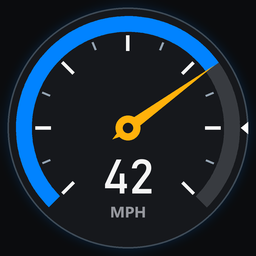
A speedometer dial in a corner of the screen while you skate. The needle and a blue arc show how fast you're going, the number sits big in the middle, and a white notch on the rim marks your top speed.
What it shows
- Your speed, in mph or km/h. It's your full speed, down a hill included, not just across the ground.
- A scale that fits. Pushing round a park reads on 0–25 mph (0–40 km/h). Bomb a hill and the scale steps up to 40, 60, 80 and on as you need it. It steps back down once you've stayed slower for 4 seconds, so a quick check before a gap doesn't make it jump around.
- Top speed. Your fastest since the map loaded, as a number under the dial and a notch on the rim. It starts again on every map, or when you reset it.
The dial hides under the pause menu, on loading screens and while you teleport. It stays up while its own settings page shows, so you can see where it sits and how big it is while you set it.
Style and colors
Two settings, so any colors go with either style.
Style
- Dial: a needle on a dial, with your speed in figures under it.
- Digital: no dial. Your speed in big figures over a bar of segments that fills along the scale and changes color near the top, with your top speed marked on it.
Colors
- Classic: dark glass, blue and amber.
- Retro: a cream face in a chrome rim, black and red, like an old car's.
- Neon: purple glass, magenta and cyan.
- Green: black glass and green figures, like an old LCD.
Settings
In the menu's PLUGINS section, under Speedometer. Every choice is a row of buttons with the one in use lit:
| Setting | Choices |
|---|---|
| Speedometer | ON or OFF |
| Units | MPH (default) or KM/H |
| Style | DIAL (default) or DIGITAL |
| Colors | CLASSIC (default), RETRO, NEON or GREEN |
| Where | the four corners, laid out like the screen (bottom right is the default) |
| Size | SMALL, MEDIUM (default) or LARGE |
| Top speed | your top speed, and RESET TOP SPEED to set it back to 0 |
Your settings are kept between sessions.
Console
| Command | What it does |
|---|---|
speedometer |
shows whether it's on, the units and your top speed |
speedometer on / speedometer off |
turns the dial on or off |
speedometer kmh / speedometer mph |
changes the units |
speedometer dial / speedometer digital |
changes the style |
speedometer classic / retro / neon / green |
changes the colors |
speedometer reset |
sets top speed back to 0 |
speedometer test |
runs the plugin's own checks |
What you need
ReSkate 2.1.4 or newer for the settings page. On an older ReSkate with plugins the dial still works, and the page asks you to update; use the console commands until then.
It's a sandboxed ReSkate plugin (the plugin folder, no DLL). It reads your skater's speed, draws on the screen, adds its page to the menu and a console command, and saves its settings, and nothing else.
Install
Install with the mod manager. To install by hand, extract the zip into its own folder inside Skate\Mods.