Immersion CleanView
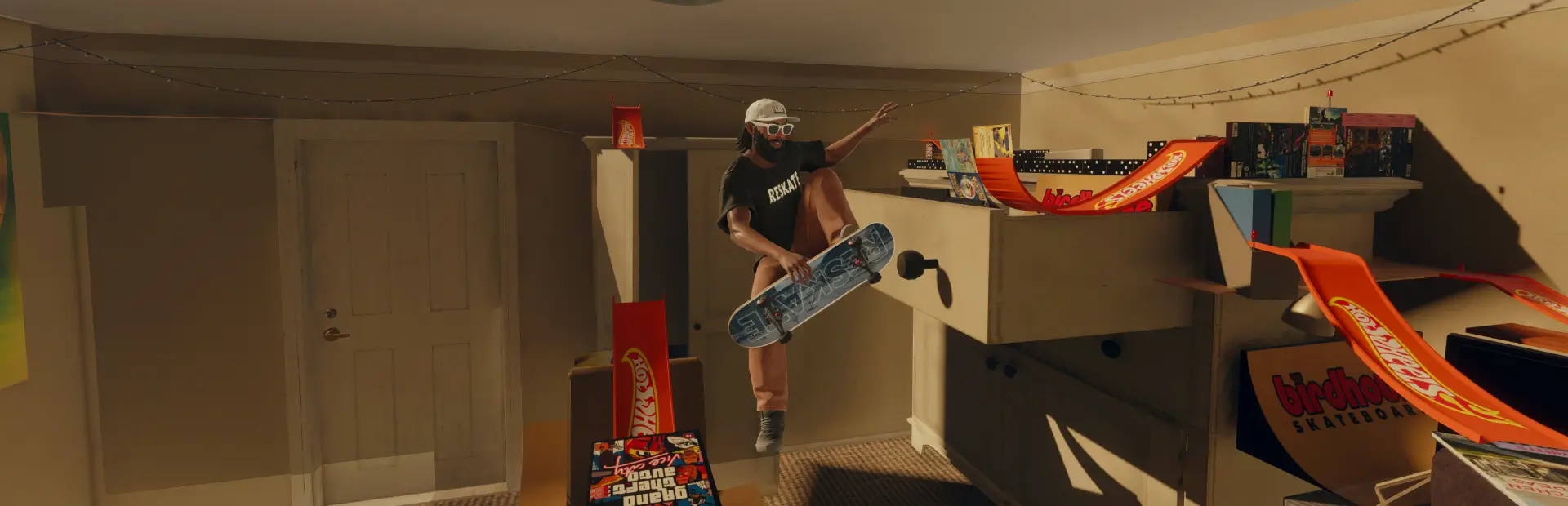
Skate with a clean screen: hide the interaction prompts and button icons, the music source animation, the song title banner and the blue Quick Drop outline. Each one is set from the ReSkate menu.Immersion CleanView
Skate with a clean screen. Immersion CleanView removes the on-screen clutter that pulls you out of a session (prompts, button icons, music pop-ups, selection outlines) and leaves the city, your skater and your lines. Everything it hides keeps working: you can still interact, climb, grab music and use Quick Drop.
Every element is set separately from the ReSkate menu, so you keep exactly what you want on screen.
What it can hide
| Element | What disappears | Setting |
|---|---|---|
| Interaction buttons | The Interact, Climb and Grab Music prompts and their controller button icons |
Menu, then Appliquer (Apply) |
| Song title and artist | The banner announcing each new track | Menu, then Appliquer |
| Music source animation | The animated ring around a music source | Menu, then Appliquer |
| Quick Drop outline | The blue outline around selectable Quick Drop objects, adjustable from 0 to 100 % | Instant |
| Standard HUD | The game's regular HUD | Instant |
The actions, inputs, music playback, menus and the rest of the interface are left exactly as the game ships them.
How to use it
- Install with the ReSkate launcher (Thunderstore tab, or MODS → Install .zip).
- Start the game and open the ReSkate menu: PLUGINS → Immersion CleanView.
- Tick what you want hidden (the menu is in French):
- BOUTONS D'INTERACTION → Masquer les boutons d'interaction (interaction buttons).
- MUSIQUE → Masquer le titre et l'artiste (song title and artist) and Masquer l'animation de la source (music source animation), two separate options.
- Click Appliquer (Apply). ReSkate re-applies your mods and reloads the level with your choice.
- OBJETS QUICK DROP (outline slider) and GENERAL (standard HUD) apply instantly, no reload needed.
On first launch everything is hidden.
Good to know
- Applying takes longer with big mod lists. The prompts, music ring and title banner are part of the game's interface files, so a change needs ReSkate to merge your mods again and reload the level. With a few mods this is quick; with hundreds it can take several minutes. Your choice is saved the moment you click Appliquer, so restarting the game applies it as well.
- Console:
immersion status,immersion on/off,immersion opacity 0..100,immersion hud on|off.
Compatibility
- ReSkate 2.1.2 on the supported Skate build.
- Mods that change the same HUD or music player interface files can conflict: ReSkate then loads only the one higher in the load order.
- About 460 MB installed: each combination of the three options ships pre-built, so switching never needs extra tools.
Uninstall
Disable or remove Immersion CleanView in the launcher's MODS page and restart the game: everything comes back as before.
Français
Skatez avec un écran épuré. Immersion CleanView retire de l'écran les invites Interact, Climb et Grab Music ainsi que leurs icônes de manette. Il peut aussi masquer le titre et l'artiste des morceaux, l'animation autour des sources musicales, le liseré bleu du Quick Drop et le HUD standard. Toutes les actions restent disponibles.
Réglages : menu ReSkate, PLUGINS → Immersion CleanView. Les boutons d'interaction, le titre/artiste et l'animation de la source se règlent séparément, puis Appliquer : ReSkate réapplique les mods et recharge le niveau. Avec beaucoup de mods, cela peut prendre plusieurs minutes, et relancer le jeu applique aussi le choix enregistré. Le liseré Quick Drop (0 à 100 %) et le HUD standard s'appliquent immédiatement.