


r2mod cli
A simple CLI Mod Manager for Linuxr2mod_cli
| Features | Installation | Usage | Changelog |
|---|
A simple mod manager written in Bash for Linux users.
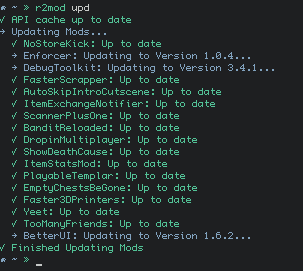
Features
- Simple No-Nonsense Usage
- Setup BepInEx and R2API
- Install and Update Mods
- Resolve Dependencies
- Hold Specific Mods Back from Updating
- Enable/Disable Mods
- Edit Mod Configs
- Check for Updates for itself
- Supports Importing/Exporting r2modman profile codes
- Supports Flatpak Steam Installs
- Tab Completion
Installation
AUR
r2mod is available in the Arch AUR as r2mod_cli
yay -S r2mod_cli
Flatpak
r2mod is available from flathub as io.github.Foldex.r2mod
flatpak install flathub io.github.Foldex.r2mod
Alias
Flatpak bin exports should allow you to run r2mod using io.github.Foldex.r2mod.
But you may wish to set up an alias for easier use.
alias r2mod="io.github.Foldex.r2mod"
Completions
Flatpak does not allow shell completions to be installed in the usual root owned locations.
The flatpak will install them under user owned directories at runtime instead.
For ZSH, you may need to add $HOME/.local/share/zsh/site-functions to your $fpath
Manual
The prior methods are preferred, but if you wish to manually install:
Extract the zip and run sudo make install inside its directory.
Dependencies
Arch
sudo pacman -S curl findutils gawk jq p7zip sed
Fedora
sudo dnf install curl findutils gawk jq p7zip sed
Ubuntu
sudo apt-get install curl findutils gawk jq p7zip-full sed
Usage
First Setup
Make sure you have run Risk of Rain 2 beforehand to create the needed directories.
It is heavily recommended to run r2mod setup to create a new install.
Some empty folders will be placed in the BepInEx/plugins dir, do not remove them.
They are used to track updates for certain mods.
Custom Install Location
The default install directories for Steam/Flatpak should automatically be handled.
If you've installed Risk of Rain 2 to a different location, please export the environment variable
$R2MOD_INSTALL_DIR in your bash profile and point it to your install directory:
export R2MOD_INSTALL_DIR="$HOME/custom/dir/Risk of Rain 2"
$R2MOD_COMPAT_DIR also exists for custom locations of Steam's compatdata directory.
export R2MOD_COMPAT_DIR="$HOME/custom/dir/steamapps/compatdata/632360"
Flatpak
If you wish to use a custom install location with the flatpak, you may use overrides or Flatseal to edit the permissions and environment variables.
-
The env vars must be an absolute path, they are literal strings and do not have
~expansion. -
Do NOT include
Risk of Rain 2in theR2MOD_INSTALL_DIRenv path, an issue with flatpak does not allow for spaces in environment variables. Just point up tosteamapps/common. -
Use
flatpak override --userif it is a user installed flatpak
flatpak override \
--env='R2MOD_INSTALL_DIR=/home/foldex/Games/Steam/SteamLibrary/steamapps/common' \
--env='R2MOD_COMPAT_DIR=/home/foldex/Games/Steam/SteamLibrary/steamapps/compatdata/632360' \
--filesystem='~/Games/Steam/SteamLibrary/steamapps/common/Risk of Rain 2' \
--filesystem='~/Games/Steam/SteamLibrary/steamapps/compatdata/632360' \
io.github.Foldex.r2mod
Command List
Accepts shorthand for command names.
r2mod ch(eck): Check for Script Updates
r2mod del(ete) ProfileName: Delete Local Profile
r2mod dis(able) (Mod-Dependency-String): Disable Mods
r2mod ed(it) ConfigName: Edit Mod Configs
r2mod en(able) (Mod-Dependency-String): Enable Mods
r2mod exp(ort) ProfileName: Export r2modman mod profile
r2mod hol(d): Toggle Mod Updates
r2mod imp(ort) ProfileCode: Install r2modman mod profile
r2mod ins(tall) Mod-Dependency-String: Install New Mod
r2mod li(st) (count|all) : List or Count Installed Mods
r2mod loa(d) ProfileName: Import Local Profile
r2mod ref(resh): Force Refresh Package Cache
r2mod run: Launch Risk of Rain
r2mod sav(e) ProfileName: Export Local Profile
r2mod sea(rch): Search for Mods
r2mod set(up): Install a Fresh BepInEx Setup
r2mod un(install) Mod-Dependency-String: Uninstall Mod
r2mod upd(ate): Update All Exisiting Mods
r2mod ver(sion): Print Version
Installing a Mod
r2mod install ontrigger-ItemStatsMod-2.0.0 to install a mod.
If the version number is left out, the most recent version will be installed.
r2mod install ontrigger-ItemStatsMod
Multiple mods can also be installed
r2mod install ontrigger-ItemStatsMod MagnusMagnuson-BiggerBazaar
Uninstalling a Mod
Use r2mod uninstall ontrigger-ItemStatsMod-2.0.0 to install a mod.
If the version number is left out, any version of that mod will be uninstalled.
r2mod uninstall ontrigger-ItemStatsMod
Multiple mods can also be uninstalled
r2mod uninstall ontrigger-ItemStatsMod MagnusMagnuson-BiggerBazaar
Disabling Mods
r2mod disable to disable BepInEx entirely.
r2mod enable to re-enable.
r2mod disable ontrigger-ItemStatsMod-2.0.0 to disable a specific mod.
r2mod enable ontrigger-ItemStatsMod-2.0.0 to re-enable.
Listing Installed Mods
r2mod list to display installed mods.
r2mod list all to display installed mods and disabled mods.
r2mod list count to display a count of installed mods.
r2mod list count all to display a count of installed mods and disabled mods.
Editing Configs
$EDITOR environment variable is used to determine which editor to use.
r2mod edit will open all BepInEx config files in your editor
r2mod edit name will open all matching configs (case insensitive, incomplete names are fine)
Holding
Mods can be prevented from being auto updated by running r2mod hold ModName.
Run again to remove the hold.
Updating r2mod
Updates for r2mod will be automatically checked, but not installed.
If you manually installed r2mod, updates can be done like any other mod:
r2mod install Foldex-r2mod_cli
Files
All Files, Old Versions, and Backups can be found in /tmp/r2mod
Changelog
1.3.3
- Updated ModCode Import/Export to new Thunderstore API
1.3.2
- Fix flatpak trying to use sandboxed version of
$XDG_DATA_HOME - Disabled
runcommand for flatpak version
1.3.1
- Fix for flatpak not allowing env vars to contain spaces
1.3.0
- Add r2mod flatpak version support
- Use jq to validate on package cache update
- Improved filtering of non-mod files in plugins dir
- Colorize
listandimport preview
1.2.2
- Support HookGen including configs
- Support BepInEx including plugins
- Fix for trying to install missing Hookgen while API cache did not exist
1.2.1
- Fix for BepInEx patchers folder no longer being supplied
- Now checks for steam folders using
$XDG_DATA_HOME - Improved check for proton override file
1.2.0
- Basic profile support
- Support installing from
ror2mm://links - Remove check for R2API patcher files
- Ignore deprecated mods in completion & searches
1.1.0
- Dependency Support
- Disable/Enable Individual Mods
- Install r2mod updates through r2mod
- Add HookGenPatcher to default installs
- Add r2mod to AUR
1.0.7
- Support R2API v3
- Allow Custom Steam Compat Dir
- Add Completion for
import preview - Fix mod installs with patchers
- Avoid running update check twice
1.0.6
- Fix some mods zips extracting without folders
- Improved setup logic
listnow uses color=auto- Added
list countcommand - Added
lsalias
1.0.5
- Add Search Command
- Alias
removefor uninstall - Automatically override winhttp on setup (bgkillas)
1.0.4
- Allow Custom Install Locations
- Improved ZSH Tab Completion
- Added run Command to Launch Game
1.0.3
- Added Hold Command
- Auto Check for R2Mod Updates
- Added profile_import preview option
- Fallback to previous cache if package cache update fails
1.0.2
- Added Tab Completion
1.0.1
- Fixed Update Check
1.0.0
- Initial Release