

You are viewing a potentially older version of this package. View Latest Version
CamFreeModifiyer
CamFreeModifier is a mod for Risk of Rain 2 that lets you adjust the camera view during gameplay.RoR2 CamFreeModifiyer

A Risk of Rain 2 mod that lets you customize camera settings during gameplay.
Features
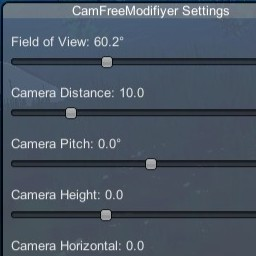
- Field of View (FOV): Adjust the camera's field of view (30° - 120°)
- Camera Distance: Change how far the camera is from your character (5 - 30)
- Camera Pitch: Tilt the camera vertically (-45° to +45°)
- Camera Height: Adjust the vertical offset of the camera (-5 to +10)
- Camera Horizontal: Shift the camera left or right (-10 to +10)
- In-Game Menu: Press F5 (configurable) to open the settings menu
- Persistent Settings: All settings are saved in the BepInEx config file
Example

Requirements
- Risk of Rain 2
- BepInEx 5.x
Installation
For Users
- Download the latest release
- Copy
CamFreeModifiyer.dllto yourBepInEx/plugins/folder - Launch the game
For Developers (Building from Source)
-
Clone this repository
-
Copy the following DLLs from your RoR2 installation to the
libs/folder:From
Risk of Rain 2/BepInEx/core/:BepInEx.dll0Harmony.dll
From
Risk of Rain 2/Risk of Rain 2_Data/Managed/:Assembly-CSharp.dllRoR2.dllUnityEngine.dllUnityEngine.CoreModule.dllUnityEngine.InputLegacyModule.dllUnityEngine.IMGUIModule.dll
-
Build the project:
dotnet build -c Release -
The compiled DLL will be in
bin/Release/netstandard2.1/
Usage
- Launch Risk of Rain 2
- Press F5 to open the camera settings menu (key is configurable)
- Adjust the sliders to your preference
- Close the menu with the "Close" button or press F5 again
Configuration
Settings are saved in BepInEx/config/com.jpriebe.camfreemodifiyer.cfg
You can edit this file manually or use the in-game menu.
License
MIT License