PauseMenuImages
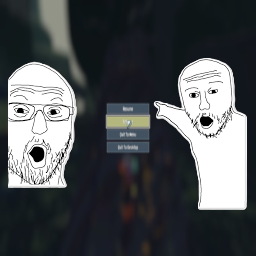
Add your own custom images on both sides of the pause menu! Now with adjustible size and position!Pause Menu Images
Adds customizable PNG images to the left and right sides of the pause menu with configurable positioning, sizing, and smooth animations.
Features
- Display custom PNG images on either side of the pause menu
- Smooth slide-up animation when pause menu appears (toggleable)
- Fully customizable position and size via in-game settings
- Images disappear when entering settings or logbook
- Non-intrusive - doesn't block menu buttons
- Works with any screen resolution
Installation
Install with r2modman or Thunderstore Mod Manager.
Configuration
All settings can be adjusted in-game via Risk of Options mod settings menu:
General Settings
- Slide up with Pause - Enable/disable the smooth slide-up animation (default: ON)
Left Image Settings
- Position X - Horizontal position (negative = more left, positive = more right)
- Position Y - Vertical position (negative = more down, positive = more up)
- Width - Image width in pixels (10-2000)
- Height - Image height in pixels (10-2000)
Right Image Settings
- Position X - Horizontal position (negative = more left, positive = more right)
- Position Y - Vertical position (negative = more down, positive = more up)
- Width - Image width in pixels (10-2000)
- Height - Image height in pixels (10-2000)
How to Use Your Own Images
- Create or find two PNG images you want to use (one for left, one for right)
- Recommended base resolution: 800x1080 or similar vertical images
- Navigate to
AppData/Roaming/r2modmanPlus-local/RiskOfRain2/profiles/DesiredProfile/BepInEx/plugins/PauseMenuImages/ - Replace
left_image.pngandright_image.pngwith your own images - Keep the exact filenames:
left_image.pngandright_image.png - Launch the game and adjust position/size in Risk of Options settings to fit your screen perfectly!
Tips
- Transparent backgrounds work great and look professional
- Vertical images (taller than wide) work best
- Use the in-game sliders to fine-tune position and size for your screen resolution
- PNG format is required (use GIMP, Photoshop, or any image editor)
- The animation is subtle - disable it in settings if you prefer instant appearance
- Test different width/height values to make images fit your aesthetic
Notes
- Placeholder images are included as examples
- Images automatically respect your screen's UI scaling
- Click-through is enabled so transparent areas won't block menu interaction
- Images only show on the main pause screen, not in submenus
- Changes to settings take effect the next time you pause
- Requires Risk of Options mod for in-game configuration
Recommended Image Tools
- GIMP - Free, powerful image editor (what the creator uses!)
- Photoshop - Professional option
- Paint.NET - Simple and lightweight