

CommandQueueRemastered
Plan Command item queues in the game scoreboard with item icons, permanent inventory counts, descriptions, presets and optional mod integrations.CommandQueue Remastered
Beta 0.4.1 — plan your Artifact of Command picks directly in the Risk of Rain 2 scoreboard.
Development build for branch testing. Gameplay and multiplayer testing is incomplete; some essences can remain on the ground while moving.
Build item queues, repeat your preferred picks and save presets without leaving the game's interface. Remastered combines the functionality of CommandQueueExtended, CommandQueueExtendedIconFix and ProperSave_CommandQueueExtended in one mod.
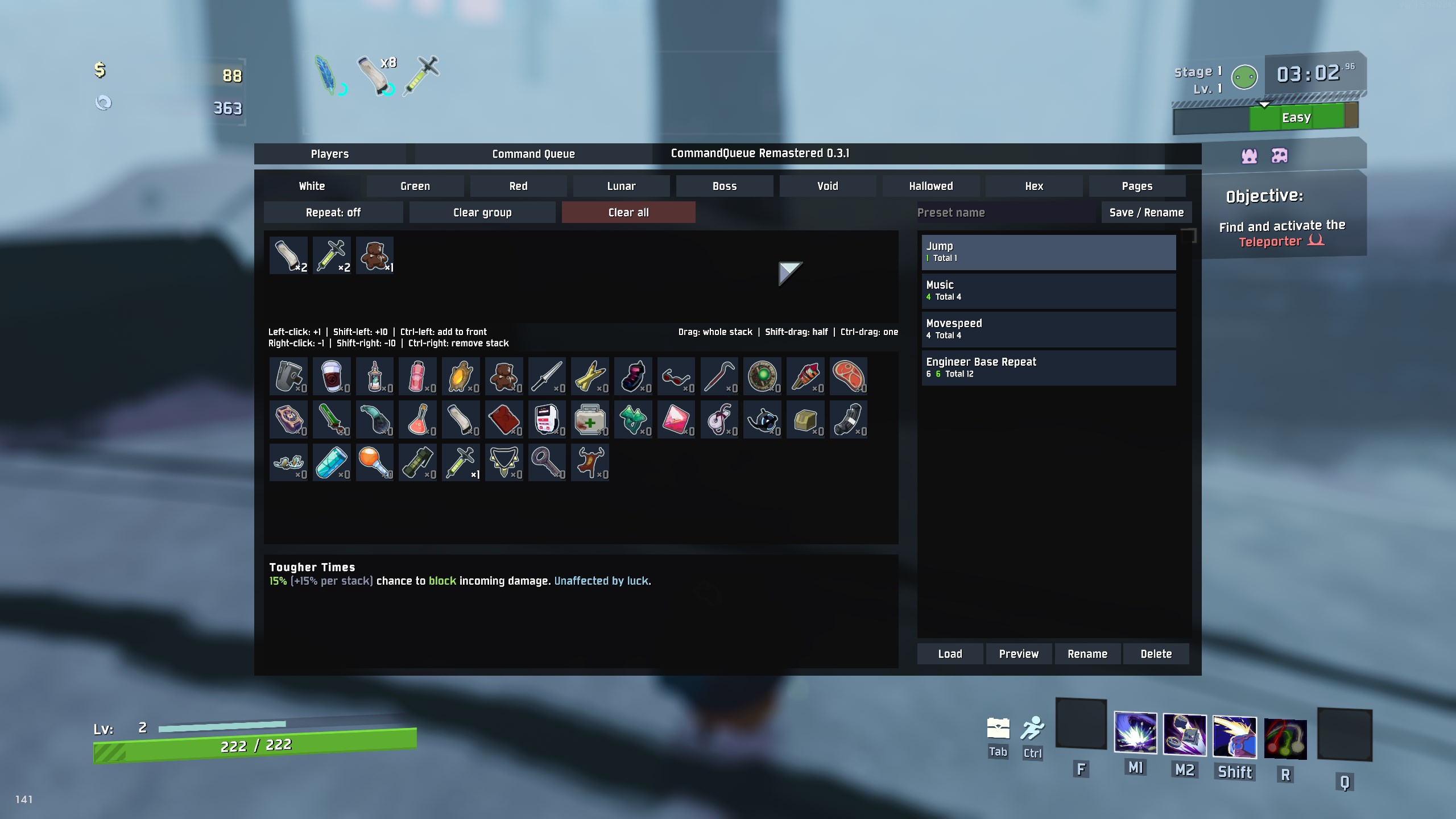
Features
- Scoreboard integration: switch between the original Players overview and Command Queue using the game's configured scoreboard key.
- Optional gameplay controls: choose
On,CommandQueueOnlyorOffforBlockGameplayInputto control which scoreboard views block movement and gameplay buttons. - Item queues: add quantities, reorder or split stacks with drag and drop, remove items and clear queues with confirmation.
- Automatic Command selection: selects the next queued item for the essence's actual tier. Empty queues or unavailable next items normally open the manual selection menu. Temporary/ethereal essences skip entries unavailable in their pool; exclusive-item behavior is configurable below.
- Queue and Limiter: switch views per item group. The third button shows Repeat in Queue view or the independent Limiter On/Off state in Limiter view. Pause remains a separate group control.
- Repeat modes: rotate selected items to the end, or cycle through the planned quantities while keeping the displayed order and counts fixed.
- Presets: save, load, preview, rename and delete queue plans. Drag preset rows to reorder them; the order is saved automatically.
- Item information: icons, permanent inventory counters and a scrollable description panel with optional LookingGlass stats.
- Configurable special pickups: choose separate behavior for temporary and ethereal Command items. Configure six exclusive items to select when queued anywhere or automatically even without a queue entry.
- Optional integrations: RiskOfOptions for in-game settings, LookingGlass for descriptions and ProperSave for run queue persistence.
- Essence locations: configure each actual item tier independently: original location, round robin, killer or player with fewest permanent items.
- Optional item collection: collect automatically selected queued items using native item-transfer orbs. Manual choices and selections without a queue entry still drop normally.
Groups appear in this order: White, Green, Red, Lunar, Boss, Void, Hallowed, Hex, Pages. Void items share one tab and show rarity color strips; automatic selection and Repeat remain separate for each actual Void tier.
Installation
Install with r2modman or another Thunderstore-compatible mod manager. BepInExPack and SeekersPatcher must be installed.
Disable or remove these older mods from the same profile before using Remastered:
- CommandQueueExtended
- CommandQueueExtendedIconFix
- ProperSave_CommandQueueExtended
Remastered replaces them and prevents simultaneous loading. ProperSave itself is a separate optional mod and should remain installed if you want to save your queue with a run.
RiskOfOptions and LookingGlass are optional. Without RiskOfOptions, use the configuration file. Without LookingGlass, descriptions use the game's normal text.
Getting started
- Start a run with the Artifact of Command enabled.
- Open the scoreboard using your game key, normally Tab, and select Command Queue.
- Choose an item group and click the items you want to queue.
- Interact with a matching Command essence. Remastered selects the next eligible queued item automatically.
The Players button returns to the original scoreboard overview. Keyboard and mouse are the intended controls; controller support has not been tested and controller compatibility is unverified.
Controls
| Action | Result |
|---|---|
| Left-click an available item | Add one to the queue |
| Left-click a queued item | Increase that stack by one |
| Shift + left-click | Add ten |
| Ctrl + left-click | Add one at the front of the displayed group |
| Ctrl + Shift + left-click | Add ten at the front of the displayed group |
| Right-click a queued item | Remove one |
| Shift + right-click | Remove up to ten |
| Ctrl + right-click | Remove the whole stack |
| Drag a queued item | Move the whole stack |
| Shift + drag | Move half the stack, rounded down |
| Ctrl + drag | Move one item |
| Click Pause | Pause or resume automatic selection for the currently selected group |
| Drag a preset row | Reorder presets and save the new order |
Ctrl takes priority over Shift when removing or dragging. Matching neighboring items within a group merge after moves, removals and Repeat rotation. A full stack remains separate from any overflow; quantities are preserved.
Hover over an item to read its description. If the text is too long, use the mouse wheel over that item or the description panel to scroll it. Descriptions work independently of the game's Enable Inspect setting.
Inventory counters show permanent stacks unless an item has a configured limit, in which case LimiterItemCount controls its owned/limit count. Queue badges show planned quantities instead.
Limiter
Switch between Queue and Limiter above the item grid. The Limiter is a cap, not a second automatic selection list: only items from the queue are selected. Set, for example, syringe limit 3 and glasses limit 2, then keep syringes, glasses and repeating crowbars in the queue. At the cap, syringe/glasses entries are skipped and grayed out without being consumed. They become eligible again after scrapping, trading or otherwise losing counted stacks. If every queued choice is capped, the normal picker opens.
Each item has exactly one Limiter stack, in the order first added. Left-click adds one, Shift-left adds ten; right-click removes one, Shift-right removes up to ten and Ctrl-right removes the target. Ctrl-left does not move targets to the front. Dragging always moves the whole Limiter stack, including with Shift/Ctrl held. Sort by ID replaces the drag shortcut text and sorts the current group in the same catalog ID order as the selection grid. Queue drag/split controls remain available in Queue view.
The selection grid shows owned/limit, for example 5/9. General / LimiterItemCount defaults to PermanentOnly; choose IncludeTemporary, IncludeEthereal or IncludeBoth to count those stacks too, including with UseQueueNormally. Disabling the Limiter for a group ignores its caps and dims only the limit number. Queue-view items with an active cap have a thin silver-gray strip along the bottom edge.
Targets and Limiter On/Off states are included in presets and supported ProperSave payloads; preview always combines both lists. Within each tier, queued items appear first, followed by limiter-only items, before the next tier. Repeated queue entries are summed per item, badges show saved queue quantity/limit (— means no limit), and limiter-only items are gray with quantity zero. No items are automatically added to the queue from the Limiter. The Limiter applies to automatic Command choices, not manual pickups or unrelated sources.
Item Distribution Rules
These host settings have their own RiskOfOptions tab. Defaults: distribution enabled, Bazaar Between Time and Computational Exchange excluded, chest/exchange/teleporter sources enabled, DrifterSalvage set to SkillUser, Hex blocks disabled.
| Setting | Effect |
|---|---|
| Enabled | Master distribution switch; Off keeps original drop locations |
| ExcludedStages | Open the scrollable stage checklist; names are grouped by stage from the installed game catalog. Defaults exclude Bazaar Between Time and Computational Exchange |
| Chests | Standard/option chests and money shop terminals |
| ExchangePools | Lunar-item exchange pool terminals, cauldron terminals and Hallowed cauldron drops |
| TeleporterBossRewards | Teleporter boss rewards; other boss groups retain their per-tier mode |
| DrifterSalvage | Original keeps the skill location; SkillUser (default) sends every drop to its own casting Drifter; ItemDistribution uses the per-tier mode |
| HexGroupsOfSeven | Complete seven-item blocks across all permanent Hex items, including outstanding assignments |
Source/stage exclusions leave the original location and retain normal queue selection/collection settings. Original per-tier mode keeps the original location except for the explicit Drifter SkillUser target, which overrides per-tier modes. Master/stage/source exclusions, personal Ignore and optional paused-group exclusions still apply. With no eligible caster, keep the original skill location; do not redirect to a different Drifter. Source recognition covers the native hooked paths; mods implementing their own sources may bypass these contexts.
Hex blocks override the selected Hex recipient algorithm except Original. With no existing Hex items, give one player seven, then the next. Complete an unfinished block first; with several partial blocks, start with the one closest to completion and finish that player's block. Once complete, rotate by stable player ID. All eligible living players participate, with the existing optional paused-group exclusion. Different Hex items count together; temporary/ethereal stacks are excluded.
LimiterItemCount appears directly above BlockGameplayInput in General. DrifterSalvage uses one dropdown; previous checkbox/target settings are migrated automatically.
RiskOfOptions shows three categories per page for this mod: Groups, General and Special Items on page one; Item Distribution Rules followed by Item Distribution on page two. Other mods retain their native paging. ExcludedStages descriptions list environment names. In the selector, checked means excluded; Apply saves and Cancel discards changes. Defaults selects the two default realms; None allows every stage. Variants sharing a display name are selected together. Existing additional/custom scene exclusions are preserved. On the first startup of this correction, both default realms are added once to the existing exclusions; later changes, including an empty selection, are retained. Advanced comma-separated scene names remain supported in the config file.
Repeat and presets
Pause is the first button of the right-hand action group, followed by Clear Group and Clear All. It pauses automatic selection for the current item group while preserving quantities and Repeat progress; orange indicates paused. The left-hand group contains Queue, Limiter and either Repeat: On/Off or Limiter: On/Off. All six visible buttons have equal width, with a gap between the two groups. Limiter and Repeat use green for On. Pause and Limiter remain independent; pause resets each run while Limiter state is saved with targets.
Drag preset rows to change their order. A cursor label and insertion line show the destination; the list scrolls when dragging near its edges. Order is saved immediately and retained after restarting. Drop outside the list or press Escape to cancel. Selection and preview stay with their preset.
Enable Repeat for the selected group to keep using its plan. With RotateRepeatedItems enabled, each selected item moves to the end and stacks with a matching neighbor. With rotation disabled, the queue cycles through every planned quantity while its displayed order and counts stay fixed. Editing the queue or restoring it starts a new cycle.
Enter a preset name and use Save / Rename to save your plan. Select a saved row, then use Load, Preview, Rename or Delete.
Queue and Limiter load independently: queued entries replace only Queue groups represented in the preset, while limits replace only represented Limiter groups. A limiter-only preset preserves the entire Queue and its Repeat progress; a queue-only or older preset preserves all limits. Unrepresented groups stay intact. An empty preset leaves the current plan unchanged. Preview is read-only and groups items by tier, with queued items before limiter-only items.
Presets are stored in BepInEx/config/commandQueueRemastered.presets.json. With ProperSave installed, run queue persistence is available for singleplayer and the multiplayer host. Multiplayer-client queue persistence is not implemented.
On startup, Remastered imports presets from BepInEx/config/commandQueueSaves.json in the same profile once. Existing Remastered presets remain; the old file stays unchanged. Names, item order and quantities are retained. Repeat starts off because the old file does not store it. Deleting imported presets does not import them again. If the source is missing, it can be added before a later startup; invalid input is logged and retried on the next startup.
Settings
With RiskOfOptions installed, open Settings → MOD OPTIONS → CommandQueue Remastered. Otherwise edit BepInEx/config/local.commandqueue.remastered.cfg.
| Section | Setting | Default |
|---|---|---|
| Groups | Nine independent group toggles | All enabled |
| General | RotateRepeatedItems | Enabled |
| General | BlockGameplayInput | On |
| General | MenuScale | 1.00x, range 0.50x–2.00x |
| General | ItemScale | 1.00x, range 0.50x–2.00x |
| Special Items | TemporaryItemBehavior | ManualMenu |
| Special Items | EtherealItemBehavior | ManualMenu |
| Special Items | ExclusiveItemSelection | Default |
| General | AutoCollectQueuedItems | Disabled |
| General | AutoPickupCommandEssence | Disabled |
| General | LimiterItemCount | PermanentOnly |
| General | ExcludePausedPlayers | Disabled |
| Item Distribution | FewestItemsCount | AllItems; alternatively SameTier |
| Item Distribution | One mode per actual item tier | Original; alternatively RoundRobin, Killer or FewestItems |
Essence location settings are controlled by the host/server and affect Command item droplets from all sources. Clients need no mod for relocation. Equipment, Delusion and non-Command drops retain their locations. Actual tier names are used (Tier1 = White, Tier2 = Green, Tier3 = Red, Cursed = Hallowed), with independent choices for all four Void tiers.
RoundRobin alternates between living players by stable network ID, independently per tier, resetting each run. Killer uses the killing player, including owned minions. Missing/dead killers, non-kill sources and delayed boss rewards without a live kill context fall back to round robin. With no living players, keep the original location. Essences remain shared and require interaction; relocation does not reserve or automatically open them.
FewestItems counts permanent stacks plus outstanding permanent essence assignments. Choose AllItems across all items or SameTier for the actual essence tier. Temporary and ethereal items are excluded; ties alternate per tier. Assignments follow the native droplet, essence, selected ground item and transfer orb, and are released on collection, arrival, destruction or run reset. All settings apply immediately. This accounting grants no exclusive ownership of drops.
AutoCollectQueuedItems defaults off and collects only successful automatic selections using an existing queue entry. Manual choices and exclusive Automatic choices without an entry still drop normally. Use AutoPickupCommandEssence to also open matching nearby essences automatically. Pause, group and temporary/ethereal policies retain priority; native item-transfer orbs preserve pickup status and normal consumption/Repeat behavior. In multiplayer, Remastered 0.4.0 or newer and this option are required on both host and selecting client. Older/unmodded hosts retain normal item drops. Multiplayer behavior still needs in-game validation.
Preset files keep their versioned metadata and legacy import status, with one compact preset per line.
Assigned drops wait as complete pickup data until delivery. The host leaves at least 1/30 second between deliveries (at most 30 per second), never creates more than one per rendered frame, and does not catch up with a burst after a frame hitch, using the recipient's current position and the native Command conversion. Waiting drops do not depend on live droplet objects. Missing recipients fall back to the original position and normal physics; Original-location drops keep their normal flight.
AutoPickup uses registered live essences, with at most 32 distance checks, four nearby choice checks and one interaction per local player per step. New essences receive priority and old candidates rotate. No repeated full-scene essence/prompt scan or global sorting is used. Normal interaction range, line of sight, pause and next-frame queue validation still apply. These limits do not constitute a measured FPS guarantee; large bursts and fast multiplayer movement need in-game testing.
RiskOfOptions uses Item Distribution, Special Items, VoidWhite, VoidGreen and VoidRed. Behavior choices in descriptions are separated by blank lines. Existing BepInEx sections and keys retain their stored values.
AutoCollectQueuedItems is under General: automatically collect the item selected from your queue; otherwise it drops on the ground. In multiplayer, enable this on both the host and your client. Moving the setting retains its previous value.
AutoPickupCommandEssence, also under General, automatically opens nearby Command essences within normal interaction range when your active queue has an available matching entry. Empty, paused, disabled or unavailable queues are left alone, including exclusive Automatic choices without an entry. It works while viewing the scoreboard; other menus, dialogs, text input, dragging, another active interaction and obstructing world geometry prevent automatic interaction. Enable AutoCollectQueuedItems as well to collect the selected item.
ExcludePausedPlayers is a General host setting, off by default. It skips players whose matching queue group is paused in RoundRobin, Killer and FewestItems; other groups remain eligible. Void uses its shared pause. When everyone is excluded, the essence keeps its original location. Remote players need this updated mod to report their pause state; unknown or stale states remain eligible. Reports are sent shortly after changes. RiskOfOptions displays the basic tiers as White, Green and Red, retaining existing Tier1/Tier2/Tier3 configuration keys and values.
BlockGameplayInput has three choices and defaults to On:
| Mode | Players | Command Queue |
|---|---|---|
| On | Gameplay blocked | Gameplay blocked |
| CommandQueueOnly | Gameplay active | Gameplay blocked |
| Off | Gameplay active | Gameplay active |
Changes and view switches apply immediately. In an unblocked view, movement and gameplay buttons stay active after clicking or hovering buttons, while typing preset names, and during the Clear all confirmation. UI actions can therefore also trigger gameplay actions. The UI keeps its normal focus and the cursor remains available for menu interaction; mouse-look follows the game's normal cursor behavior. The actual pause menu and the game's camera-control restrictions remain in effect.
Menu scale affects the whole interface and is limited by the available screen space. Item scale adjusts icon size separately.
Temporary and ethereal pickups each have these choices:
| Behavior | Effect |
|---|---|
| ManualMenu | Open the normal selection menu |
| UseQueueWithoutConsuming | Select the next available queued item of the same tier without changing quantities, order or Repeat progress |
| UseQueueNormally | Select and consume from the queue normally |
IgnoreTemporaryItems and IgnoreEtherealItems are independent personal True/False settings under Special Items, both off by default. Enabling one excludes only your own player from distribution of that pickup type, even when ExcludePausedPlayers is off. It also disables proximity auto-opening for that type; manual interaction retains your chosen Behaviour. The host's personal settings do not override another player's preferences. Updated clients report only their own choices to an updated host; unknown or stale remote states remain eligible. If every recipient is excluded, the drop keeps its original location. Manually collecting items remains possible.
For temporary items from other sources to route to Drifter, enable a per-tier distribution mode and let other players enable IgnoreTemporaryItems while Drifter leaves it off. For Salvage, select DrifterSalvage = SkillUser (default): Drifter A's drops target A and Drifter B's drops target B. A caster who personally opts out with Ignore is not assigned those drops.
The selected item's temporary or ethereal status is preserved. For temporary and ethereal essences, skip queued items absent or unavailable in that essence and select the next eligible item of the same actual tier. Skipped entries remain queued; consumption and Repeat apply only to the selected entry. If no eligible queued choice exists, open the normal picker. Permanent essences retain their usual head rule.
ExclusiveItemSelection applies to exclusive Command essences offering Halcyon Seed, Newly Hatched Zoea, Exposed Cerebellum, Encrypted Cerebellum, Prison Matrix or Sentry Key. Default requires the item anywhere in the queue. Automatic selects it even without an entry. Automatic selects after you interact with the essence; it does not open an essence by itself. AutoPickupCommandEssence opens it only when an active queue has a matching entry. Existing entries follow consumption/Repeat rules; without an entry, the queue stays unchanged. Pause, disabled groups and temporary/ethereal policies take priority. AutoCollectQueuedItems can collect selections using an existing queue entry; selections without an entry still drop normally. Queued exclusive items that are not offered by the current essence do not block later normal items of the same tier. Those exclusive entries stay queued for their matching essences. Offered but unavailable items still open the manual menu.
Beta status and feedback
This beta targets Risk of Rain 2 1.5.0. Multiplayer behavior and all mod combinations have not been fully validated. Controller support is untested.
Each queue stack supports up to 999 items. Larger imported stacks are split without losing items.
When reporting a problem, include the mod and game versions, steps to reproduce it, relevant settings, and your BepInEx/LogOutput.log. A screenshot helps with interface problems.
Credits
- gabrielgad — CommandQueueExtended.
- KubeRoot — original CommandQueue project.
- KennedyMindsetMovement — ProperSave_CommandQueueExtended, the reference for CommandQueueExtended run queue persistence.
- KingEnderBrine / ProperSave — optional run save integration.
- Rune580 / RiskOfOptions — optional in-game settings UI.
- Wet-Boys / LookingGlass — optional enhanced item descriptions.
AI disclosure
Generative AI (OpenAI Codex) assisted with the development of this mod and the writing of its documentation. In-game testing and feedback were provided by the maintainer. AI assistance does not guarantee correctness; the validation limits described above apply.