
LogisticsPlanner
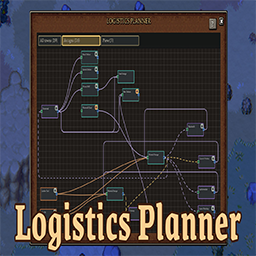
Adds an in-game logistics planning board for viewing, editing, and managing town supply lines.说明:本描述为中英双语版本,中文内容位于英文内容下方。
Note: This description is bilingual. The Chinese section is provided below the English section.
Logistics Planner (English)
Adds an in-game logistics planning board for viewing, editing, and managing town supply lines.
Main Features
- Flat Logistics Planning Board
- Open a flat planning board with a configurable hotkey, P by default
- Show logistics-capable town buildings as draggable cards
- Pan the canvas and zoom farther out with the mouse wheel to fit larger logistics networks
- Scale card text with the zoom level and automatically save card positions, zoom
- Direct Connection Editing
- Drag from a building output port to another building input port to create a logistics connection
- Right-click connection lines to edit or delete them directly from the planner
- Use line colors to identify transported cargo types, including items, resources, and item+resource routes
- Use line styles to identify logistics mode: solid for repeating and dashed for requesting
- Limit a connection to selected items with a searchable item filter, so one source building can send different products to different destinations
- Repeating Item Weights
- Assign weights to repeating item connections from the same source building
- Split matching items between multiple destinations by relative weights, such as 3 and 2 for about a 3:2 split
- Building Management
- Rename building display names from the planner and keep the names visible on the world map
- Pause or resume supported production buildings from their planner cards
- Use different card border colors to distinguish storage, production, workshop, processing, and other building types
- Building Details
- Hover buildings to view storage contents, output resources, workers, current work, and processing progress
- Show worker job levels when a building has assigned workers
- Hover filtered connection lines to view the items allowed on that route
- Town Filtering & Multiplayer Permissions
- Filter the board by all towns, a specific town, or unassigned buildings
- Remember the player's selected town filter instead of always reopening on all towns
- Optional multiplayer edit protection restricts edits to the player's own towns, with configurable admin Steam64 IDs
- Controls & Configuration
- Includes a larger in-game help window for controls such as zooming, panning, dragging, renaming, and editing lines
- Configure options and hotkeys in-game through Mod Settings Menu
Multi-language Support
- Supports Simplified Chinese, Traditional Chinese, English, and Japanese by default. The mod automatically switches language based on the game language
- If you want to contribute another language, you can contact me to add it to the mod. Any language supported by the game can be added
Compatibility
- Game version:
0.26.1_2+
Bug Reports & Feature Suggestions
If you have any questions or feature suggestions, please submit through GitHub Issues, or contact me directly at [email protected] or [email protected].
If you enjoy my mods, feel free to support me! / 如果你喜欢我的模组,请支持我一下吧!


Logistics Planner (中文)
加入一个游戏内物流规划板,用于查看、编辑和管理城镇供应线路。
主要功能
- 平面物流规划板
- 通过可配置热键打开平面规划板,默认按键为 P
- 将支持物流的城镇建筑显示为可拖动卡片
- 支持拖动画布、滚轮缩放到更大视野
- 卡片文字会随缩放比例一起变化,并按存档自动保存卡片位置、缩放比例和视图位置
- 直接编辑物流连接
- 从建筑输出连接点拖到另一栋建筑输入连接点即可创建物流连接
- 右键连接线可以直接在规划板中编辑或删除连接
- 连线颜色区分运输内容,包括物品、资源、物品+资源线路
- 连线样式区分物流模式:实线表示重复,虚线表示按需
- 可为单条连接设置允许物品过滤,只让指定物品通过,从而让同一来源建筑把不同产物送到不同目标
- 重复物品权重
- 为同一来源建筑的重复物品连接设置权重
- 按相对权重把匹配物品分配到多个目标,例如 3 和 2 大致表示 3:2 分流
- 建筑管理
- 在规划板中重命名建筑显示名,并同步显示到世界地图上
- 在建筑卡片上暂停或恢复支持的生产建筑
- 用不同卡片边框颜色区分仓储、生产、工坊、加工等建筑类型
- 建筑信息提示
- 鼠标悬停建筑时查看库存、输出资源、工作人员、当前工作和加工进度
- 有工作人员时显示其当前工坊等级
- 鼠标悬停在设置了过滤的连接线上时,可以查看该线路允许通过的物品
- 城镇筛选与多人权限
- 按全部城镇、指定城镇或未归属建筑筛选规划板
- 记住玩家上次选择的城镇筛选,不会每次打开都默认显示全部城镇
- 可选多人编辑保护:限制玩家只能编辑自己的城镇,并支持配置管理员 Steam64 ID 绕过限制
- 操作与配置
- 内置更大的使用教程窗口,说明缩放、拖动画布、拖动卡片、重命名和编辑线路等操作
- 通过 Mod Settings Menu 在游戏内配置选项和热键
多语言支持
- 默认支持简体中文、繁体中文、英语和日语,模组会根据游戏语言自动切换语言
- 如果你想贡献其他语言可以联系我加入到模组中,游戏支持的语言模组均可添加
兼容性
- 游戏版本:
0.26.1_2+
Bug 提交 & 新功能建议
如果你有任何问题或新功能建议,请通过 GitHub Issues 提交,或直接通过邮箱 [email protected] 或 [email protected] 联系我。