
You are viewing a potentially older version of this package. View Latest Version
说明:本描述为中英双语版本,英文内容位于中文内容下方。
Note: This description is bilingual. The English section is provided below the Chinese section.
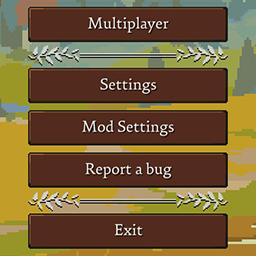
Adds a mod configuration menu under the game's Settings menu. Used to display mod configuration entries.
Settings > Controls page through ConfigDescription tags, without a separate keybind registration stepMod Settings Menu as read-only hints, with compact binding text such as F8 or F8 / D1ConfigEntry<Keys> hotkeys and three-slot ConfigEntry<string> bindings; the string format can store keyboard, mouse, and controller button slotsMod Settings Menu is optional. If your mod uses normal BepInEx Config.Bind entries, Mod Settings Menu can detect and display those entries automatically.ModSettingsMenu.dll, or use a soft dependency and call the API through reflection so your mod can still load without Mod Settings Menu installed.new { DisplayName = "Speed", Order = 10, SliderStep = 0.5 }.ConfigureSection and ConfigureEntry API remains supported for compatibility, but new integrations should prefer the simplified ConfigDescription tag workflow.ConfigureEntry; standard Config.Bind entries will still be displayed automatically. If your mod has no config entries but you still want it listed for its description, NexusMods link, or update status, set HideWhenEmpty to false.ModKeybindTags.Keybind(...) or ModSettingsTags.Keybind(...) to a BepInEx config entry and it will appear under the native Settings > Controls page, grouped by mod name.ConfigEntry<Keys> for a simple keyboard key, and ConfigEntry<string> using K:key,key,key;M:mouse,mouse,mouse;B:button,button,button. K means keyboard Keys, M means mouse MouseButtons, and B means gamepad/controller Buttons.ModKeybindValue provides a small helper API for reading keybind config values: FromEntry, Parse, Keys, MouseButtons, Buttons, ToSingleKey, ToConfigString, and ToDisplayString.Optional hard dependency example:
using BepInEx;
using BepInEx.Configuration;
using BepInEx.NET.Common;
using Microsoft.Xna.Framework.Input;
using ModSettingsMenu.Api;
using System.IO;

[BepInDependency(ModSettingsMenu.PluginInfo.PLUGIN_GUID)]
public sealed class MyPlugin : BasePlugin
{
    public override void Load()
    {
        /*
         * Config.Bind(section, key, defaultValue, description)
         * section: BepInEx .cfg section and Mod Settings Menu category.
         * key: BepInEx .cfg key used to match saved config values.
         * defaultValue: value used when the .cfg does not already contain this key.
         * ConfigDescription(description, acceptableValues, params tags):
         *   description: BepInEx .cfg comment text. Mod Settings Menu also shows it unless Entry sets a custom description.
         *   acceptableValues: BepInEx validation metadata. Use null for unrestricted values.
         *   tags: optional extra objects after acceptableValues. Mod Settings Menu reads ModSettingsTags here.
         * ModSettingsTags.Section(section, displayName, order, hidden): category metadata. Put it on one entry in that section.
         * ModSettingsTags.Entry(displayName, description, order, sliderStep, hidden): config entry display metadata.
         * ModKeybindTags.Keybind(displayName, description, order, hidden): native Settings > Controls keybind metadata.
         *   Keys entries use the first keyboard slot.
         *   String entries use K:key,key,key;M:mouse,mouse,mouse;B:button,button,button.
         *   K = keyboard Keys, M = mouse MouseButtons, B = gamepad/controller Buttons.
         * ModKeybindValue.FromEntry(entry): parse ConfigEntry<Keys> or ConfigEntry<string>.
         * ModKeybindValue.Parse(raw): parse a raw K/M/B config string.
         * value.Keys / value.MouseButtons / value.Buttons: read the three binding slots.
         * value.ToSingleKey(): convert slot 0 to a Keys value for ConfigEntry<Keys>.
         * value.ToConfigString(): serialize back to K/M/B string format.
         * value.ToDisplayString(): compact display text, for example F8 or F8 / D1.
         */
        Config.Bind("General", "Enabled", true, new ConfigDescription(
            // BepInEx description shown by default.
            "Master switch for this mod.",
            // Acceptable values. Null means any value of this config type is accepted.
            null,
            // Optional section metadata. Put it on one entry in the section to rename or sort the category.
            ModSettingsTags.Section("General", "General", 10),
            // Optional entry metadata: display name, description, order, slider step, and hidden state.
            ModSettingsTags.Entry("Enabled", order: 1)));

        Config.Bind("General", "SpeedMultiplier", 1f, new ConfigDescription(
            "Speed multiplier.",
            // AcceptableValueRange creates a slider for supported numeric types.
            new AcceptableValueRange<float>(0.1f, 5f),
            ModSettingsTags.Entry(
                displayName: "Speed Multiplier",
                description: "Custom description shown under this config entry.",
                order: 2,
                sliderStep: 0.5)));

        Config.Bind("Controls", "QuickAction", Keys.F7, new ConfigDescription(
            "Simple keyboard hotkey.",
            null,
            ModSettingsTags.Section("Controls", "Controls", 30),
            ModKeybindTags.Keybind("Quick Action", order: 1)));

        var quickActionAlt = Config.Bind("Controls", "QuickActionAlt", "K:F8,-,-;M:-,-,-;B:-,-,-", new ConfigDescription(
            "Three-slot hotkey string. K = keyboard Keys, M = mouse MouseButtons, B = gamepad/controller Buttons.",
            null,
            ModKeybindTags.Keybind("Quick Action Alt", order: 2)));

        var quickActionAltValue = ModKeybindValue.FromEntry(quickActionAlt);
        Log.LogInfo($"Quick Action Alt: {quickActionAltValue.ToDisplayString()}");

        ModSettingsRegistry.Register(PluginInfo.PLUGIN_GUID, "My Mod", Config, new ModSettingsModOptions
        {
            Icon = "cog",
            // Optional: use a PNG icon if your mod ships one.
            // IconPath = Path.Combine(Paths.PluginPath, "MyMod", "icon.png"),
            Version = PluginInfo.PLUGIN_VERSION,
            Author = "Your Name",
            Description = "A short description shown above this mod's config entries.",
            // Optional: link to your NexusMods page.
            // NexusModsId = 8,
            // Optional: HTTPS JSON manifest used only for update checks.
            // Example: { "version": "1.1.0" }
            // UpdateManifestUrl = "https://example.com/my-mod/version.json",
            // Optional: show metadata-only mods even when there are no config entries.
            // HideWhenEmpty = false,
            Order = 10
        });
    }
}
0.25.1_6+If you have any questions or feature suggestions, please submit them through GitHub Issues, or contact me directly at [email protected] or [email protected].
在游戏设置菜单下添加一个模组配置菜单。用于显示模组的配置项。
ConfigDescription tag 将模组快捷键加入游戏原生 设置 > 控制 页面,不需要单独注册快捷键Mod Settings Menu 中把快捷键配置项显示为只读提示,并使用 F8 或 F8 / D1 这样的紧凑绑定文本ConfigEntry<Keys> 快捷键,也支持 ConfigEntry<string> 三槽位绑定格式;字符串格式可以保存键盘、鼠标和手柄按钮槽位Mod Settings Menu 是可选的。只要你的模组使用普通的 BepInEx Config.Bind 配置项,Mod Settings Menu 就可以自动检测并显示这些配置。ModSettingsMenu.dll,也可以使用软依赖并通过反射调用 API,这样即使玩家没有安装 Mod Settings Menu,你的模组也能继续加载。new { DisplayName = "速度", Order = 10, SliderStep = 0.5 }。ConfigureSection 和 ConfigureEntry API 会继续作为兼容层保留,但新接入推荐使用简化的 ConfigDescription tag 工作流。ConfigureEntry;标准 Config.Bind 配置项仍会自动显示。如果你的模组没有任何配置项,但仍想在菜单里显示简介、NexusMods 链接或更新状态,可以把 HideWhenEmpty 设置为 false。ModKeybindTags.Keybind(...) 或 ModSettingsTags.Keybind(...) 后,它会出现在游戏原生 设置 > 控制 页面,并按模组名分组。ConfigEntry<Keys> 用于简单键盘单键,ConfigEntry<string> 使用 K:key,key,key;M:mouse,mouse,mouse;B:button,button,button 格式。K 表示键盘 Keys,M 表示鼠标 MouseButtons,B 表示手柄/控制器 Buttons。ModKeybindValue 提供小型辅助 API 用于读取快捷键配置值:FromEntry、Parse、Keys、MouseButtons、Buttons、ToSingleKey、ToConfigString 和 ToDisplayString。可选硬依赖示例:
using BepInEx;
using BepInEx.Configuration;
using BepInEx.NET.Common;
using Microsoft.Xna.Framework.Input;
using ModSettingsMenu.Api;
using System.IO;

[BepInDependency(ModSettingsMenu.PluginInfo.PLUGIN_GUID)]
public sealed class MyPlugin : BasePlugin
{
    public override void Load()
    {
        /*
         * Config.Bind(section, key, defaultValue, description)
         * section: BepInEx .cfg 分类,也是 Mod Settings Menu 里的分类。
         * key: BepInEx .cfg 键名,用于匹配已保存的配置值。
         * defaultValue: .cfg 里还没有这个键时使用的默认值。
         * ConfigDescription(description, acceptableValues, params tags):
         *   description: BepInEx .cfg 注释文本。Mod Settings Menu 默认也会显示它,除非 Entry 设置了自定义说明。
         *   acceptableValues: BepInEx 的值校验信息。不限制值时传 null。
         *   tags: acceptableValues 后面的可选附加对象。Mod Settings Menu 会从这里读取 ModSettingsTags。
         * ModSettingsTags.Section(section, displayName, order, hidden): 分类信息。放在该分类中的任意一个配置项上即可。
         * ModSettingsTags.Entry(displayName, description, order, sliderStep, hidden): 配置项显示信息。
         * ModKeybindTags.Keybind(displayName, description, order, hidden): 游戏原生 设置 > 控制 页面的快捷键信息。
         *   Keys 配置项使用第一个键盘槽位。
         *   string 配置项使用 K:key,key,key;M:mouse,mouse,mouse;B:button,button,button。
         *   K = 键盘 Keys,M = 鼠标 MouseButtons,B = 手柄/控制器 Buttons。
         * ModKeybindValue.FromEntry(entry): 解析 ConfigEntry<Keys> 或 ConfigEntry<string>。
         * ModKeybindValue.Parse(raw): 解析原始 K/M/B 配置字符串。
         * value.Keys / value.MouseButtons / value.Buttons: 读取三个绑定槽位。
         * value.ToSingleKey(): 将槽位 0 转为 ConfigEntry<Keys> 使用的 Keys 值。
         * value.ToConfigString(): 序列化回 K/M/B 字符串格式。
         * value.ToDisplayString(): 生成紧凑显示文本,例如 F8 或 F8 / D1。
         */
        Config.Bind("General", "Enabled", true, new ConfigDescription(
            // BepInEx 原始说明,默认会显示在菜单里。
            "这个模组的总开关。",
            // 可接受值。null 表示接受这个配置类型的任意值。
            null,
            // 可选分类信息。放在这个分类中的任意一个配置项上,用于重命名或排序分类。
            ModSettingsTags.Section("General", "通用", 10),
            // 可选配置项信息:显示名、说明、排序、滑条步长、隐藏状态。
            ModSettingsTags.Entry("启用", order: 1)));

        Config.Bind("General", "SpeedMultiplier", 1f, new ConfigDescription(
            "速度倍率。",
            // AcceptableValueRange 会为支持的数值类型创建滑条。
            new AcceptableValueRange<float>(0.1f, 5f),
            ModSettingsTags.Entry(
                displayName: "速度倍率",
                description: "显示在这个配置项下方的自定义说明。",
                order: 2,
                sliderStep: 0.5)));

        Config.Bind("Controls", "QuickAction", Keys.F7, new ConfigDescription(
            "简单键盘快捷键。",
            null,
            ModSettingsTags.Section("Controls", "控制", 30),
            ModKeybindTags.Keybind("快速动作", order: 1)));

        var quickActionAlt = Config.Bind("Controls", "QuickActionAlt", "K:F8,-,-;M:-,-,-;B:-,-,-", new ConfigDescription(
            "三槽位快捷键字符串。K = 键盘 Keys,M = 鼠标 MouseButtons,B = 手柄/控制器 Buttons。",
            null,
            ModKeybindTags.Keybind("快速动作备用", order: 2)));

        var quickActionAltValue = ModKeybindValue.FromEntry(quickActionAlt);
        Log.LogInfo($"快速动作备用:{quickActionAltValue.ToDisplayString()}");

        ModSettingsRegistry.Register(PluginInfo.PLUGIN_GUID, "我的模组", Config, new ModSettingsModOptions
        {
            Icon = "cog",
            // 可选:如果你的模组自带 PNG 图标,可以设置 IconPath。
            // IconPath = Path.Combine(Paths.PluginPath, "MyMod", "icon.png"),
            Version = PluginInfo.PLUGIN_VERSION,
            Author = "你的名字",
            Description = "显示在这个模组配置项上方的简短介绍。",
            // 可选:点击进入你的 NexusMods 模组页面。
            // NexusModsId = 8,
            // 可选 HTTPS JSON manifest,只用于检测更新。
            // 示例:{ "version": "1.1.0" }
            // UpdateManifestUrl = "https://example.com/my-mod/version.json",
            // 可选:没有配置项时也显示只包含 meta 信息的模组。
            // HideWhenEmpty = false,
            Order = 10
        });
    }
}
0.25.1_6+如果你有任何问题或新功能建议,请通过 GitHub Issues 提交,或直接通过邮箱 [email protected] 或 [email protected] 联系我。