You are viewing a potentially older version of this package. View Latest Version
Worldwright
Customize new Romestead worlds with eight terrain presets, advanced biome controls, save tooltips, and optional minimap biome and coordinates.说明:本描述为中英双语版本,中文内容位于英文内容下方。
Note: This description is bilingual. The Chinese section is provided below the English section.
Worldwright (English)
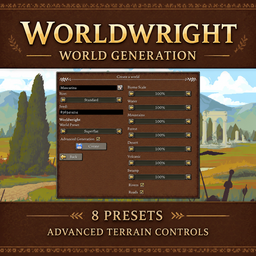
Adds world-generation presets and advanced terrain controls to the Create World menu, with optional minimap biome and coordinate information.
Main Features
- World Creation
- Choose a Worldwright preset directly in the game's Create World menu
- Expand Advanced Generation to adjust the additional options in a panel on the right
- World Presets
- Balanced: use the native terrain mix as a starting point
- Superflat: create a grass-only sandbox without normal POI, entity, or wild crop generation
- Flattened: reduce blocking mountain and forest terrain while retaining other native generation systems
- Mountainous: increase rocky mountain regions
- Water World: increase water and islands, with additional land connections between islands
- Drylands: increase dry plains and deserts
- Volcanic: expand volcanic regions, including rocky and lava-bearing terrain
- Forest: increase wooded regions
- Advanced Generation
- Adjust biome scale and the generation strength of water, mountains, forests, deserts, volcanic regions, and swamps
- Enable or disable rivers and roads independently
- Use generation strengths to tune a preset rather than set exact percentages of final map area
- Save Information
- Show a [MOD] label and the preset name in the world list
- Hover a save to view its preset and any custom advanced parameters
- Minimap Information
- Optionally show the localized biome name below the minimap
- Center coordinates below the minimap in the format X: 111, Y: 111, Z: 0
- Controls & Configuration
- Configure default generation options and the minimap display in-game through Mod Settings Menu
- Apply generation settings when creating a new world; existing worlds are not regenerated
- World Hosting
- For single-player or client-hosted games, install Worldwright on the game client
- For custom world creation on a dedicated server, install the separate Worldwright Server package from Nexus and choose the preset and advanced options in the server console; its config file supplies defaults for manual and automatic creation
- You can also generate a world in the game client and copy the entire save folder to the server's saved_worlds directory
Multi-language Support
- Supports Simplified Chinese, Traditional Chinese, English, and Japanese by default. The mod automatically switches language based on the game language
- If you want to contribute another language, you can contact me to add it to the mod. Any language supported by the game can be added
Compatibility
- Game version:
0.26.2_3+
Bug Reports & Feature Suggestions
If you have any questions or feature suggestions, please submit through GitHub Issues, or contact me directly at [email protected] or [email protected].
If you enjoy my mods, feel free to support me! / 如果你喜欢我的模组,请支持我一下吧!


Worldwright (中文)
在创建世界界面加入地形预设与高级生成控制,并可在小地图下方显示生物群系和坐标信息。
主要功能
- 创建世界
- 在游戏原本的创建世界界面直接选择 Worldwright 预设
- 展开高级生成后,在右侧面板调整更多生成选项
- 世界预设
- 均衡:以原版地形分布为基础进行调整
- 超平坦:生成纯草地沙盒,跳过普通 POI、实体和野生作物生成
- 平原化:减少挡路的山地和森林地形,保留其他原版生成系统
- 山地:增加岩石山地区域
- 水世界:增加水域和岛屿,并为岛屿添加陆地连接
- 旱地:增加干燥平原和沙漠
- 火山:扩大火山区,包含石质与熔岩地形
- 森林:增加林地区域
- 高级生成
- 调整群系尺度,以及水体、山地、森林、沙漠、火山和沼泽的生成强度
- 独立开启或关闭河流与道路
- 通过生成强度微调预设,不代表最终地图面积的精确百分比
- 存档信息
- 在世界列表显示 [MOD] 标记和预设名称
- 鼠标悬停存档时,查看预设以及使用过的自定义高级参数
- 小地图信息
- 可选在小地图下方显示本地化的生物群系名称
- 在小地图范围内居中显示 X: 111, Y: 111, Z: 0 格式的坐标
- 操作与配置
- 通过 Mod Settings Menu 在游戏内设置默认生成参数和小地图显示
- 生成设置在创建新世界时生效,不会重新生成已有世界
- 世界托管
- 单人游戏或本机开服游玩时,在游戏客户端安装 Worldwright
- 要在专用服务器直接创建自定义世界,请从 Nexus 安装独立的 Worldwright Server 包,在服务器控制台选择预设和高级参数;配置文件提供手动和自动建档的默认值
- 也可以先在游戏客户端生成地图,再将整个存档文件夹复制到服务器的 saved_worlds 目录
多语言支持
- 默认支持简体中文、繁体中文、英语和日语,模组会根据游戏语言自动切换语言
- 如果你想贡献其他语言可以联系我加入到模组中,游戏支持的语言模组均可添加
兼容性
- 游戏版本:
0.26.2_3+
Bug 提交 & 新功能建议
如果你有任何问题或新功能建议,请通过 GitHub Issues 提交,或直接通过邮箱 [email protected] 或 [email protected] 联系我。