
You are viewing a potentially older version of this package. View Latest Version

RUMBLE mod that allows controlling OBS Studio from inside of the game.
This mod implements a websocket client that communicates directly with OBS and allows controlling it from inside the game, without the need for third-party software. It provides:
The client connects automatically as soon as the server (ie OBS Studio) is available. If the server is unavailable, it will keep trying to contact it every 3 seconds. If it connects but fails to authenticate (wrong password), it will disconnect, log an error message and stop trying until the options in ModUI are changed.
In addition to the displayed dependencies, this mod requires the obs-websocket plugin, which is included by default with OBS Studio 28.0.0 and above. For older versions, you need to install the plugin manually.
After starting the game with the mod and loading into the gym, you should be able to edit the options in UI Framework by pressing F9. This needs to be done the first time you use the mod, in order to configure the websocket client.
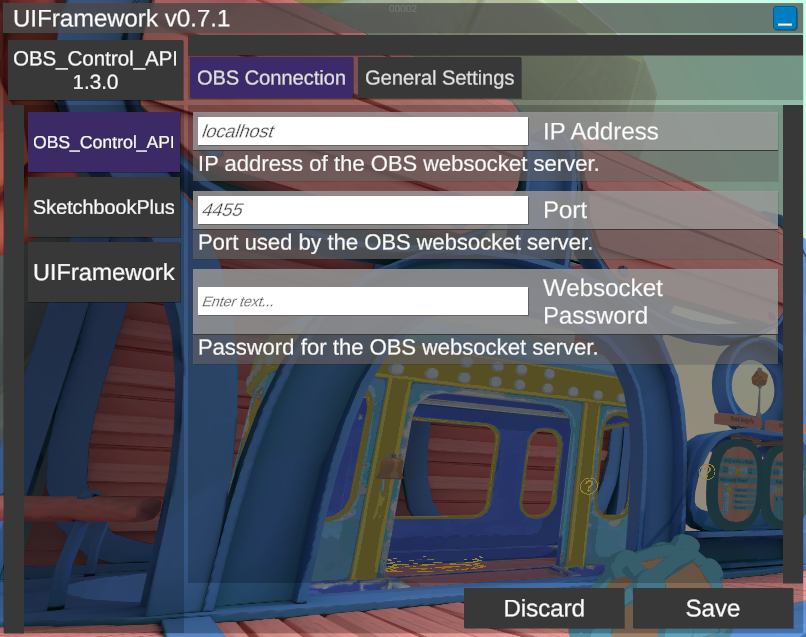
Open OBS Studio and go to "Tools"->"WebSocket Server Settings". There, check "Enable WebSocket server":
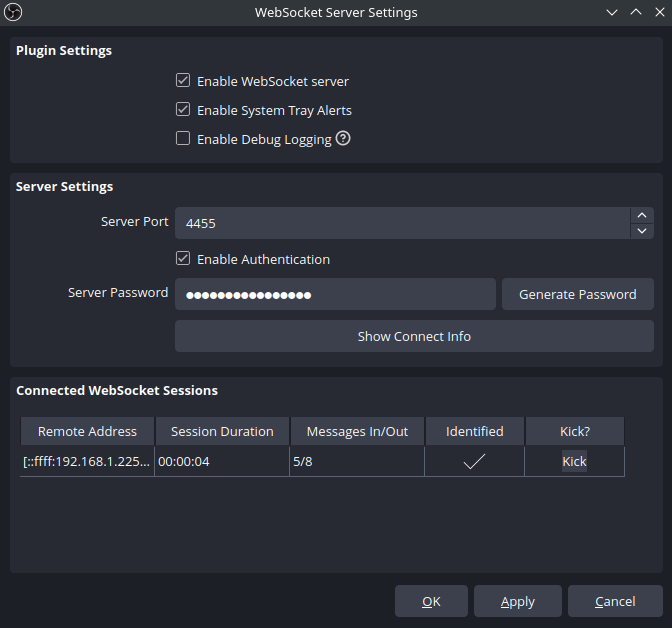
After that, use the server's configuration to configure the mod:
Once you save the configuration, the mod will try to connect again, and if it's successful you should see it under "Connected WebSocket Sessions".
Other options you can set in ModUI are:
The default configuration is set to automatically start the replay buffer when the client connects, save the replay buffer when the two buttons on the left controller are pressed (screenshot for the right one), and it will give haptic and audio feedback as confirmation that the clip was successfully saved.
In order to play audio when an action is executed, the mod reads .wav files from UserData/OBS_Control_API/sfx_assets:
This folder is automatically filled with the right files when the mod first starts, but you can replace them with your own files (with the same names) if you want different sounds, or to remove some sound effects and not others.
The mod provides 3 types of programming interfaces:
All classes, functions and types are defined in the namespace OBS_Control_API.
All of the methods and events are provided inside of a single public class named "OBS", so all of the following definitions are assumed to have the prefix OBS. before them. For example, to save the replay buffer, you need to call the appropriate static method:
OBS.SaveReplayBuffer();
Most of these functions are here to remove the need to create a new request for information that is already tracked by the mod, like the recording status for example.
Returns true if the client is connected to OBS, ready to send requests and receive events.
Returns true if the replay buffer is active.
Returns true if recording is active.
Returns true if streaming is active.
Forces the mod to open a websocket connection. If it was already connected, the old connection is killed and a new one is initiated.
Forces the mod to close the websocket connection. The mod will not attempt to reconnect by itself.
Play the confirmation tone that is used for the "save replay buffer" action.
Play the screenshot SFX (camera shutter sound).
Play the "start recording" SFX (two-note rising tone).
Play the "stop recording" SFX (two-note falling tone).
Execute a haptic impulse on both controllers. Can be used to implement your own haptic feedback for various events.
null.true if successful, false if failed.Fetches the current status of the replay buffer.
public class GetReplayBufferStatus
{
    public bool outputActive { Get; Set; }
}
Fetches the current recording status.
public class GetRecordStatus
{
    public bool outputActive { Get; Set; }
    public bool outputPaused { Get; Set; }
    public string outputTimecode { Get; Set; }
    public int outputDuration { Get; Set; }
    public long outputBytes { Get; Set; }
}
Fetches the current streaming status.
public class GetStreamStatus
{
    public bool outputActive { Get; Set; }
    public bool outputReconnecting { Get; Set; }
    public string outputTimecode { Get; Set; }
    public int outputDuration { Get; Set; }
    public float outputCongestion { Get; Set; }
    public long outputBytes { Get; Set; }
    public int outputSkippedFrames { Get; Set; }
    public int outputTotalFrames { Get; Set; }
}
Fetches the version of OBS and the negociated protocol parameters.
public class GetVersion
{
    public string obsVersion { Get; Set; }
    public string obsWebSocketVersion { Get; Set; }
    public int rpcVersion { Get; Set; }
    public string[] availableRequests { Get; Set; }
    public string[] supportedImageFormats { Get; Set; }
    public string platform { Get; Set; }
    public string platformDescription { Get; Set; }
}
Starts the stream.
Stops the stream.
Starts the replay buffer.
Stops the replay buffer.
Saves the replay buffer.
Gets the name of the file that the replay buffer was saved to last time.
public class GetLastReplayBufferReplay
{
    public string savedReplayPath { Get; Set; }
}
Starts recording.
Stops recording.
public class StopRecord
{
    public string outputPath { Get; Set; }
}
Toggles the recording status. Stops it if it was running, starts it if it wasn't. Doesn't do anything if it's in the "stopping" state.
public class ToggleRecord
{
    public bool outputActive { Get; Set; }
}
Pauses recording.
Resumes recording.
Splits the current file being recorded into a new file.
Gets the current directory that recording is saved to.
public class GetRecordDirectory
{
    public string recordDirectory { Get; Set; }
}
Sets a new directory to write recording files to.
Save a new screenshot from the current scene. The file has an auto-generated timestamp name.
Save a new screenshot from the current scene to a specific file.
Save a new screenshot from a specific source and to a specific file.
Generic request function that can be used for requests that are not in the list above. The parameters object needs to be constructed specifically for the request type. The returned string is the extracted responseData json, it needs to be parsed differently depending on the request type. It may be null if the request type does not have a response in the API.
To see the full list of requests and their parameters, check the official documentation.
Same as the previous one but for requests that do not require any parameters.
public static event Action onConnect;
public static event Action onDisconnect;
public static event Action<OBS_Control_API.Event> onEvent; //generic type OBS_Msg_Types.Event
public static event Action<string> onReplayBufferSaved; // savedReplayPath
public static event Action onReplayBufferStarted;
public static event Action onReplayBufferStopped;
public static event Action<string> onRecordingStarted;  // outputPath
public static event Action<string> onRecordingStopping; // outputPath
public static event Action<string> onRecordingStopped;  // outputPath
public static event Action onRecordingPaused;
public static event Action onRecordingResumed;
public static event Action onStreamStarted;
public static event Action onStreamStopped;
public static event Action<string> onRecordFileChanged; //newOutputPath
public static event Action<string> onScreenshotSaved;
Note that onConnect is triggered after the client is connected and identified, ie when the mod is ready to send requests and receive events. If the client connects but fails to authenticate, the event will not trigger.
Note that onScreenshotSaved is triggered for the screenshot feature available in Settings -> Hotkeys -> Screenshot Output ONLY. Screenshots requested by the websocket client will not trigger it.
The event onEvent is a generic one that is triggered on all events that are received from You can use this if the event you want to suscribe to isn't on the list. The class has a simple structure:
object eventData that depends on the event and needs to be parsedint eventIntent the EventSubscription value (why the event was received)string eventType the type of event that was receivedTo see the full list of events and their parameters, check the official documentation.
