
You are viewing a potentially older version of this package. View Latest Version
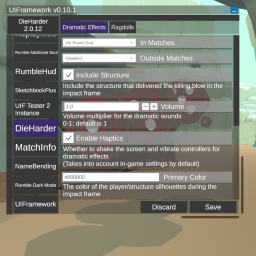
btw: The changelog doubles as a feature list
Note: This change has made floating point errors more obvious. I've opted to limit floating point types to display
1 decimal place by default. This can be easily overridden with the INumberBoxDescriptor UI Extension class.
You can now use the ICustomViewProvider interface to be able to pass your own custom representations to the UI Framework.
Default implementation: CustomViewProvider. More details in CustomUI
Drop the dll in your mods folder.
F9 keyChanging a value of an entry automatically updates the value of the preference and is applied. How that preference's parent mod reacts depends on the modder's implementation.
* the above is no longer true as of 0.8.0. Values will not update until the saved button has been clicked
The save button writes it to the file for permanent storage. Closing your game might also save preferences to file automatically depending on whether it's closed from the game window or through Steam. Stopping through Steam doesn't save because it force closes it.
A (more) detailed API Overview exists over at https://github.com/Reverb-And-Spice/UIFramework/blob/main/API_OverView.md
Add [assembly: MelonAdditionalDependencies("UIFramework")] to your AssemblyInfo. This prevents your mod from calling on UIFramework before it's been initialized.
Define your MelonPreferences in OnInitializeMelon and then register them to the UI.
UI.Register(this, TestCategory1, TestCategory2...);
Right now, support is limited to common types like string, int, bool, double, float, and enums without the flags attribute. Working on expanding this.
Support is no longer limited to the types mentioned above. Serialization and parsing is now handled by Tomlet. This means that it supports types described in Toml 1.0.0 and whatever Tomlet supports. You can even make your own custom mappers
Caveat: Types handled by Tomlet will be presented as regular text inputs and they might not always look good. Numerics will have the appropriate filters. I do plan to continue expanding the number of custom UI presenters like I did with enums and booleans.
You can add an event handler that gets called when the save button is clicked while your mod is selected.
private void MyModSaved()
{
    // Do something when the save button is clicked while your mod is selected
}
UI.Register((MelonBase)this, OBSAutoRecorderSettings, TestCategory1, TestCategory2...).OnModSaved += MyModSaved;
Casting to melonbase isn't necessary but it forces your compiler to use the newer MelonBase registration instead of the obsolete MelonMod registration In the future, all mods will be registered as MelonBase by default and the cast won't be needed. But the cast makes sure that your mod won't break when the old MelonMod registration gets removed
Add [assembly: UIInfo("My Mod's Better\nDisplay Name")] to your assembly attributes to change how the mod's name is displayed
in the UI. Line breaks are supported.
I moved this section the API Overview
I detail usage and creation here: https://github.com/Reverb-And-Spice/UIFramework/blob/main/API_OverView.md#melonpreferences
And the official docs are here: https://melonwiki.xyz/#/modders/preferences?id=melon-preferences
This mod is in active development. The plan is to increase extensibility.
Basic MelonPreferences registration is stable and should always be backwards compatible.
So while advanced API usage will have a lot of changes for the time that this mod is in Version 0.x.x,
mods that implement the basic use case of this framework don't have to worry about breaking in the future (as long as I don't mess up too bad).
Well, so much for always be backwards compatible. In order to support plugins, I'm having to change .Register to use MelonBase as the instance instead of MelonMod Currently, I have an obsolete bridging function for backwards compatibility. But that will be removed in a future version if I'm confident that enough mods have migrated that it won't be too big of a problem.
In order to make your mod future proof, explicitly cast your MelonMod instance to MelonBase in your next update. You don't need to publish that update now for this small change but it makes it so that when the old function does become actually deprecated, you won't need to push an update specific to it.
UI.Register((MelonBase)this, TestCategory1, TestCategory2);
Okay, so for real this time: Basic MelonPreferences registration is stable and should always be backwards compatible.
You can place the .xml documentation file for UIFramework in the same folder as the dll to get intellisense documentation for the API. It is currently incomplete, however but I do add to it every update.
