

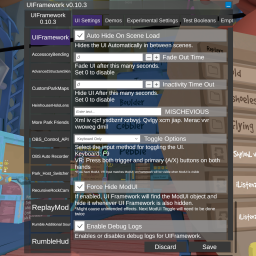
UIFramework
A UI For settings in Rumble VRbtw: The changelog doubles as a feature list
New in 0.10.3
New feature: Added OnSliderValueChanged event
The ISliderDescriptor now has an OnSliderValueChanged event that you can subscribe to if you wanna be notified of that user interactionNew feature: Added Text Input Behaviour Descriptors
This lets you set `ContentType`, `CharacterLimit`, and `IsReadOnly` properties. You also get a `PasswordChar` property that you can use when you set your content type to passwordREADME changes
Bug Fix: Fixed VR Toggle not counting for activity
Toggling the UI in VR would still make the UI time out making the user unable to pull it up.Bug Fix: Fixed autofill typo
Force Hide ModUI was called Force Hide ModButtonView UIBug Fix: Fixed fade out not disabling when set to 0
New in 0.10.1/2
New feature: Made resize handles visible
- Right handle for scale
- Bottom handle to stretch downwards
Bug fix: Nullref error when the player doesn't have ModUI
Wasn't really motivated to be rigorous because everybody had ModUI😅Bug fix: Continuous refresh error
Fixed the refresh method to not keep trying every frame when a part of the UI fails to buildNew feature: Made UI Framework available in the loader
UI Framework can now be used in the loader.New feature: Enabled Re-registration
Mods can now register themselves any time the game is running and re-register to change what categories they have and what order.Bug fix: Null check for requestrefresh
In case anyone assigns a value before the UI is builtNew in 0.10.0
New Feature: Window is now resizable
You can now scale the window or adjust its height.- Scale: Click and drag the right edge to make the window scale uniformly.
- Height: Click and drag the bottom edge to adjust the height of the window.
New Feature: Increment and Decrement buttons in number fields
You can now click on buttons to increment or decrement values in number fields.- Integral types like ints, bytes, longs, etc. will increment and decrement by 1 by default.
- Floating point types like floats and doubles will increment and decrement by 0.1 by default.
Note: This change has made floating point errors more obvious. I've opted to limit floating point types to display
1 decimal place by default. This can be easily overridden with the INumberBoxDescriptor UI Extension class.
New Feature: Advanced UI Customization for modders
You can now use the ICustomViewProvider interface to be able to pass your own custom representations to the UI Framework.
Default implementation: CustomViewProvider. More details in CustomUI
AI Use Disclosure:
Moving and resizing the window was mostly done with AI with me doing the tuning. The rest of the mod is written by me other than intellicode's autocomplete suggestions and search engines.
For Users
Drop the dll in your mods folder.
Default toggle is the F9 key
Changing a value of an entry automatically updates the value of the preference and is applied. How that preference's parent mod reacts depends on the modder's implementation.
* the above is no longer true as of 0.8.0. Values will not update until the save button has been clicked
The save button writes it to the file for permanent storage. Closing your game might also save preferences to file automatically depending on whether it's closed from the game window or through Steam. Stopping through Steam doesn't save because it force closes the game.
For Modders
A (more) detailed API Overview exists over at https://github.com/Reverb-And-Spice/UIFramework/blob/main/API_OverView.md
Basic Registration
Define your MelonPreferences in OnInitializeMelon and then register them to the UI.
UI.RegisterMelon(this, TestCategory1, TestCategory2...);
Type Support: Whatever works with Tomlet
Expanded Type Support details
Serialization and parsing is now handled by Tomlet. This means that it supports types described in Toml 1.0.0 and whatever Tomlet supports. You can even make your own custom mappers
Caveat: Types handled by Tomlet will be presented as regular text inputs and they might not always look good. Numeric types will have the appropriate filters. I do plan to continue expanding the number of custom UI presenters like I did with enums and booleans.
Optional: OnSave Event Handler
You can add an event handler that gets called when the save button is clicked while your mod is selected.
private void MyModSaved()
{
    // Do something when the save button is clicked while your mod is selected
}
UI.RegisterMelon(this, OBSAutoRecorderSettings, TestCategory1, TestCategory2...).OnModSaved += MyModSaved;
I moved registration from UI.Register() to UI.RegisterMelon.
Optional: Custom display names
Add [assembly: UIInfo("My Mod's Better\nDisplay Name")] to your assembly attributes to change how the mod's name is displayed
in the UI. Line breaks are supported.
Advanced Usage
I moved this section to the API Overview
If you haven't used MelonPreferences before
I detail usage and creation here: https://github.com/Reverb-And-Spice/UIFramework/blob/main/API_OverView.md#melonpreferences
And the official docs are here: https://melonwiki.xyz/#/modders/preferences?id=melon-preferences
Ongoing Development Disclosure
This mod is in active development. The plan is to increase extensibility. Basic MelonPreferences registration is mostly stable and should be backwards compatible. So while advanced API usage will have a lot of changes for the time that this mod is in Version 0.x.x, mods that implement the basic use case of this framework don't have to worry about breaking in the future (as long as I don't mess up too badly).
Oops (0.10.0)
Keeping track of multiple overloads of .Register was getting cluttered. I moved registration to .RegisterMelon instead.
Okay, so for real this time: Basic MelonPreferences registration is stable and should always be backwards compatible.
XML Documentation File
Download Here You can place the .xml documentation file for UIFramework in the same folder as the dll to get intellisense documentation for the API. It is currently incomplete, however but I do add to it every update.