
You are viewing a potentially older version of this package. View Latest Version
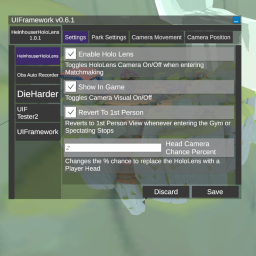
*btw while text wrapping is disabled in mod list buttons, your MelonInfo name property does support spaces and line breaks that you can add manually if your mod name is still too long to fit into one line
You can now subscribe to the OnModSaved event that triggers when the saved button is clicked while your mod is selected.
This is an alternative for OnPreferencesSaved from MelonPreferences which gets called per category.
This one is called once and only if your mod is selected.
UI.Register(this, OBSAutoRecorderSettings, TestCategory1, TestCategory2...).OnModSaved += MyModSaved;
Drop the dll in your mods folder.
F9 keyChanging a value of an entry automatically updates the value of the preference and is applied. How that preference's parent mod reacts depends on the modder's implementation.
The save button writes it to the file for permanent storage. Closing your game might also save preferences to file automatically depending on whether it's closed from the game window or through Steam. Stopping through Steam doesn't save because it force closes it.
Add [assembly: MelonAdditionalDependencies("UIFramework")] to your AssemblyInfo. This prevents your mod from calling on UIFramework before it's been initialized.
Define your MelonPreferences in OnInitializeMelon and then register them to the UI.
UI.Register(this, TestCategory1, TestCategory2...);
Right now, support is limited to common types like string, int, bool, double, float, and enums without the flags attribute. Working on expanding this.
You can add an event handler that gets called when the save button is clicked while your mod is selected.
private void MyModSaved()
{
    // Do something when the save button is clicked while your mod is selected
}
UI.Register(this, OBSAutoRecorderSettings, TestCategory1, TestCategory2...).OnModSaved += MyModSaved;
Make sure the directory exists for your mod. Otherwise, it will not fail silently and your preferences don't save at all.
private const string USER_DATA = "UserData/MyMod/";
private const string CONFIG_FILE = "config.cfg";
if (!Directory.Exists(USER_DATA))
    Directory.CreateDirectory(USER_DATA);
private MelonPreferences_Category TestCategory1;
private MelonPreferences_Category TestCategory2;
private MelonPreferences_Entry<string> TestEntry11;
private MelonPreferences_Entry<int> TestEntry12;

private MelonPreferences_Entry<float> TestEntry21;
private MelonPreferences_Entry<bool> TestEntry22;
TestCategory1 = MelonPreferences.CreateCategory("TestCat1", "Category DisplayName 1");
TestCategory1.SetFilePath(Path.Combine(USER_DATA, CONFIG_FILE));

TestCategory2 = MelonPreferences.CreateCategory("TestCat2", "Category DisplayName 2");
TestCategory2.SetFilePath(Path.Combine(USER_DATA, CONFIG_FILE));
Identifier, Default Value, Display Name, and DescriptionTestEntry11 = TestCategory1.CreateEntry("Entry 1-1", "Test Val", "Display Name1", "Test String");
TestEntry12 = TestCategory1.CreateEntry("Entry 1-2", 1, "Display Name2", "Test Int");
TestEntry21 = TestCategory2.CreateEntry("Entry 2-1", "0.5126", "Display Name 3", "Test float");
TestEntry22 = TestCategory2.CreateEntry("Entry 2-2", true, "Display Name 4", "Test bool");
https://melonwiki.xyz/#/modders/preferences?id=melon-preferences
Enum dropdowns will now show the Display(Name) attribute. If unavailable, it will fall back to the default enum value name.
using System.ComponentModel.DataAnnotations;
public enum Example
{
    [Display(Name = "DisplayName")]
    value1,
    [Display(Name = "Other Value")]
    value2
}
This mod is in active development. The plan is to increase extensibility. Basic MelonPreferences registration is stable and should always be backwards compatible. So while advanced API usage will have a lot of changes for the time that this mod is in Version 0.x.x, mods that implement the basic use case of this framework don't have to worry about breaking in the future (as long as I don't mess up too bad).
You can place the .xml documentation file for UIFramework in the same folder as the dll to get intellisense documentation for the API. It is currently incomplete, however but I do add to it every update.
