
You are viewing a potentially older version of this package. View Latest Version
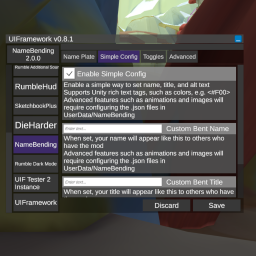
btw: The changelog doubles as a feature list
If you have the same category identifier as another mod, your preferences will have a naming collision
and might be displayed alongside their categories' entries.
Please prefix your identifiers with your mod such as "MyMod_MyCategory1"to avoid this.
This is a base MelonLoader problem. Not something that can be fixed in the UI.
Naming collisions also means you might accidentally change another mod's preferences if you have the same category and entry identifiers.
The UI window is now draggable by the title bar.
If ModUI is enabled, and it has the VR Menu Toggle setting enabled, UI Framework will follow ModUI's visibility. If ModUI is visible (when the VR toggle is pressed), UI Framework will also be visible and vice versa. If you don't have ModUI or the setting is off, UI Framework will toggle normally with the VR toggle.
The toggle with VR buttons preference is also no longer a thing. A new preference is added for toggling with VR, keyboard, or both.
Just add [assembly: UIInfo("My Mod's Better\nDisplay Name")] to your assembly attributes to display your
mod's name differently on its button in UI Framework. Yes, it supports line breaks
Entries with IsHidden set to true won't be listed in the preferences list anymore.
Modders can now implement sliders for numeric vlaues.
MySlider = Category.CreateEntry("MySlider", 0.5f, "My Slider", "Float Slider",false, false, new SliderDescriptor { Min = 0, Max = 1, DecimalPlaces = 3 });
Modders can now add their own buttons as entries into UI Framework.
UI.CreateButtonEntry(MelonPreferences_Category category, string buttonText, string displayName, string description, Action handler)
Go to Buttons for more details.
Drop the dll in your mods folder.
F9 keyChanging a value of an entry automatically updates the value of the preference and is applied. How that preference's parent mod reacts depends on the modder's implementation.
* the above is no longer true as of 0.8.0. Values will not update until the saved button has been clicked
The save button writes it to the file for permanent storage. Closing your game might also save preferences to file automatically depending on whether it's closed from the game window or through Steam. Stopping through Steam doesn't save because it force closes it.
Add [assembly: MelonAdditionalDependencies("UIFramework")] to your AssemblyInfo. This prevents your mod from calling on UIFramework before it's been initialized.
Define your MelonPreferences in OnInitializeMelon and then register them to the UI.
UI.Register(this, TestCategory1, TestCategory2...);
Right now, support is limited to common types like string, int, bool, double, float, and enums without the flags attribute. Working on expanding this.
Support is no longer limited to the types mentioned above. Serialization and parsing is now handled by Tomlet. This means that it supports types described in Toml 1.0.0 and whatever Tomlet supports. You can even make your own custom mappers
Caveat: Types handled by Tomlet will be presented as regular text inputs and they might not always look good. Numerics will have the appropriate filters. I do plan to continue expanding the number of custom UI presenters like I did with enums and booleans.
You can add an event handler that gets called when the save button is clicked while your mod is selected.
private void MyModSaved()
{
    // Do something when the save button is clicked while your mod is selected
}
UI.Register((MelonBase)this, OBSAutoRecorderSettings, TestCategory1, TestCategory2...).OnModSaved += MyModSaved;
Casting to melonbase isn't necessary but it forces your compiler to use the newer MelonBase registration instead of the obsolete MelonMod registration In the future, all mods will be registered as MelonBase by default and the cast won't be needed. But the cast makes sure that your mod won't break when the old MelonMod registration gets removed
Add [assembly: UIInfo("My Mod's Better\nDisplay Name")] to your assembly attributes to change how the mod's name is displayed
in the UI. Line breaks are supported.
Melonloader has a custom validator feature that you can use by inheriting the ValueValidator class. Here's an example of a custom validator that approves everything.
public class CustomValidator : ValueValidator
{
    // These two are required members
    public override bool IsValid(object value) { return true; }
    public override object EnsureValid(object value) { return value; }
}
In UI Framework, we use this system to describe how the entry is represented in the UI. This is done through implementing interfaces in the UIFramework.ValidationExtensions namespace.
UI Framework's ValidationControls namespace contains interfaces you can implement into your validator class. Each interface has required member implementations. So, if you want a slider, the declaration for your validator becomes
using UIFramework.ValidationExtensions;
public class CustomValidator : ValueValidator, SliderDescriptor
{
    // These two are required members from MelonPreferences Value Validator.
    // You can implement actual validators here or just return true and return the same value
    public override bool IsValid(object value) { return true; }
	public override object EnsureValid(object value) { return value; }

    //You can set default values or set them when you pass a new instance into the validator parameter
    public float Min { get; set; } = 0;
    public float Max { get; set; } = 100;
    public int DecimalPlaces { get; set; } = 5
}
Now, when you create your entry, you can pass a new instance of your validator with the appropriate properties set for the slider to be represented in the UI:
MySlider = Category.CreateEntry("MySlider", 0.5f, "My Slider", "Float Slider",false, false, new SliderDescriptor { Min = 0, Max = 1, DecimalPlaces = 3 });
Most interfaces haven't been implemented yet but I will list the available ones below as they get added
I will also have a default concrete class for most interfaces that has the required members implemented so you can just set the properties when you create a new instance of the class instead of having to make your own validator class.
ISliderDescriptorSliderDescriptorThe UI will represent your entry with a slider if you add a validator that implements SliderDescriptor.
MySlider = Category.CreateEntry("MySlider", 0.5f, "My Slider", "Float Slider",false, false, new SliderDescriptor { Min = 0, Max = 1, DecimalPlaces = 3 });
IButtonDescriptorButtonAsEntry (internal)This is a special case. You don't need to implement this yourself. Instead, you call
UI.CreateButtonEntry(MelonPreferences_Category category, string buttonText, string displayName, string description, Action handler)
This method will handle the implementation for you and it will show the button in the entries list.
Make sure the directory exists for your mod. Otherwise, it will not fail silently and your preferences don't save at all.
private const string USER_DATA = "UserData/MyMod/";
private const string CONFIG_FILE = "config.cfg";
if (!Directory.Exists(USER_DATA))
    Directory.CreateDirectory(USER_DATA);
private MelonPreferences_Category TestCategory1;
private MelonPreferences_Category TestCategory2;
private MelonPreferences_Entry<string> TestEntry11;
private MelonPreferences_Entry<int> TestEntry12;

private MelonPreferences_Entry<float> TestEntry21;
private MelonPreferences_Entry<bool> TestEntry22;
TestCategory1 = MelonPreferences.CreateCategory("MyMod_TestCat1", "Category DisplayName 1");
TestCategory1.SetFilePath(Path.Combine(USER_DATA, CONFIG_FILE));

TestCategory2 = MelonPreferences.CreateCategory("MyMod_TestCat2", "Category DisplayName 2");
TestCategory2.SetFilePath(Path.Combine(USER_DATA, CONFIG_FILE));
*Prefix your category identifiers with the name of your mod to avoid conflicts with other categories later on
Identifier, Default Value, Display Name, and DescriptionTestEntry11 = TestCategory1.CreateEntry("Entry 1-1", "Test Val", "Display Name1", "Test String");
TestEntry12 = TestCategory1.CreateEntry("Entry 1-2", 1, "Display Name2", "Test Int");
TestEntry21 = TestCategory2.CreateEntry("Entry 2-1", "0.5126", "Display Name 3", "Test float");
TestEntry22 = TestCategory2.CreateEntry("Entry 2-2", true, "Display Name 4", "Test bool");
https://melonwiki.xyz/#/modders/preferences?id=melon-preferences
MelonPreferences_Entry.OnEntryValueChanged: Event that fires when the value is changed (Value is applied when you hit the save button in the UI Framework window). Provides oldValue and newValue parameters so you can monitor if it's been changed from the previous values.
Must be subscribed with via the .Subscribe() method instead of +=Enum dropdowns will now show the Display(Name) attribute. If unavailable, it will fall back to the default enum value name.
using System.ComponentModel.DataAnnotations;
public enum Example
{
    [Display(Name = "DisplayName")]
    value1,
    [Display(Name = "Other Value")]
    value2
}
This mod is in active development. The plan is to increase extensibility.
Basic MelonPreferences registration is stable and should always be backwards compatible.
So while advanced API usage will have a lot of changes for the time that this mod is in Version 0.x.x,
mods that implement the basic use case of this framework don't have to worry about breaking in the future (as long as I don't mess up too bad).
Well, so much for always be backwards compatible. In order to support plugins, I'm having to change .Register to use MelonBase as the instance instead of MelonMod Currently, I have an obsolete bridging function for backwards compatibility. But that will be removed in a future version if I'm confident that enough mods have migrated that it won't be too big of a problem.
In order to make your mod future proof, explicitly cast your MelonMod instance to MelonBase in your next update. You don't need to publish that update now for this small change but it makes it so that when the old function does become actually deprecated, you won't need to push an update specific to it.
UI.Register((MelonBase)this, TestCategory1, TestCategory2);
Okay, so for real this time: Basic MelonPreferences registration is stable and should always be backwards compatible.
You can place the .xml documentation file for UIFramework in the same folder as the dll to get intellisense documentation for the API. It is currently incomplete, however but I do add to it every update.
