
ShiftStoneManager
Automate Your Shift StonesI'm rewriting Shift Stone Randomizer.
This is the old version that people can have in the meantime.
Should work about as well as the last one.
Shift Stone Randomizer 2.0 Automator
Adds more buttons to the shift stone quick swapper to allow to save loadouts and settings for shift stones. Also allows for automatic management and selection of stones depending on client/host status and maps.
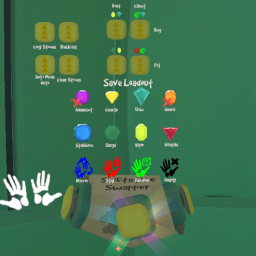
Shiftstone Quick Swapper
The four buttons on top with a pair of shift stones each are loadout apply buttons by default. Clicking them applies the loadout stored in them to your hands
- Front button: The tablets are now replaced with floating shift stones. The loadout buttons are still there but they are now for saving shift stones and will store the stones or commands you have equipped into the loadout
- Commands: Four additional objects are on the bottom. When you click them, they will be displayed on your shift stone socket allowing you to save them to the loadout and executed when you apply a loadout that contains them.
- Mirror: Copies the opponent stone on the same hand
- None: Does not make any changes when applied
- Random: Picks a random stone that isn't blacklisted.
- Empty: Clears equipped shift stone for that hand when applied.
- Commands: Four additional objects are on the bottom. When you click them, they will be displayed on your shift stone socket allowing you to save them to the loadout and executed when you apply a loadout that contains them.
- Right Button: Dedicated randomize button
- Left Button: Rotates between having left, right, or both hands being randomized by the dedicated random button
Automation
There are three modes for automation:
- Auto: Each of the loadout buttons now represent combinations of host/client status and map. If you are in the gym going into a match, they'll be applied on map load. When a round ends, the stones will be applied for the host/client status you'll get after replaying. The buttons remain interactable so you can select a different loadout for the next match.
- Random: Will automatically randomize your stones in between matches and on first map load
- Mirror: Copies your opponent's shift stones in between matches and on first map load. If your opponent changes their shift stones after copying, you'll have to manually copy them again.
Manual Config
All config options are editable with the in-game UI but...
Preferences
| Option | Default | Description |
|---|---|---|
| Enable Debug Mode | false | Enable for more verbose logging |
| Randomized Hand | Both | Hand where randomization is enabled |
| Auto Equip Mode | Random | Random: Randomize every match, Auto: Based on map automation config, Mirror: Copy your opponent's Shiftstones, None: No action |
Enabled Stones
| Option | Default | Description |
|---|---|---|
| Shift Stone | true | Include in the randomization choices |