You are viewing a potentially older version of this package. View Latest Version
This Sailwind mod is intended to keep track of various player activities along with badges that are acquired upon meeting certain criteria. Below are the currently tracked items and what is configurable.

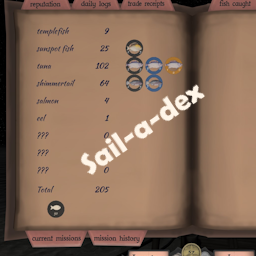
A UI showing how many fish that you caught separated by the different types.
A fish is registered as caught once you reel it in and collect it.
Badges are acquired upon catching 25, 50, and 100 of each type, 50, 250, and 500 total, and also for catching at least one of each type.
Access this log by selecting the "fish caught" bookmark in the player log.

A UI showing which ports you have visited separated by region.
A port is registered as visited once you enter the area where mission goods are normally delivered.
Badges are acquired upon visiting all ports within a region as well as visiting every port.
Access this log by selecting the "ports visited" bookmark in the log.

A UI showing various stats and transit times between regions.
Cargo mass is is the mass some of all crates, barrels, and packages.
Cargo mass stat "Record" will be recorded once you unmoor from the dock.
Underway "Record" is the longest time you are out at sea before pulling into port.
Transit time "Record" is the fastest time you made a transit.
The starting time for transits are tracked from the last island you were moored at from a region that you leave. This time will be used for when you moor at any island in other regions
(only the first time mooring at a city in another region will be recorded, i.e. You leave Gold Rock City, only the first time reaching Crab Beach will be recorded).
Happy Bay is ignored for calculating fastest transits.
If you use PassageDude mod and book travel or teleport via console that will reset your currently tracked transits.
If you have RandomEncounters installed, Flotsam encounters and Dense Fog encounters if enabled will be tracked if.
If you have the SeaLifeMod installed and controlled through RandomEncounters, the SeaLife encounters will be tracked as well.
Notifications will pop up along with a ship bell sound on badges earned and fastest transit times recorded.
Place the Sail-a-dex folder (not the contents, the whole thing) into the Sailwind/BepInEx/Plugins folder.
If upgrading from v1.0.0 delete the old Sail-a-dex.dll from the BepInEx/plugins folder first.