You are viewing a potentially older version of this package. View Latest Version
Sailwind mod that adds more save slots, save slot naming, and save slot file management.

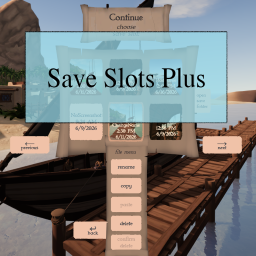
Save slots are added by adding a configurable number of more pages of slots. Instead of just having 6 slots to use, you can have 12, 18, 24... all the way up to 60. Use the previous and next buttons added to the save slot screen to change pages. If you adjust the number of pages of save slots in game using the BepInEx Configuration Manager you will need to restart the game for the changes to take effect.
When creating a new save, you can enter a name for the save. Enter the name for the save before clicking the starting region.
When you click continue and are brought to the screen to select a save slot, you can right click a slot to bring up the file menu. You will have different options available depending on if the slot you right clicked is an active save slot or not. If you have backup saves in the slot, right click the slot again to switch from the file menu back to the back saves list. The following is available in the file menu:
Rename: Clicking rename will present you with a text input for renaming a save. The save does not need to have a name to begin with to rename it. There is a max of 13 characters. The name for the save is kept in a new meta file along side your save (e.g., slot0.save will have a slot0.save.meta file). Click the confirm rename button once you are done entering in the new name for the save.
Copy: Clicking copy will select this save slot to be copied and will enable the paste button when an inactive\empty slot is right clicked.
Paste: Clicking paste will copy all of the files associated with the save slot that you selected to copy to the inactive\empty save slot where you have clicked paste.
Delete: Clicking delete will enable the confirm delete button. Then clicking on the confirm delete button will delete all of the files associated with the save slot.
If updating, remove MoreSaveSlots folders and/or MoreSaveSlots.dll files from previous installations.
Extract the downloaded zip. Inside the extracted MoreSaveSlots-<version> folder copy the MoreSaveSlots folder and paste it into the Sailwind/BepInEx/Plugins folder.