
MusicMod
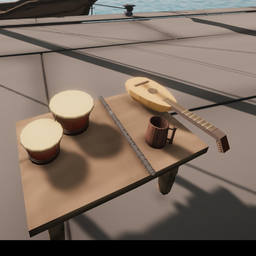
Playable instruments: lute, xiao flute, nakers, hurdy-gurdy, square piano, kalimba, shamisen and more, sold in ports all over the map. Buy them, press R to play and use the keys to play your own melodies.MusicMod
Adds playable musical instruments to Sailwind: a lute, a Chinese xiao flute, a pair of hand drums (nakers), a hurdy-gurdy, a square piano, a kalimba and a Japanese shamisen. Buy them, take them in your hand and play your own melodies.
Where to buy them
| Instrument | Where | Region |
|---|---|---|
| Lute | Siren Song (market stall) | Aestrin |
| Xiao flute | Crab Beach | Emerald Archipelago |
| Nakers | Neverdin (market stall) | Al'Ankh |
| Hurdy-gurdy | Aestra Abbey (the tavern) | Aestrin |
| Square piano | Happy Bay | Aestrin |
| Kalimba | Al'Nilem | Al'Ankh |
| Shamisen | Kicia Bay (next to the ship models table) | Fire Fish Lagoon |
The price is shown in the local currency. A new one is put on sale a couple of minutes after you buy one.
How to play
- Take the instrument in your hand.
- Press the activate key (R by default) to start playing. Press it again to stop.
- Use the note keys:
| Instrument | Keys | Notes |
|---|---|---|
| Lute | 6 7 8 9 0 Y U I | C major scale (C D E F G A B C). One note per key press. |
| Xiao flute | 6 7 8 9 0 Y U I | D major scale (D E F# G A B C# D). The note sounds while you hold the key. |
| Nakers | 6 7 8 9 | Big drum centre, big drum edge, small drum centre, small drum edge. |
| Hurdy-gurdy | 6 7 8 9 0 Y U I O P | E major scale over 10 notes (E F# G# A B C# D# E F# G#). The note sounds while you hold the key, over a constant drone, and the crank turns while you play. |
| Kalimba | 6 7 8 9 0 Y U I O P | C major scale over 10 notes (C D E F G A B C D E). One note per key press. |
| Shamisen | 6 7 8 9 0 Y U I | Japanese in scale (G Ab C Db F G Ab C). One note per key press. |
Octave shift: hold Left Shift while playing and the notes sound one octave higher; hold Left Alt and they sound one octave lower. It works with every instrument except the nakers, including the piano, so each instrument has three times as many notes. On the flute and the hurdy-gurdy you can hold a note and press Shift or Alt to jump octave without stopping. Both keys can be changed in the settings (section General - Octave), in case they clash with another mod.
Flute and hurdy-gurdy tip: to play smoothly, you don't need to release one key before pressing the next. Keep a key held and press another one: the instrument glides to the new note. Release it and it goes back to the note you are still holding.
The square piano
The piano is a piece of furniture: it is played where it stands, not in your hands.
- Place it on your deck or anywhere you like.
- Look at it and press R to start playing. Press R again to stop. The keyboard lid opens by itself.
- Look at it and press T to open or close the big lid and admire the inside.
- One full octave with sharps, laid out like a real keyboard on two rows:
| Notes | Keys |
|---|---|
| White keys (C D E F G A B C) | C V B N M , . - |
| Black keys (C# D# F# G# A#) | G H J K L |
All instruments can be left on tables and boats and are saved with your game. If you have HooksHangMore installed, the lute, the flute and the shamisen can be hung on hooks (the nakers, the hurdy-gurdy, the piano and the kalimba cannot). HooksHangMore is optional.
Installation
- With a mod manager (Gale, r2modman, Thunderstore Mod Manager): install MusicMod and you are done. BepInEx is installed automatically.
- Manually: install BepInExPack, then copy
LaudMod.dllandlaud_bundletogether into a folder insideBepInEx/plugins(for exampleBepInEx/plugins/MusicMod/). Both files must be in the same folder.
Configuration
The settings file is BepInEx/config/com.vikingdmike.musicmod.cfg (it is created the first time you start the game with the mod). There are sections for every instrument (Keys and Sound). You can change:
- The key of every note (for example
Alpha6,Y,Z,Keypad1,F5). - The volume (0 to 1).
- DroneVolume (hurdy-gurdy only): the volume of the drone, from 0 (no drone) to 1.
- Piano keys: the keys to play and to open the lid.
- Octave keys (section General - Octave): the keys to play one octave higher or lower (
Noneturns them off).
You can also change them in game with the ConfigurationManager mod (F1).
Compatibility
- The instruments use fixed slots in the game's prefab list (from 20391 to 20398). If another mod uses the same slot, that instrument will not be registered and a message is written to the BepInEx log.
- Works together with my other mods.
Uninstalling
Important: if you remove the mod, any save that contains one of these instruments will get stuck on the loading screen.
To remove the mod safely, install Save Cleaner before loading those saves. It removes the missing items when the save loads. Always keep a backup copy of your saves before installing or removing mods.
Credits
Made by Viking D. Mike. All the 3D models were made by the author.
Sounds:
- Xiao flute: from the track "Xiao Chinese Bamboo Flute on the Bridge of Avignon" by nourishedbymusic on Pixabay (Pixabay Content License), edited into single notes.
- Hurdy-gurdy: from the recordings "secondo cantino" and "primo bordone" by freesound_community on Pixabay (Pixabay Content License), edited into notes and a drone.
- Square piano: based on "acoustic piano c4 medium" and "acoustic piano c4 pianissimo" by nanliu_music on Freesound (CC BY-NC 4.0), edited into notes.
- Kalimba: based on "cedar kalimba in c" by ultradust on Freesound (CC BY-NC), edited into notes.
- Shamisen: based on the "Shamisen" SoundFont shared by Gubotom on Polyphone (public domain), tuned and edited.
- Some notes are based on VSCO 2 Community Edition by Versilian Studios (CC0).
- The lute and drum sounds were synthesized for this mod.
The piano and kalimba sounds are licensed for non-commercial use only. This mod is free and always will be.