


QuietPause
Mutes Schedule I while minimized or unfocused and pauses world sounds in the pause menu (menu clicks stay). Options in Settings > Audio. IL2CPP build.Quiet Pause
IL2CPP build for the default Steam branch. Playing on the
alternate(Mono) branch? Install QuietPause_Mono instead.

Schedule I keeps playing every sound while it is minimized and while the pause menu is open. Quiet Pause fixes both:
- Mute in background — silent while the window is minimized or another window has focus; fades back in when you return. Or keep a low background volume if you prefer.
- Mute when paused — world sounds (ambience, footsteps, vehicles, voices, weather) pause while the pause menu is open and resume exactly where they stopped. Menu clicks stay audible; music can keep playing if you like.
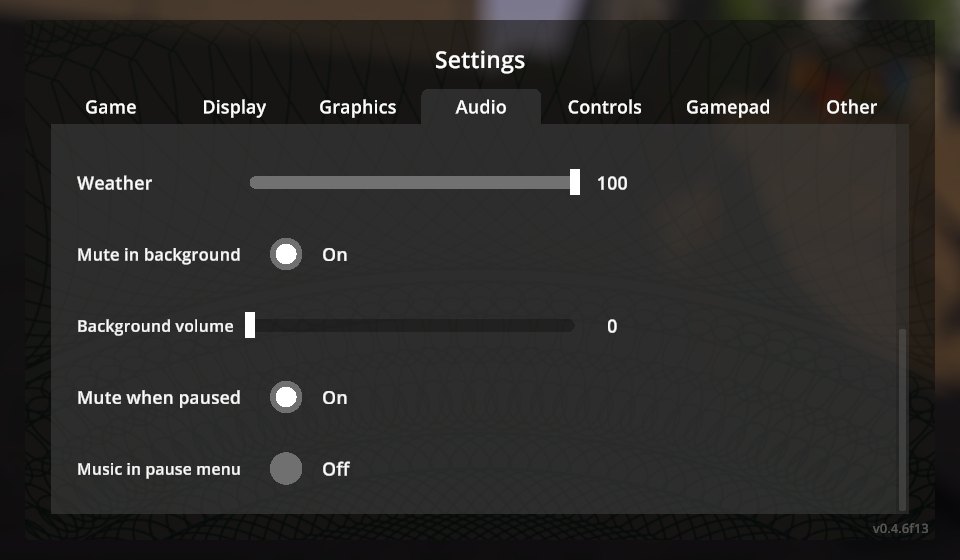
The options are added to the game's own Settings → Audio tab (main menu and pause menu), translated by Polyglot.
Installation
- Install MelonLoader 0.7.3 (0.7.1 is not supported).
- Download
QuietPause-<version>-IL2CPP.zip(default Steam branch) orQuietPause-<version>-Mono.zip(alternatebranch) from Releases. - Extract it into the game folder so that
Mods/QuietPause_Il2Cpp.dll(or_Mono.dll) is in place.
Configuration
UserData/MelonPreferences.cfg:
[QuietPause]
MuteInBackground = true   # silent while minimized / unfocused
BackgroundVolume = 0      # 0-100 % volume in the background
MuteWhenPaused = true     # pause world sounds in the pause menu
MusicWhenPaused = false   # keep the music playing in the pause menu
Changelog
See CHANGELOG.md.
Credits
Developed with AI assistance (Claude by Anthropic) and tested in game on both branches with automated in-game tests.
License
MIT.