
DrivablePolice
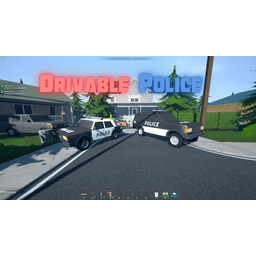
Replaces player owned SUVs & Shitboxes with the police variants.🚓 DrivablePolice
Trade your Shitbox or SUV for something with lights, sirens, and style.
🧩 Features
- ✅ Replaces all player-owned SUVs with the Police SUV
- ✅ Replaces all player-owned Shitboxes with the Police Shitbox
- ✅ Has fully operational lights & sirens controlled via keybind.
📁 How to Install
- Make sure you have Melon Loader installed for Schedule I.
- Drop the DrivablePolice.dll into your Mods folder.
📁 Schedule I
 └── 📁 Mods
      └── 📄 DrivablePolice.dll
🧪 Compatibility
- Game Version: IL2CPP (main version of Schedule I)
- Framework: Melon Loader
⚙️ Configuration
You can tweak the config to your liking through the MelonPreferences.cfg file:
-
Where to Find the Config File
The configuration settings are stored in the default MelonPreferences.cfg file in your game's UserData directory. -
Config Example (in MelonPreferences.cfg):
Valid key names: https://docs.unity3d.com/ScriptReference/KeyCode.html
[DrivablePolice]
ActivatePoliceLightKey = "P"
HoldKey = true
❓ FAQ
Q: How do I use the sirens?
A: Enter the SUV/Shitbox that you want to enable sirens on and press the keybind. If you have hold off and want to keep the lights on after exit just hold the key as your exiting the vehicle.