
BetterCounterOffer
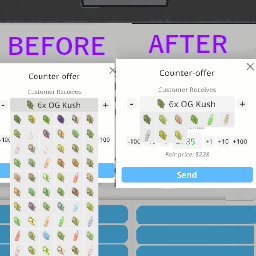
Quality of Life improvements to the Counter-offer popup. Only products that are listed get displayed when changing product. The sell price automatically updates when a different product is selected or the quantity is changed.Better Counter-Offer UI
This mod introduces a series of quality of life improvements to the Counter-offer popup, enhancing the overall user experience when dealing with trades and negotiations in the game.
Key Features
Mod works automatically after installation.
Filtered Product List
Phone only displays listed products
With this mod, only products that you have listed in the product app will be displayed when counter-offering a different product. Now you can discover as many mixes as you would like and don't have to worry about them flowing off screen or having to tediously search through all the displayed squares.
Automatic Sell Price Update
Sell Price Automatically Updates
The sell price is now automatically updated when you select a different product or adjust the quantity of the selected item. The sell price is updated based on the price you set in the product management app.
Installation
- Download and install MelonLoader
- Download this mod.
- Unzip the downloaded file and drag the .dll into the "Mods" folder in your Schedule I files.