

BepInExConfigManager
A port of BepInExConfigManager v1.3.0 by sinai, modified to work with BepInEx Bleeding Edge Version/Artifact 667. Similar in style to GTFOModding-UnityExplorer_IL2CPP-4.9.1.What is this?
The initial commit of this repo is an exact copy of the latest release (as of May 23rd, 2023) located here. The code has been modified to work with BepInEx Bleeding Edge, Version/Artifact 667. I updated the dlls to match those located here, added a simple build pipeline, and changed a few references here and there. The build output has been tested with BepInEx Bleeding Edge Version/Artifact 667, alongside a mod that makes use of it for the game Shadows of Doubt v33.19. It is not guaranteed to work outside of that context.
BepInExConfigManager
By sinai-dev.
In-game UI for managing BepInEx Configurations, for IL2CPP and Mono Unity games.
✨ Powered by UniverseLib
Releases
Download the latest IL2CPP.CoreCLR release from the Downloads page. Mono and non-Interop IL2CPP versions are not included, see the original repo for those versions.
How to use
- Put the
plugins/BepInExConfigManager.{VERSION}.dlland theUniverseLib.{VERSION}.dllfiles in yourBepInEx/plugins/folder. - Put the
patchers/BepInExConfigManager.{VERSION}.Patcher.dllfile in yourBepInEx/patchers/folder. - Start the game and press
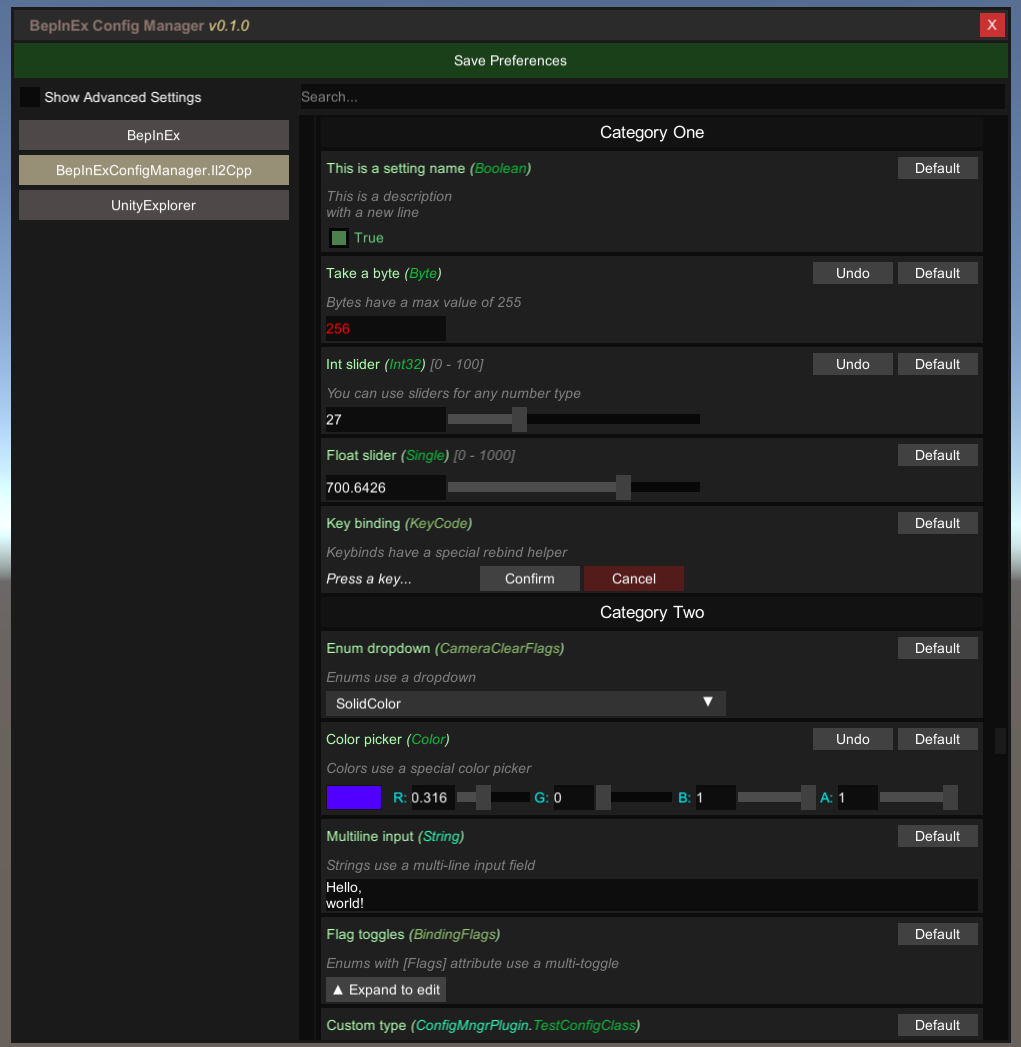
F5to open the Menu. - You can change the keybinding under the
BepInExConfigManagercategory in the Menu, or by editing the fileBepInEx/config/com.sinai.BepInExConfigManager.cfg.
Common issues and solutions
Although this tool should work out of the box for most Unity games, in some cases you may need to tweak the settings for it to work properly.
To adjust the settings, open the config file: BepInEx\config\com.sinai.bepinexconfigmanager.cfg
Try adjusting the following settings and see if it fixes your issues:
Startup_Delay_Time- increase to 5-10 seconds (or more as needed), can fix issues with the UI being destroyed or corrupted during startup.Disable_EventSystem_Override- if input is not working properly, try setting this totrue.
If these fixes do not work, please create an issue in this repo and I'll do my best to look into it.
Info for developers
Advanced (hidden) settings
This config manager supports advanced settings, defined either with the ConfigurationManagerAttributes tag or with a simple "Advanced" tag.
Simple method ("Advanced" string tag):
Config.Bind("Section", "Hidden setting", true, new ConfigDescription("my description", null, "Advanced"));
Advanced method (official attributes class):
- You will need to include the
ConfigurationManagerAttributesclass in your project as outlined here - I have not implemented any other attributes from the class, but I may at some point if there is enough demand.
Config.Bind("Section", "Advanced setting", true, new ConfigDescription("my description", null,
    new ConfigurationManagerAttributes() { IsAdvanced = true }));
Setting type support
The UI supports the following types by default:
- Toggle:
bool - Number input:
int,floatetc (any primitive number type) - String input:
string - Key binder:
UnityEngine.KeyCodeorUnityEngine.InputSystem.Key - Dropdown:
enumor any setting withAcceptableValueList - Multi-toggle:
enumwith[Flags]attribute - Color picker:
UnityEngine.Color - Struct editor:
UnityEngine.Vector3,UnityEngine.Quaternion, etc - Toml input: Anything else with a corresponding TypeConverter registered to
BepInEx.Configuration.TomlTypeConverter.
Sliders
To make a slider, use a number type and provide an AcceptableValueRange when creating the entry. For example:
Config.Bind("Section", "Int slider", 32, new ConfigDescription("You can use sliders for any number type",
        new AcceptableValueRange<int>(0, 100)));
Dropdowns
Dropdowns are used for enum types, as well as any setting with an AcceptableValueList provided.
If you use an AcceptableValueList it will override any other UI handler and force it to be a dropdown.
Config.Bind(new ConfigDefinition("Section", "Some list"), "One", new ConfigDescription("An example of a string list",
        new AcceptableValueList<string>("One", "Two", "Three", "Four", "etc...")));
Custom UI Handlers
You can override the Toml input for a Type by registering your own InteractiveValue for it. Refer to existing classes for more concrete examples.
// Define an InteractiveValue class to handle 'Something'
public class InteractiveSomething : InteractiveValue
{
    // declaring this ctor is required
    public InteractiveSomething(object value, Type fallbackType) : base(value, fallbackType) { }

    // you could also check "if type == typeof(Something)" to be more strict
    public override bool SupportsType(Type type) => typeof(Something).IsAssignableFrom(type);

    // override other methods as necessary
}

// Register your class in your BasePlugin.Load method:
public class MyMod : BepInEx.Unity.IL2CPP.BasePlugin
{
    public override void Load()
    {
        InteractiveValue.RegisterIValueType<InteractiveSomething>();
    }
}