
SessionVisibility
Switch a Stonewards lobby between Friends and Public during a game using the in-game Session menu.Stonewards Session Visibility
Switch between Friends and Public lobby visibility during a Stonewards session without restarting it. Hosts can change visibility from the in-game Session window.
✨ Features
- Live visibility switch — change the same Steam lobby between Friends and Public.
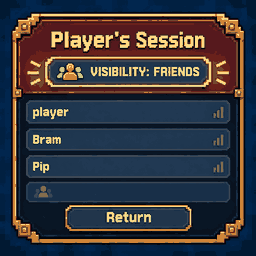
- Built into Session — a single button below the session name shows the current setting.
- Matching game UI — pixel-art styling and a larger Session window that accommodates all four player rows.
- Host-only control — only the host can change visibility.
🎮 How to use
Host a session, open Pause → Session, and click VISIBILITY: FRIENDS or VISIBILITY: PUBLIC to switch modes. The button displays the current mode.
There is no hotkey; switching is done from the Session window.
📦 Installation
Install SessionVisibility using r2modman or another compatible Thunderstore mod manager. Launch Stonewards through the modded profile. The package declares BepInExPack as a dependency.
🔧 Compatibility
- Game: Stonewards 0.2.3 (tested).
- Mod loader: BepInEx 5.
- Multiplayer: Host-only control; changes apply to the existing Steam lobby.
⚠️ Known limitations
Changing visibility does not bypass the game's join lock. If Stonewards has blocked new joins, switching the lobby to Public will not unlock it. The selectable modes are Friends and Public, not the game's internal Private/locked state.
🔗 Links
GitHub · Report an issue · Changelog
Made by thereisnouser