

DamageSparks
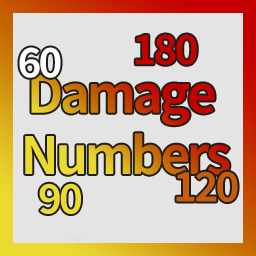
Floating damage numbers with weakpoint colors for SULFUR.Damage Sparks
Floating damage numbers for SULFUR.
Damage Sparks shows damage numbers when the player damages enemies with guns, shotguns, thrown weapons, melee weapons, or other player-driven attacks.
Weakpoint hits use colors based on the game's weakpoint multiplier. Normal damage is shown in white.
This mod does not change damage, weapon balance, enemy stats, loot, or progression. It only adds visual combat feedback.
Features
- Floating damage numbers for player-caused damage
- Supports guns, shotguns, melee weapons, thrown weapons, and player-owned attack effects
- Uses the game's calculated damage log value
- Damage over time from player-applied burning, poison and electrocution
- Weakpoint color feedback
- Normal damage is white
- Two damage display modes
- Optional vanilla renderer that uses SULFUR's own target-dummy damage text
- Configurable number spread
- SULFUR Config support with localized settings
- Does not modify actual damage calculation
Damage Display Modes
Damage Sparks has two display modes.
You can change the mode in:
BepInEx/config/ryuka.sulfur.damagenumbers.cfg
or through SULFUR Config if installed.
Per Target Total
This mode combines damage dealt to the same enemy within the same attack frame.
Shotgun example:
If one shotgun blast fires multiple pellets and 10 pellets hit the same enemy, the mod shows one damage number with the total damage dealt to that enemy.
If the same shotgun blast hits two enemies, the mod shows two damage numbers:
- one total number above the first enemy
- one total number above the second enemy
This mode is cleaner and easier to read, especially for shotguns and other multi-hit weapons.
It does not use a long delay window such as 200 ms, so it should not incorrectly merge separate hits from fast-firing weapons.
Per Hit
This mode shows one number for each actual damage hit.
Shotgun example:
If one shotgun blast has 15 pellets that actually hit enemies, the mod shows 15 damage numbers.
This mode gives more detailed feedback, but it can be visually busy with shotguns or high pellet-count weapons. Per Hit mode has extra number spread so shotgun pellet numbers do not overlap too tightly.
Renderers
Renderer decides how a damage number is drawn. The display mode, the filters and the performance
limits work the same way in every renderer.
Renderer = ScreenSpace
ScreenSpace- the default look of this mod: pooled screen-space text with a black outline.WorldTextMeshPro- the same numbers as 3D world-space text.Both- both of the above at once, mainly for testing.Vanilla- SULFUR's own damage text, the one the target dummies use.
Vanilla renderer
Renderer = Vanilla does not imitate the game's damage text. It uses the game's actual damage text
prefab, so the animation, font, fly-out direction and the critical-hit variant are exactly what you
see when you shoot a target dummy.
Renderer = Vanilla
VanillaUseDamageTypeColors = true
VanillaScale = 1.0
VanillaUseDamageTypeColors = trueuses the game's damage-type colors, like the target dummies.VanillaUseDamageTypeColors = falsekeeps this mod's weakpoint colors on the vanilla animation.VanillaScaleresizes the text.1.0is the size the target dummies use.
The game's damage text shows whole numbers only, so ShowDecimals has no effect in this renderer.
If the game does not provide the prefab, this renderer falls back to ScreenSpace and writes a
warning to the log.
Weakpoint Colors
Damage number color is based on the game's weakpoint multiplier.
- Normal damage: white
- Weakpoint / higher multiplier damage: colored
- If the multiplier cannot be detected, the number falls back to white
In Per Target Total mode, combined damage uses the highest multiplier color by default. This makes it easier to notice when a shotgun blast includes a weakpoint hit.
Configuration
Config file:
BepInEx/config/ryuka.sulfur.damagenumbers.cfg
Important options:
DamageDisplayMode = PerTargetTotal
Renderer = ScreenSpace
ScreenJitter = 26
PerHitStackScreenSpread = 12.8
MaxActiveNumbers = 160
Available renderers:
Renderer = ScreenSpace
Renderer = WorldTextMeshPro
Renderer = Both
Renderer = Vanilla
Available display modes:
DamageDisplayMode = PerTargetTotal
DamageDisplayMode = PerHit
Recommended setting for normal gameplay:
DamageDisplayMode = PerTargetTotal
Renderer = ScreenSpace
Recommended setting for detailed hit testing:
DamageDisplayMode = PerHit
PerHitStackScreenSpread = 12.8
Installation
Install with a mod manager, or manually place the DLL here:
SULFUR/BepInEx/plugins/DamageSparks/
Start the game once to generate the config file.
Requirements
- BepInEx 5.4.2305 or compatible BepInEx 5 version
- SULFUR
Compatibility
Damage Sparks reads SULFUR's final damage log value and displays it as a number.
It does not modify the game's damage calculation.
The mod should be compatible with most gameplay mods unless another mod heavily changes enemy damage logging.
If a future SULFUR update changes the internal damage log method, this mod may need an update.
Source Code
The source code for this mod is available in my GitHub repository.
It is shared for learning, reference, and transparency.
The repository only contains my original mod source code and packaging text. It does not include SULFUR game files, Unity assemblies, BepInEx binaries, paid assets, or decompiled game source.
If you are another modder, feel free to study how the mod works or use it as a reference for your own implementation.
GitHub repository:
https://github.com/ryuka-dev/Damage-Sparks
Feedback
Thunderstore does not provide a convenient feedback channel.
For bug reports or suggestions, please use NexusMods or GitHub.
v1.1.0
Added a vanilla renderer. Renderer = Vanilla draws damage numbers with SULFUR's own damage text, the same one the target dummies use, including its animation, font and damage-type colors. It reuses the game's prefab rather than imitating it, so nothing new is shipped with the mod. The renderer default is unchanged and still uses the previous look.
Also fixed damage over time from status effects the player applied, such as burning, poison and electrocution, which was never shown before. Those are the colored numbers the target dummies display. This adds numbers in every renderer, so set ShowStatusEffectDamage = false under [Filter] if you prefer the old behavior.
Fixed weakpoint coloring for damage that has no hitbox, such as status damage over time and explosions. It used the head shot color before and is now white. Weapon hits are unchanged.
v1.0.12
Reworked the damage number rendering system to improve performance and stability. Damage numbers now use pooled TextMeshPro objects instead of OnGUI, excessive overlapping numbers are automatically suppressed, renderer updates have been optimized, and the text outline and default font size have been improved. These changes significantly reduce frame-rate drops during high-damage or rapid-fire situations and may also address the reported GC stack overflow crashes.