


GridWise
A grid-based inventory sorter for SULFUR with custom zones, locked cells, container support, and 14-language localization.GridWise
A grid-based inventory sorter for SULFUR.
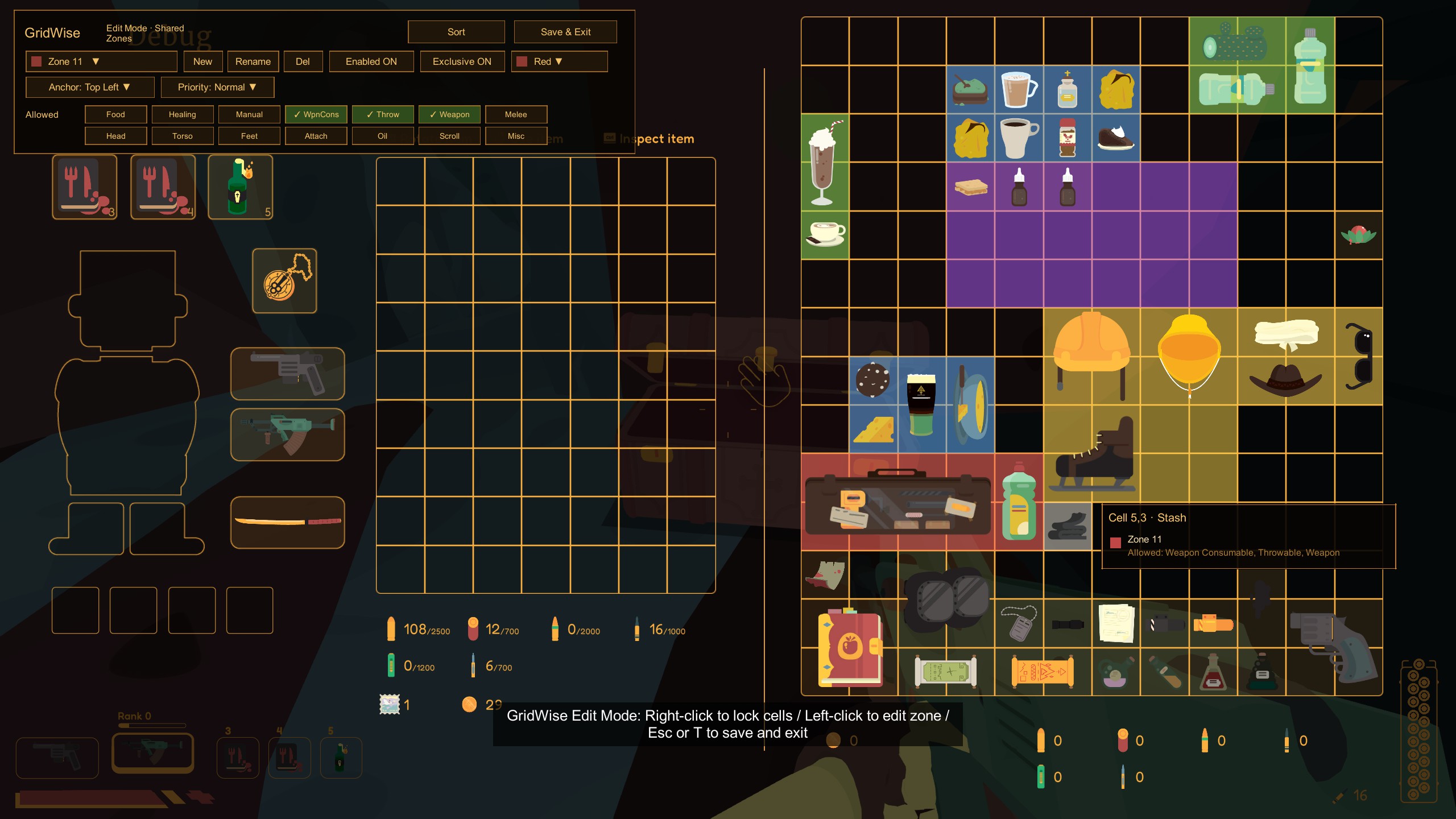
GridWise adds real inventory sorting, editable custom zones, locked cells, container support, and native-style in-game UI for inventory organization.
Features
- Real inventory sorting.
- Player backpack support.
- Stash / container support, including chests and fridge-style storage.
- Sort hotkey.
- In-game Sort button.
- Edit Mode for custom layout editing.
- Custom Zones:
- New / delete / rename zones.
- Enable or disable zones.
- Allowed item categories.
- Exclusive zones.
- Priority.
- Anchor direction.
- Zone color.
- Per-grid zone layouts:
- Zone rules are shared globally.
- Player backpack and containers save their own zone cell layouts.
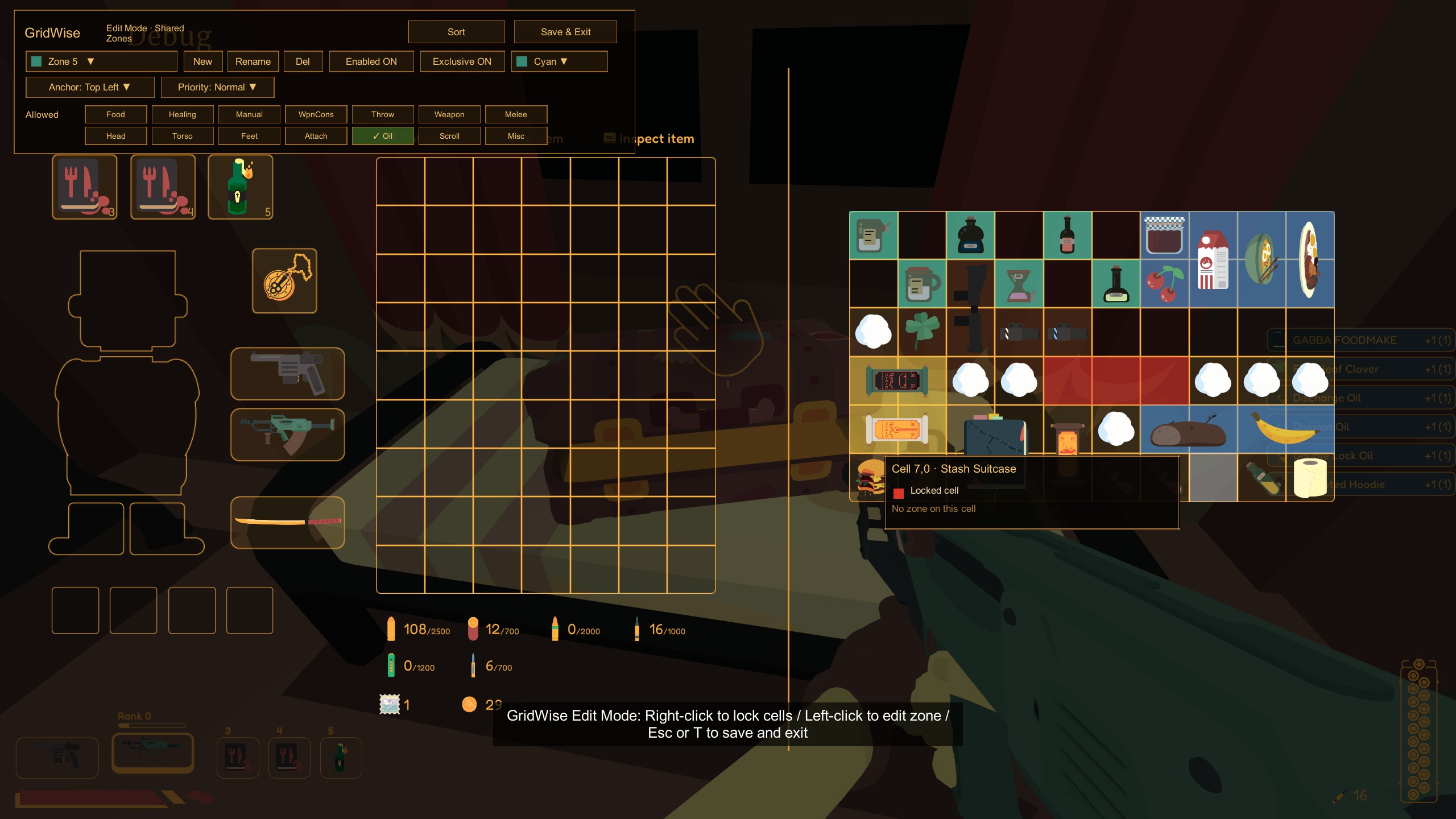
- Locked cells:
- Right-click cells in Edit Mode to lock them.
- Locked cells are saved separately for the player backpack and containers.
- Hover tooltip in Edit Mode:
- Shows cell coordinates.
- Shows locked state.
- Shows zones on the cell.
- Shows zone colors and allowed categories.
- 14-language localization:
- ar, de, en, es, fr, it, ja, ko, pl, pt, ru, sv, tr, zh-CN.
- Follows the game's language setting.
- Native-style dark and gold UI.
Default Controls
| Action | Default |
|---|---|
| Sort inventory | R |
| Enter / exit Edit Mode | T |
| Lock / unlock cell in Edit Mode | Right-click |
| Paint zone cells in Edit Mode | Left-click |
| Save and exit Edit Mode | Esc or F |
When a container is open:
- Pressing the sort hotkey sorts the side under the mouse.
- Clicking the Sort button sorts both the player backpack and the opened container.
- In Edit Mode, Sort affects all currently open grids.
Installation
Thunderstore / r2modman
Install the mod through Thunderstore Mod Manager or r2modman.
Make sure the required BepInExPack dependency is installed.
Manual Installation
- Install BepInExPack for SULFUR.
- Start the game once so BepInEx creates its folders.
- Place
GridWise.dllinto:
BepInEx/plugins/
- Start the game.
Configuration
The config file is generated after the first launch:
BepInEx/config/Ryuka.Sulfur.GridWise.cfg
Important defaults:
[Safety]
EnableRealSort = true

[Output]
ExportRealSortDebugFiles = false
ShowRealSortResultAlert = false
Generated user data files are stored under GridWise's config data location, for example:
GridWise.CustomZones.json
GridWise.ZoneLayout.json
GridWise.ZoneLayout.stash-*.json
GridWise.LockedCells.json
GridWise.LockedCells.stash-*.json
Notes
GridWise does not edit original game files.
This mod was built for the current SULFUR BepInEx modding environment. If a game update changes inventory or container internals, some features may need an update.
Source Code
The source code for this mod is available in my GitHub repository.
It is shared for learning, reference, and transparency.
The repository only contains my original mod source code and packaging text. It does not include SULFUR game files, Unity assemblies, BepInEx binaries, paid assets, or decompiled game source.
If you are another modder, feel free to study how the mod works or use it as a reference for your own implementation.