
Falkenpass
New 30-night Thronefall map: six mountain routes, eight outposts, fog of war, tower specializations and campaign checkpoints. Windows Steam single-player beta.Falkenpass
NEW MAP · NEW UPGRADES · LIVE FOG OF WAR
Hold the gates. Light the pass.
A free, unofficial Thronefall campaign across a sprawling mountain frontier.

Watch the full trailer with sound
The War Table · 28 seconds of original 3D animation, not gameplay.
Claim the frontier
Thirty nights. Two gates. A kingdom to build beyond them.
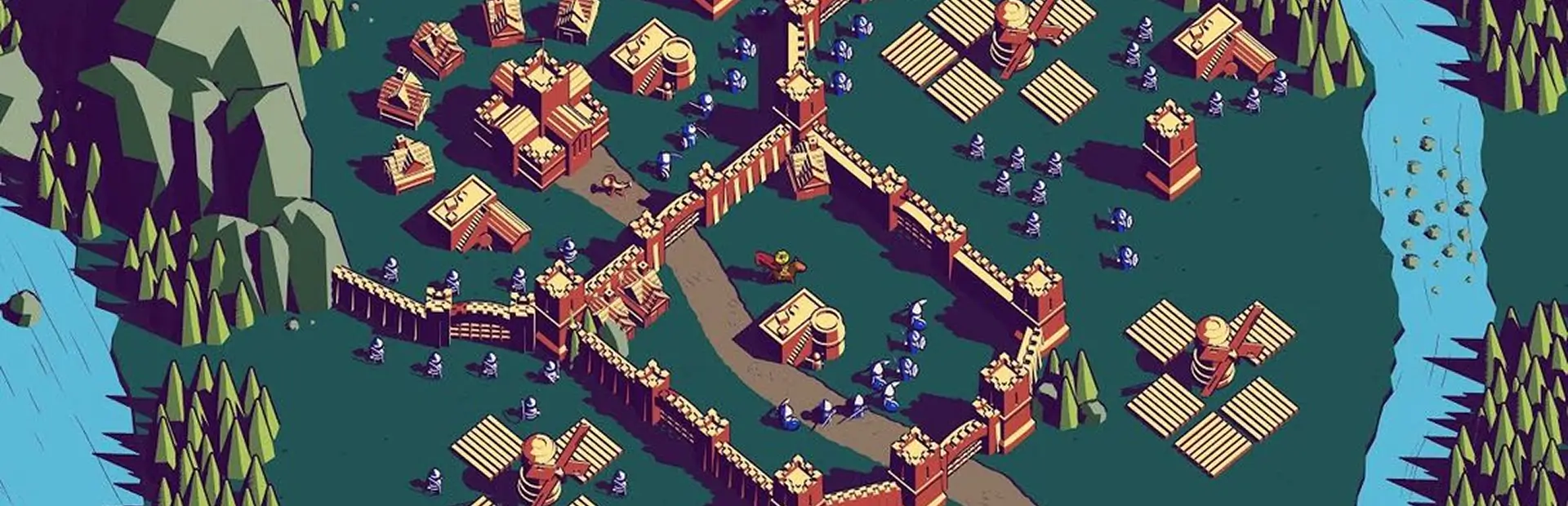
- New map. Six winding mountain approaches, eight outpost territories and 87 build sites, including 32 towers. Expand for farms, troop reserves and trading income. Forward construction pushes that branch's enemy spawn outward; the forecast follows it.
- New upgrades. Spend gold on tower specializations and masterworks. Grow your castle to open new territories, and prepare for siege columns, ridge attacks and the closing four nights.
- Live fog of war. Your ruler and living buildings reveal the terrain. Destroyed buildings lose sight; repairs restore it. Tower vision grows with attack range. Hold Left Alt to see unbuilt sites through the fog.
Install and play
Windows Steam · single-player beta. Requires your own copy of Thronefall.
Save your campaign and come back later. Daytime progress autosaves, with a checkpoint before every night. Interrupted battles restart from preparation.
- Open r2modman, choose Thronefall and create a Falkenpass profile.
- Find Falkenpass and select Download mod + dependencies to install the map and its BepInEx loader.
- Choose Start modded, then Play Falkenpass at the title screen. Pick your unlocked weapon, perks and mutations, and confirm Play.
Build your castle and plan the opening defense. Daytime lasts until you choose to start the next night.
Choose Continue – Night N to restore your campaign and loadout. New run asks before replacing it. Keep using the same manager profile: its checkpoints are local and do not sync through Steam Cloud.
Manual installation
- Close the game and back up your saves.
- Install BepInExPack Thronefall 5.4.2100 using its manual instructions.
- Place
Falkenpass.dllatBepInEx/plugins/Falkenpass/Falkenpass.dll, launch the game and choose Play Falkenpass.
If switching from a manual install to a manager profile, remove the manual DLL first to avoid loading two copies.
Compatibility, removal and troubleshooting
Tested with Thronefall Steam build 25306299, Windows x64, Unity Mono 2022.3.62f2 and BepInExPack Thronefall 5.4.2100. Mac, Linux/Steam Deck, multiplayer and combinations with other campaign, wave or perk mods are unverified.
Falkenpass awards no ordinary campaign XP and does not update Nordfels scores. Hard difficulty is the design target; final human difficulty review is still pending.
To remove it, close the game and disable/remove Falkenpass in your manager profile. For a manual install, remove its DLL. Other manually installed mods may still load through Steam.
If the menu entry is missing, check that you chose Start modded and look for Falkenpass 0.3.0 in the profile's BepInEx/LogOutput.log. Remove account and machine details before sharing logs. Include mod/game versions and reproduction steps; for gameplay reports, include the night and loadout.
Credits and license
Project by Jefferson Kline / JeffLepp. Full development credits are maintained in the source repository, which is currently private.
Runtime loading uses BepInEx and Harmony; development used Universal Modder. Thronefall is by Grizzly Games, published by Mythwright. This is an unofficial mod.
Original code is MIT licensed. Native game content loads from your owned installation; game assemblies, extracted assets, saves and decompiled source are excluded from this package. The code license does not relicense captured game visuals.