Category Button
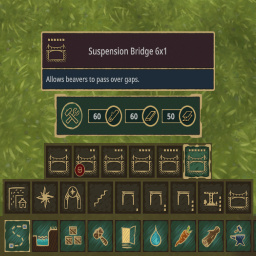
This mod adds the ability for mod makers to add buttons that have multiple buttons. Also groups the bridges in the paths menu.
Disclaimer!
This plugin is currently only supported in the experimental version of Timberborn.
How to use
You will see what it does in-game!
Modders: how to use
- Add the CategoryButton package to the the project.
- Create a new prefab that has the following components:
- Prefab (Required: Prefab Name)
- Placeable Block Object (Required: ToolGroupID, Tool Order (SHOULD BE LOWER THAN THE BUTTONS THAT ARE IN THE GROUP!))
- Labeled Prefab (Required: DisplayNameLocKey, Image)
- Block Object (Required: a blocksize of atleast 1. The BlockSpecification entries that can be anything)
- Category Button Component (Required: List with names of the prefabs of which the buttons need to be in the group)
- Add a BepInEx dependency to the plugin: [BepInDependency("tobbert.categorybutton")].
- Load the object as usually (Manifest and specification).
Installing
Recommended way to install this mod is through Thunderstore. You can install this plugin manually by cloning the repo, building it
and adding the dll to your bepinex plugins folder. This plugin is dependent on the magnificent TimberAPI.
Problems?
In case you experience problems, message me in the modding channel of the the Timberborn discord or message me directly (Tobbert#1607). I will try to fix it as soon as possible. :D
Changelog
1.0.2 14.8.2022
- Fixed a bug that closed the category window when clicking the category button twice.
- Fixed a bug that caused a crash when opening the editor.
1.0.1 13.8.2022
- Fixed a bug that prevented loading the mod.
1.0.0 - 13.8.2022