You are viewing a potentially older version of this package. View Latest Version
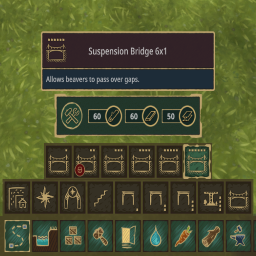
This mod adds the ability for mod makers to add buttons that have multiple buttons. Also groups the bridges in the paths menu.
The category buttons works as you think it would, it adds another layer of buttons to use. But u can also use SHIFT + MOUSE SCROLL to switch between buttons of the same group.
{
  "Name": "CategoryBridges",
  "ToolGroup": "Paths",
  "ToolOrder": 300,
  "ButtonIcon": "Bridges.png",
  "Buildings": [
    "SuspensionBridge1x1.Folktails",
    "SuspensionBridge1x1.IronTeeth",
    "SuspensionBridge2x1.Folktails",
    "SuspensionBridge2x1.IronTeeth",
    "SuspensionBridge3x1.Folktails",
    "SuspensionBridge3x1.IronTeeth",
    "SuspensionBridge4x1.Folktails",
    "SuspensionBridge4x1.IronTeeth",
    "SuspensionBridge5x1.Folktails",
    "SuspensionBridge5x1.IronTeeth",
    "SuspensionBridge6x1.Folktails",
    "SuspensionBridge6x1.IronTeeth"
  ],
  "DisplayNameLocKey": "Tobbert.CategoryBridges.DisplayName"
}
Recommended way to install this mod is through Thunderstore. You can install this plugin manually by cloning the repo, building it and adding the dll to your bepinex plugins folder. This plugin is dependent on the magnificent TimberAPI.
In case you experience problems, message me in the modding channel of the the Timberborn discord or message me directly (Tobbert#1607). I will try to fix it as soon as possible. :D