

ULTRASTATS
Stat tracking, stat viewing, performance analysis, and run logging for ULTRAKILL. (UPDATE ID: FEATHER)ULTRAKILL doesn't track run stats, this fix.
ULTRASTATS
ULTRASTATS is an all-in-one stat tracking, performance analysis, and data collection mod for ULTRAKILL.
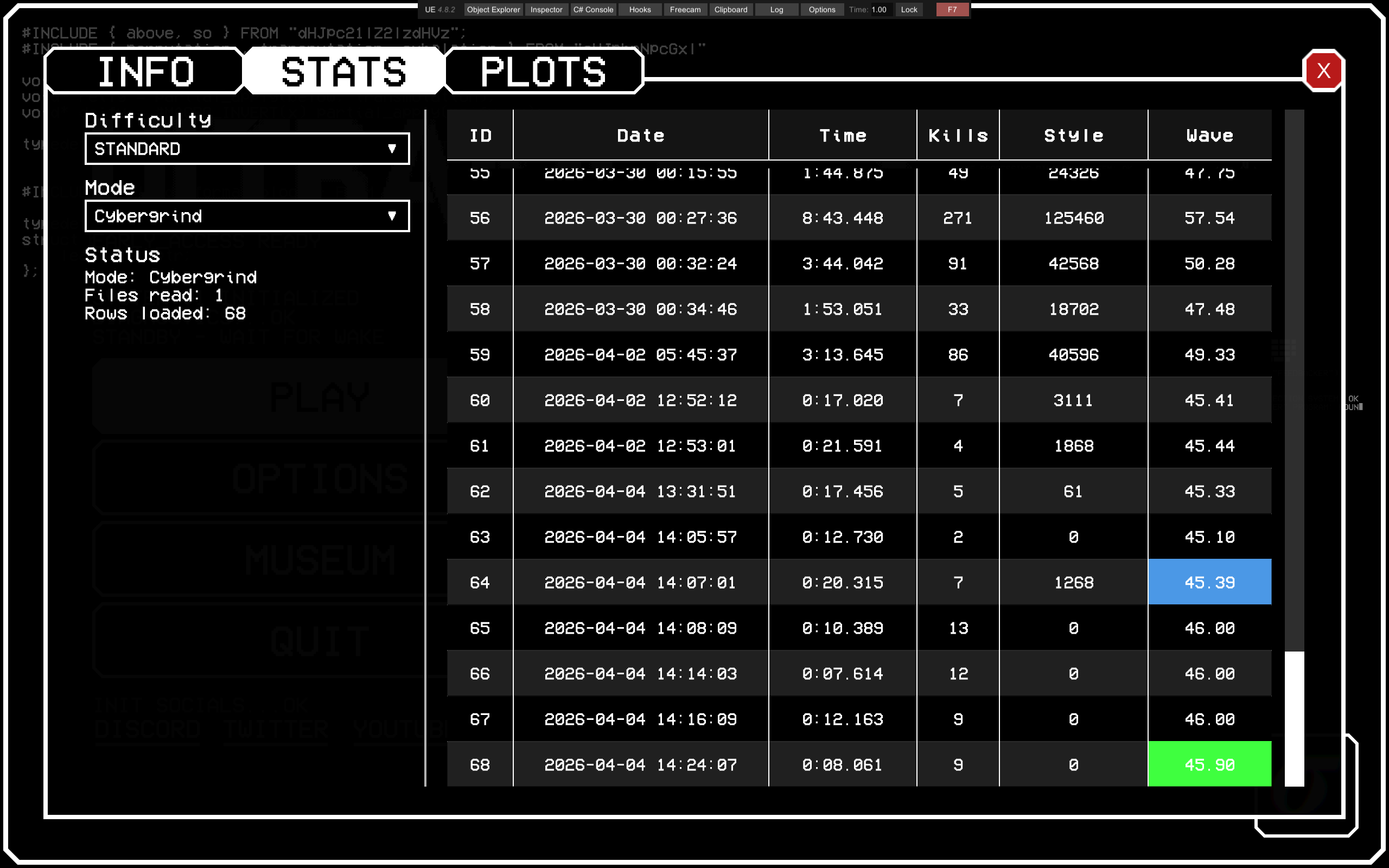
Whether you speedrun, high round Cybergrind, play custom levels, or just want a better record of how you play, ULTRASTATS saves your run data and allows you to browse it in-game.
ULTRASTATS currently supports:
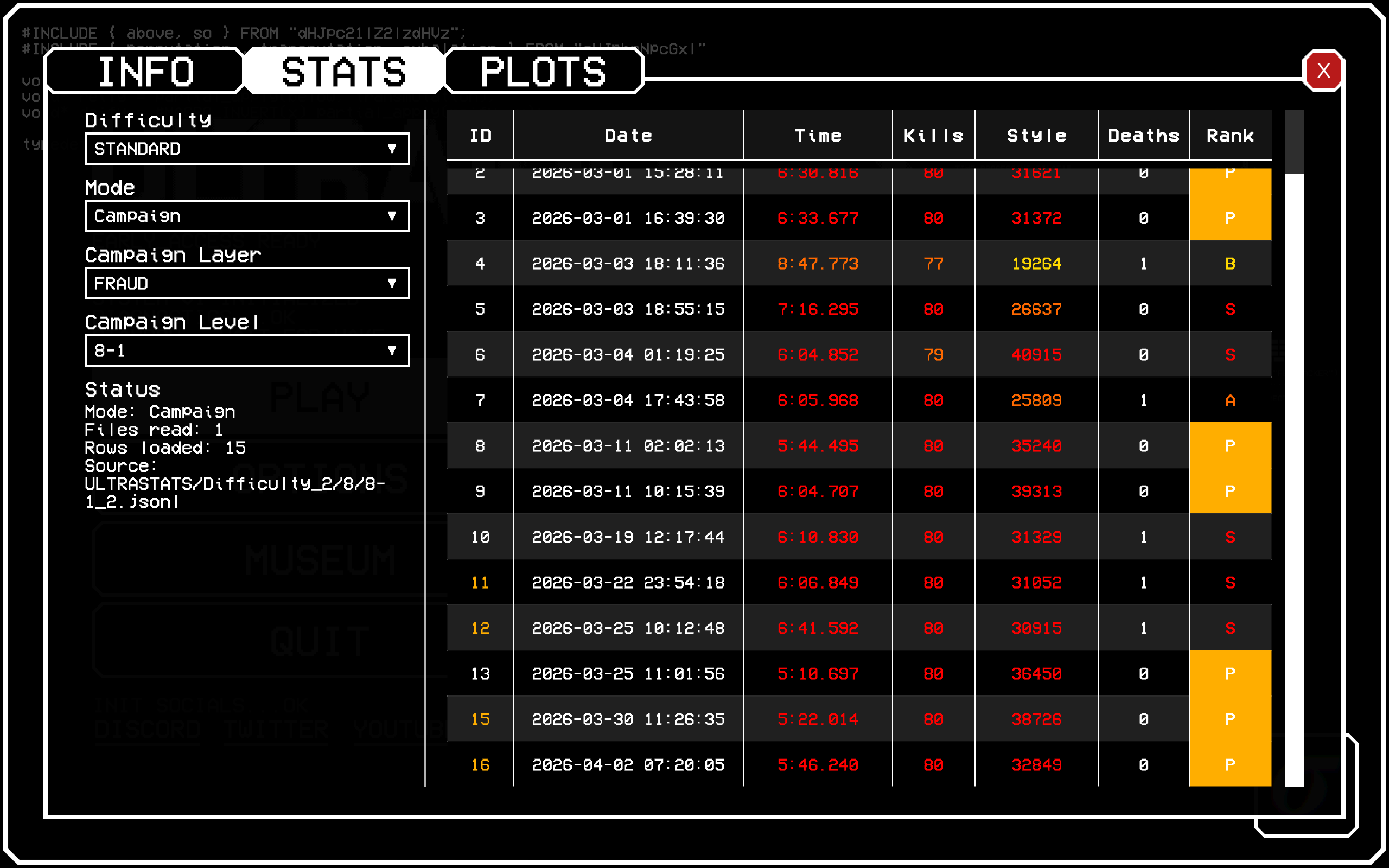
- Campaign run logging
- Cybergrind run logging
- Custom level run logging through Angry Level Loader
- A SQLite backed database for faster filtering, sorting, migration, and future analysis
- An in-game main menu UI with INFO, STATS, and PLOTS tabs
- A STATS tab for browsing saved runs without opening the raw database
- A FILTERS window for narrowing down the displayed runs
- An ANALYSIS window for averages, best values, standard deviations, and other useful summaries
- PluginConfigurator options for data storage, logging preferences, menu behavior, UI defaults, and startup notices
Current Version
This plugin is currently on v0.1.2.
v0.1.0 is the first SQLite based release of ULTRASTATS. Older versions stored runs in many .jsonl files spread across difficulty, mode, campaign, and custom-level folders. New versions store runs in one database file:
ultrastats.db
Old .jsonl data can be migrated automatically. See Updating From Older Versions before deleting any old ULTRASTATS files.
Screenshots
These are from v0.0.15, the layout may be slightly different now.
Cybergrind stats:
Campaign stats:
Custom level stats:
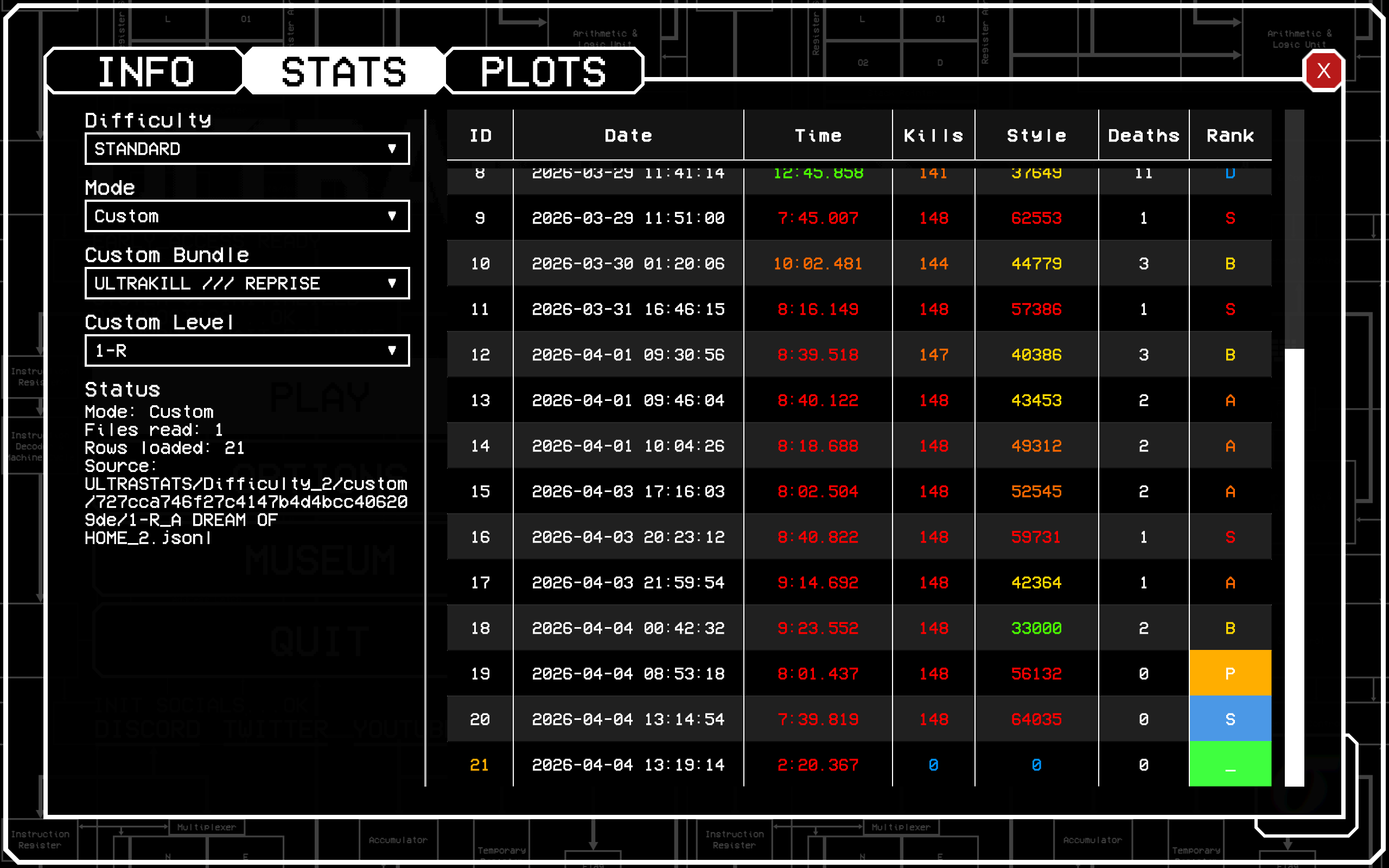
The exact columns shown depend on the selected mode and filters. ULTRASTATS converts stored values into readable dates, times, waves, ranks, flags, level names, and difficulty names whenever possible.
Features
Run logging
- Saves Campaign, Cybergrind, and Custom level runs
- Stores all new run data in a SQLite database
- Uses a queue/save flow designed to reduce endscreen overhead
- Uses backup data from the game's stats display when FinalRank endscreen data is unusable
- Supports custom difficulties instead of clamping difficulty values to only the base game range
- Lets you enable or disable Campaign, Cybergrind, and Custom logging independently
- Can optionally let you discard a pending endscreen run with a configurable key
In-game UI
- Adds a main menu button that opens the ULTRASTATS UI
- Includes INFO, STATS, and PLOTS tabs
- Lets you choose which tab opens by default
- Lets you choose the main menu button corner
- Lets you choose the default STATS difficulty
- Lets you browse runs by mode, difficulty, save slot, layer, bundle, and level
- Includes a separate FILTERS window for more detailed filtering
- Includes a separate ANALYSIS window for summaries of the currently displayed runs
- Uses rank/flag coloring to make special runs easier to notice
- Avoids showing the user's full OS username in displayed source paths
Data and analysis
- Stores runs in
ultrastats.db - Automatically creates the database when needed
- Can migrate older
.jsonldata into SQLite - Keeps old
.jsonlfiles after migration instead of deleting them automatically - Stores campaign/custom ranks in a compact encoded format
- Stores run flags as bit flags instead of many separate boolean columns
- Removes redundant points earned logging because points can be derived from other saved values
- Keeps custom level support optional so ULTRASTATS still works without Angry Level Loader
Requirements
Required:
- BepInEx
- PluginConfigurator
Optional:
- Angry Level Loader for custom level support
If Angry Level Loader is not installed, ULTRASTATS still works for Campaign and Cybergrind. Custom level logging is simply unavailable.
Installation
If you already have a working ULTRAKILL mod setup, install ULTRASTATS like any other BepInEx plugin.
Quick install
-
Install BepInEx for ULTRAKILL.
-
Install PluginConfigurator.
-
Drop the ULTRASTATS plugin files into:
ULTRAKILL\BepInEx\plugins\ -
Launch ULTRAKILL.
-
Confirm the mod loaded by checking the BepInEx console or log.
Optional custom level support
To enable custom level logging, also install:
- Angry Level Loader
Updating From Older Versions
v0.1.0 changes the storage backend from .jsonl files to SQLite.
What changed?
Older ULTRASTATS versions saved runs in a folder structure with separate files for different difficulties, modes, campaign levels, and custom levels. v0.1.0 stores new runs in one database file named:
ultrastats.db
This makes filtering and sorting much faster and makes future analysis features easier to build.
Automatic migration
When ULTRASTATS starts:
- If
ultrastats.dbalready exists, ULTRASTATS uses it. - If no
ultrastats.dbexists but the old.jsonlfile structure exists, ULTRASTATS will create a new database and import the old runs. - Imported runs are assigned database IDs based on chronological order.
- Old
.jsonlfiles are not deleted automatically.
Do not delete your old ULTRASTATS folders until you have launched the game, opened the STATS tab, and confirmed that your old runs appear correctly.
If both old files and ultrastats.db exist
If ULTRASTATS detects both the new database and the old file structure, it may show a startup notice explaining the storage change. This notice can be disabled in PluginConfigurator.
What ULTRASTATS Does In-Game
ULTRASTATS adds a main menu button that opens its UI.
The UI contains:
- INFO: project information, notes, and contact info
- STATS: an in-game browser for saved ULTRASTATS runs
- PLOTS: a placeholder tab for future graphs and visualizations
The STATS tab can:
- Browse saved runs by difficulty and mode
- Display readable names for campaign layers, custom bundles, and custom levels
- Convert stored timestamps into readable dates
- Convert stored milliseconds into readable time values
- Convert Cybergrind wave data into readable wave values
- Show rank colored time, kill, style, and total rank values
- Show flags for special run conditions such as assists or cheats
- Open filters and analysis tools without manually editing the database
Data Folder
By default, ULTRASTATS stores data in:
%AppData%\AtomSmasher1586\ULTRASTATS
You can change the parent folder through PluginConfigurator. ULTRASTATS will still create and use its own ULTRASTATS folder inside the selected location.
The most important file in the data folder is:
ultrastats.db
This is the SQLite database that contains your saved run data.
Reading and Editing Data Manually
Because v0.1.0 moved from .jsonl files to SQLite, new ULTRASTATS data can no longer be comfortably viewed or edited in a normal text editor.
To inspect or edit the database manually, use a SQLite database viewer such as:
Be careful when editing the database directly. It is very easy to delete or change data you did not mean to change. Make a backup of ultrastats.db before manual edits.
For information on how to read the database's values, please open the SQL schema and read the comments next to the variable.
Database overview
The database is intentionally small and practical:
runsstores the actual saved run records.levelsstores campaign, Cybergrind, and custom level metadata.bundlesstores custom level bundle metadata when available.
Flags are stored as bit flags inside an integer. This is more compact and flexible than adding a new database column for every possible flag.
Ranks are also stored in an encoded integer format. Instead of saving rank letters as strings, ULTRASTATS stores compact numeric rank values that can be decoded into time rank, kills rank, style rank, and total rank.
Notes About Custom Levels
Custom level logging is designed around Angry Level Loader.
When Angry Level Loader data is available, ULTRASTATS tries to resolve readable custom bundle and level names for the STATS tab. When that metadata is missing, ULTRASTATS falls back to stable IDs or file derived names where possible.
Custom level support is optional. Missing Angry Level Loader metadata should not prevent Campaign or Cybergrind logging from working.
Compatibility Notes
ULTRASTATS is designed to be friendly to other mods where possible:
- Custom difficulty values are allowed.
- Save file values are allowed.
- Campaign, Cybergrind, and Custom Level logging can be toggled separately.
- Angry Level Loader is optional.
- FentoKill and BillionNemesis have their own flags for their campaigns.
Because ULTRAKILL modding changes often, make sure ULTRASTATS, BepInEx, PluginConfigurator, and optional dependencies are up to date.
Planned Direction
ULTRASTATS is still in active development.
The long term direction includes better analysis and visualization tools, especially in the PLOTS tab. That tab is intended to eventually hold things like:
- Run history plots
- Performance trends
- Weapon usage breakdowns
- Comparison charts
- More detailed Cybergrind analysis
- More detailed custom level analysis
- Other useful visualizations
Feedback
If you use ULTRASTATS, feedback helps a lot.
Please reach out if you:
- use the mod regularly
- speedrun
- play Cybergrind a lot
- play casually and want better stats
- found a bug
- have feature suggestions
Discord: atomsmasher_1586
TLDR
ULTRASTATS is meant to be a practical stats backbone for ULTRAKILL:
- Save your runs
- Organize them cleanly
- Browse them in-game
- Filter them quickly
- Analyze them more easily
- Make future graphs and deeper analysis possible
If you care about understanding your gameplay, improving at ULTRAKILL, or just want to see what your Cybergrind score was last week, this mod is for you.
Special Thanks:
For catching bugs and pointing out flaws in ULTRASTATS that I missed:
- somebilly
- spatialparanoia
- 5225225
For allowing me to use his icons:
- lambcg