Blue Chainsaw
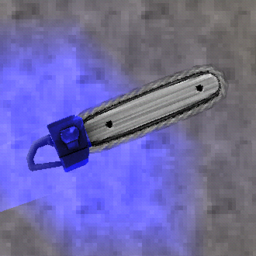
Makes the chainsaw, its projectile, trail, and glow blue.Blue Chainsaw
Makes the sawed-on shotgun's chainsaw blue. Also affects the projectile and its trail and glow. The parry flash is still red because I don't know how to change that. That's all there is to it.
I made this so the chainsaw fits better with CintraSkins' BuildTankTank impact hammer skin without having to change the variant color. Changing variant color also only changes the color of the attached shotgun, not the projectile and its trail + glow. You don't need that skin for this mod though.
How to use:
- Install this mod manually or with a mod manager. Install its dependencies, ULTRASKINS-GC and USGCColorOverride, if you do not have them already. r2modman does this automatically.
- Click the "US" button on the main menu.
- Find "Blue Chainsaw" in the list and click it. (The box will be filled with an X if it's enabled). Click "Apply".
If your chainsaw is not blue after enabling this pack, move it to the top of the list in the ULTRASKINS menu.
If Blue Chainsaw does not appear in the list, click the plus button at the bottom of the list. Click "Add undetected ThunderStore skin", find this mod, and click it. If it doesn't appear in that list either, follow the steps below but copy the T_Chainsaw_Pallete file from the folder for this mod instead.
BuildTankTank impact hammer:
Here's the link to that skin pack: https://thunderstore.io/c/ultrakill/p/CintraSkins/BuildTankTank_Impact_Hammer_Skin/
For whatever reason, ULTRASKINS-GC does not detect the BuildTankTank impact hammer skin pack for me, even in the "Add undetected Thunderstore skin" menu. If you have the same issue, here's how you can get those textures working:
- Click the plus button at the bottom of the list of skins in the ULTRASKINS menu.
- Click "create from scratch". Name, description, author, version, and icon can all be whatever.
- Click "open folder".
- Open another file explorer window and navigate to your BepinEX folder for ULTRAKILL, then the plugins folder inside of it. If using r2modman, click "settings" and "browse data folder". ULTRAKILL > profiles > (whichever profile you're using this mod on) > BepInEx > plugins
- Open the folder for the BuildTankTank impact hammer skin.
- Copy all five T_Dial files and all three T_ImpactHammer files. Paste them into the folder for the skin pack you created.
- Open the ULTRASKINS menu, turn on your skin pack, and click apply. Now your impact hammer will have the custom textures.
If the custom impact hammer texture does not show up, move the pack you made to the top of the list.
Contact:
henrijrd on discord, [email protected]