
You are viewing a potentially older version of this package. View Latest Version

Unified client-side V Rising UI mod that surfaces every chat command of the Bloodcraft server mod — with first-class support for KindredCommands and KindredLogistics on the same server.
1 — Eclipse mod incompatibility (known issue, working on it).
BloodCraftHub is built around the same MAC-signed protocol Eclipse uses, and having BOTH BloodCraftHub and Eclipse installed simultaneously currently hard-crashes the V Rising client before world entry. The crash originates inside Eclipse's CanvasService UI bring-up and is harmless in Eclipse-only setups — it only manifests when BCH is loaded alongside. Workaround: disable Eclipse in your mod manager while you use BloodCraftHub. A fix has been forwarded to Eclipse's author; this notice will go away once that lands.
2 — Pre-1.0 testing. v0.x is still public-beta. The major feature set is in place and the mod has been daily-driven on a live PvE server for months, but APIs and UI may still shift before 1.0. If you spot a bug, please reach out on the The Shadow Realm Discord — that's the fastest way to get a fix in the next release. GitHub issues also work for written-up reports.
3 — Controller / gamepad input (under investigation). There are known interaction edge cases when V Rising's controller input pipeline intersects with the BCH UI — for example, after using a teleport waypoint the controller's A button can re-open the BCH main panel because Unity's UI navigation system retains focus on the floating BCH button. v0.15.0 ships a first-pass fix that excludes the floating BCH / OV buttons from gamepad UI navigation, but more thorough controller testing is in progress. If you play with a controller and hit something unexpected — UI opening / closing on the wrong button, focus getting stuck, hotkeys not firing under controller input, etc. — please report it on the Discord with as much repro detail as you can. We're actively working on coverage here.
4 — Server-side Bloodcraft compatibility (read this if BCH looks empty). The live HUD overlays + tab readouts in BCH are driven by Bloodcraft's signed broadcast protocol, which the Bloodcraft server-side mod only emits when at least one of these systems is enabled on the server:
LevelingSystem — XP / levels / classLegacySystem — blood legacyExpertiseSystem — weapon expertiseClassSystem — Bloodcraft classesFamiliarSystem — familiarsA server that runs only QuestSystem or ProfessionSystem (with all five above disabled) will not engage the protocol at all, and BCH will mark the BLOODCRAFT tab group as unavailable. In that situation, click the BLOODCRAFT header in the left rail — BCH shows an in-panel diagnostic with a one-click "Force-enable tabs" button. After force-enabling, the chat-regex pipeline still works (.fam boxes, .quest p, .bl get, .wep get, etc.) and replies surface in the Last server response panel, but live HUD overlays will remain empty because the server isn't broadcasting.
If you want full BCH functionality on a Quests-only / Professions-only server, ask the admin to enable at least one of the five systems above. The Eclipsed Bloodcraft config value is a separate broadcast-frequency knob (true = 0.1 s updates, false = 2.5 s updates) — both values work, but Eclipsed=true gives the smoothest experience on modern Bloodcraft. On older Bloodcraft builds, Eclipsed=false may suppress broadcasts entirely; if your server is stuck on an older release, set it to true.
Repo: https://github.com/KDavidP1987/BloodCraftHub
Status: v0.15.1 (hotfix on top of v0.15.0 — fixed a hotkey double-toggle and added a "Quests disabled on this server" detection). Pre-1.0 public beta — actively developed; APIs and UI may still shift before 1.0. 24 tabs across BLOODCRAFT / KINDRED / SETTINGS-AND-HELP, 7 secondary overlays (including the combined info overlay), every chat command from the 3 backing server mods surfaced as forms + buttons (~250+ commands). v0.12.x added a two-zone panel color theme + Game Guide tab + Bloodcraft handshake retry; v0.13.x added per-profession overlay toggles, a comprehensive Mod Help reference, and inline class-synergy hint cards; v0.14.0 shipped the combined info overlay. v0.15.0 is a UX-polish + reliability release: an in-rail diagnostic panel that explains a failed Bloodcraft handshake (and offers a one-click "Force-enable" override so users on partial servers can still drive the chat-regex pipeline); a per-feature availability tracker (infrastructure for v0.16's chat-regex probes); a tab-strip ScrollRect + minHeight clamp so the Bloodcraft Admin button never hides behind the Kindred header; toggle/checkbox borders that are now genuinely visible on every monitor (anchored-stretch Frame + opaque ColorBlock); a "Reset familiar" relabel to clarify it's non-destructive; a familiar-browser min-height drop (440 → 220) so users with large text settings can fit it into small monitor corners; a first-pass controller-A-press regression fix on the floating BCH/OV buttons (controller testing is ongoing — see the controller heads-up at the top of this README); opt-in keyboard hotkeys for the floating-button actions (bind via Settings → Display → Hotkeys); a three-state diagnostic logging mode (Off / Session / Always); and a main-panel save-data fix that prevents a stale IsPinned=True from locking the panel against drag/resize.
All captures below are from v0.13.0 — every UI piece shown still applies in v0.15.0. v0.15.0's UX polish (in-rail Bloodcraft handshake diagnostic, brighter toggle borders, opt-in hotkeys, three-state diagnostic logging) is largely invisible until triggered; the screenshots below still represent the day-to-day look of the panel.
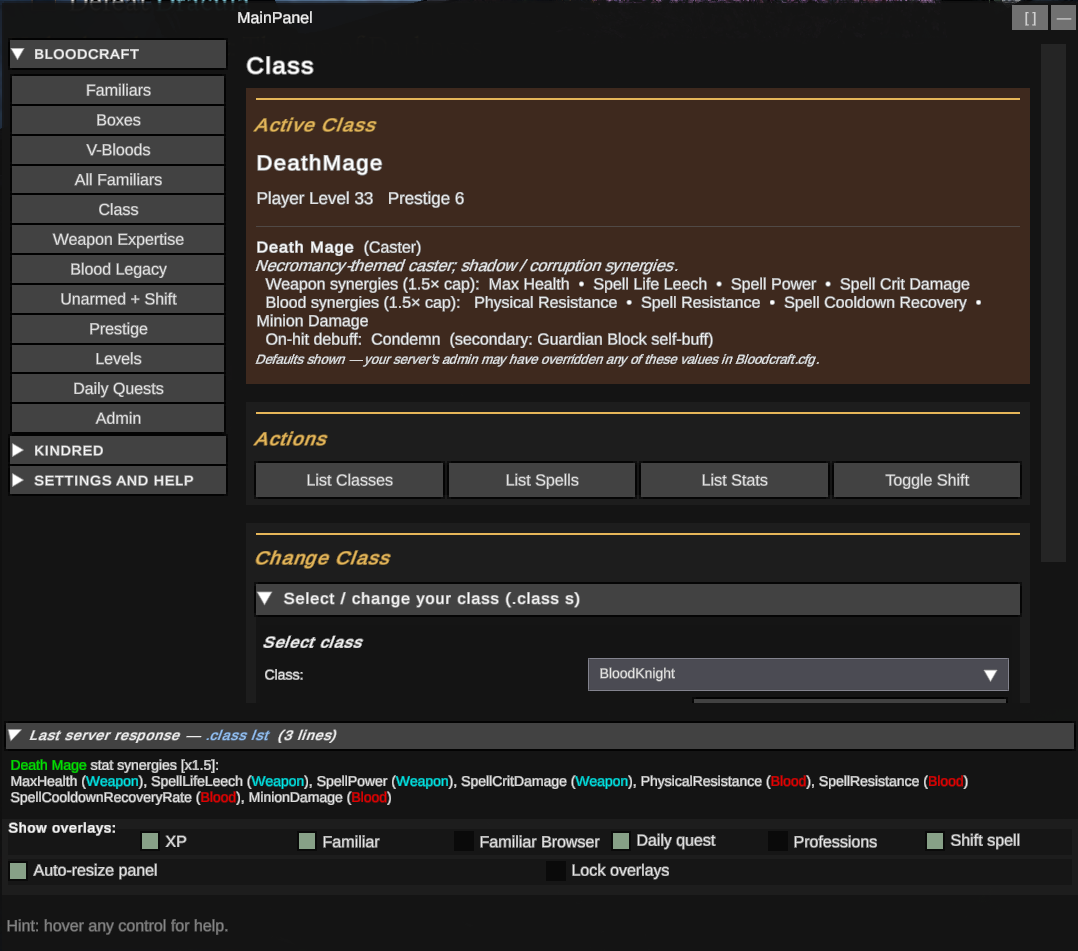 Class tab — Active Class card now includes the live class-details block (Death Mage shown here, with archetype + tagline + weapon/blood synergies + on-hit debuff). The Last server response strip at the bottom shows the same data the Bloodcraft
 .class lst reply carries, with stat synergies color-coded by Weapon / Blood. Settings → Display → Combined overlay carries the same data into the combined HUD overlay's Weapon and Blood sections.
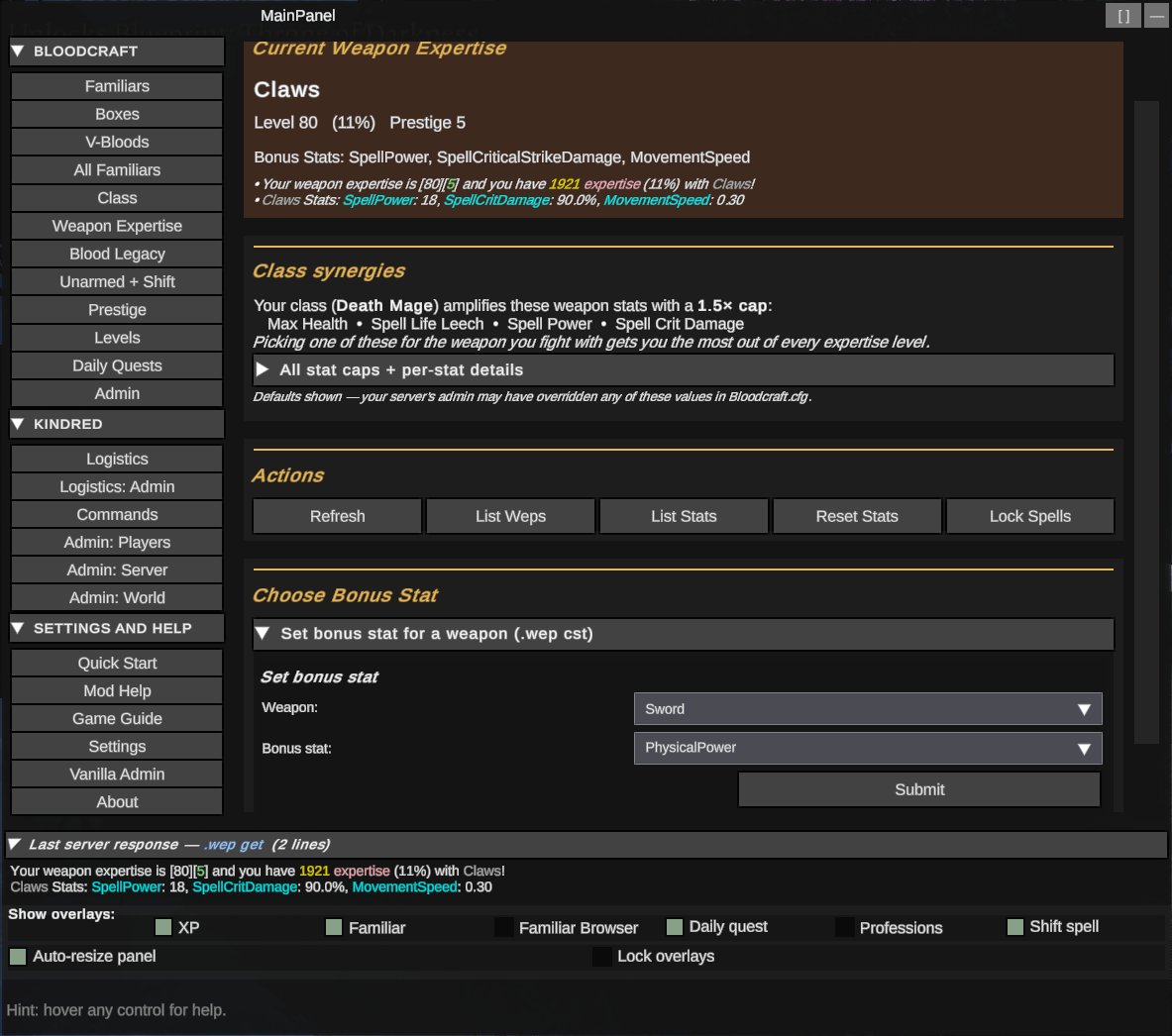 Weapon Expertise — Current Weapon Expertise card (level + chosen bonus-stat names + live numeric values), the v0.13 Class synergies card explaining which weapon stats your current class amplifies with a 1.5× cap, and the
 Set bonus stat for a weapon form. The collapsible reference below lists every baseline stat cap (Physical Power +20, Spell Power +10, etc.).
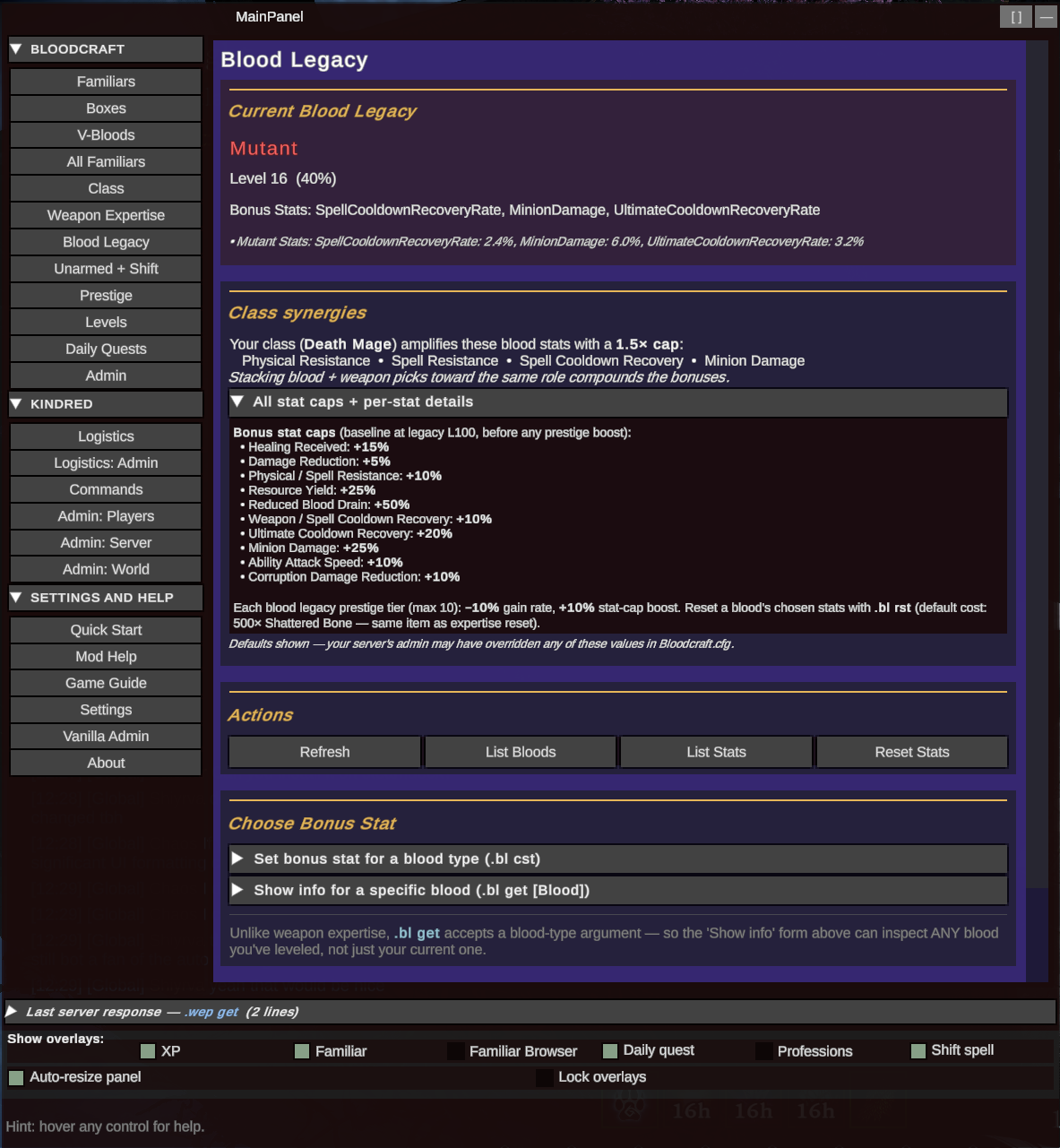 Blood Legacy — mirror treatment for the blood side. Current legacy state, class synergies card (which blood stats your class amplifies), action row, and the
 .bl cst set-bonus-stat form. Bottom collapsible has the full baseline-cap reference for every blood stat.
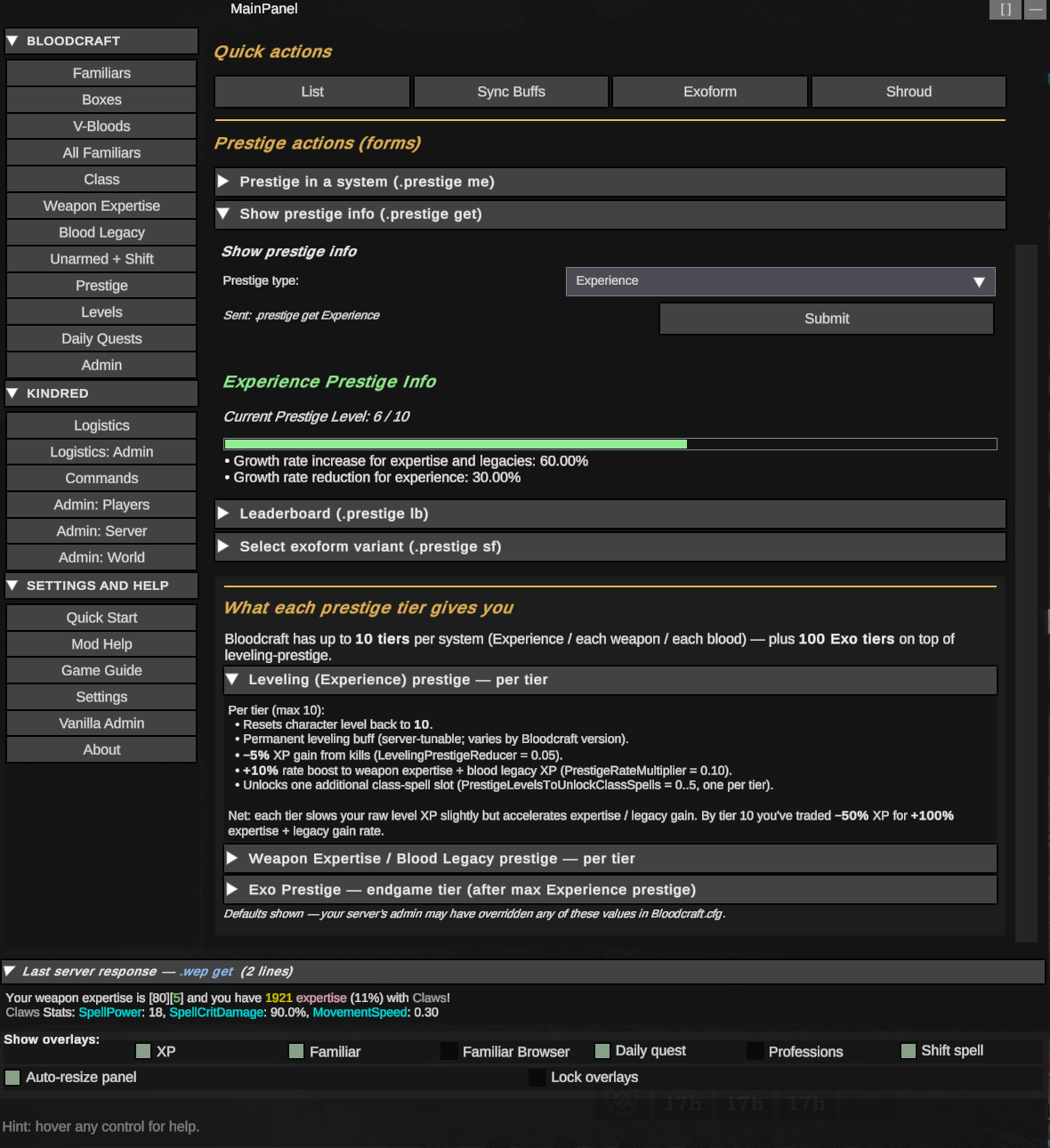 Prestige — current prestige rows for each system (XP / Blood Legacy / Weapon Expertise / Familiar), the Prestige info display with current-tier breakdown, plus the "What each prestige tier gives you" reference card so you can see what every additional tier of leveling / weapon / blood / Exo prestige actually grants.
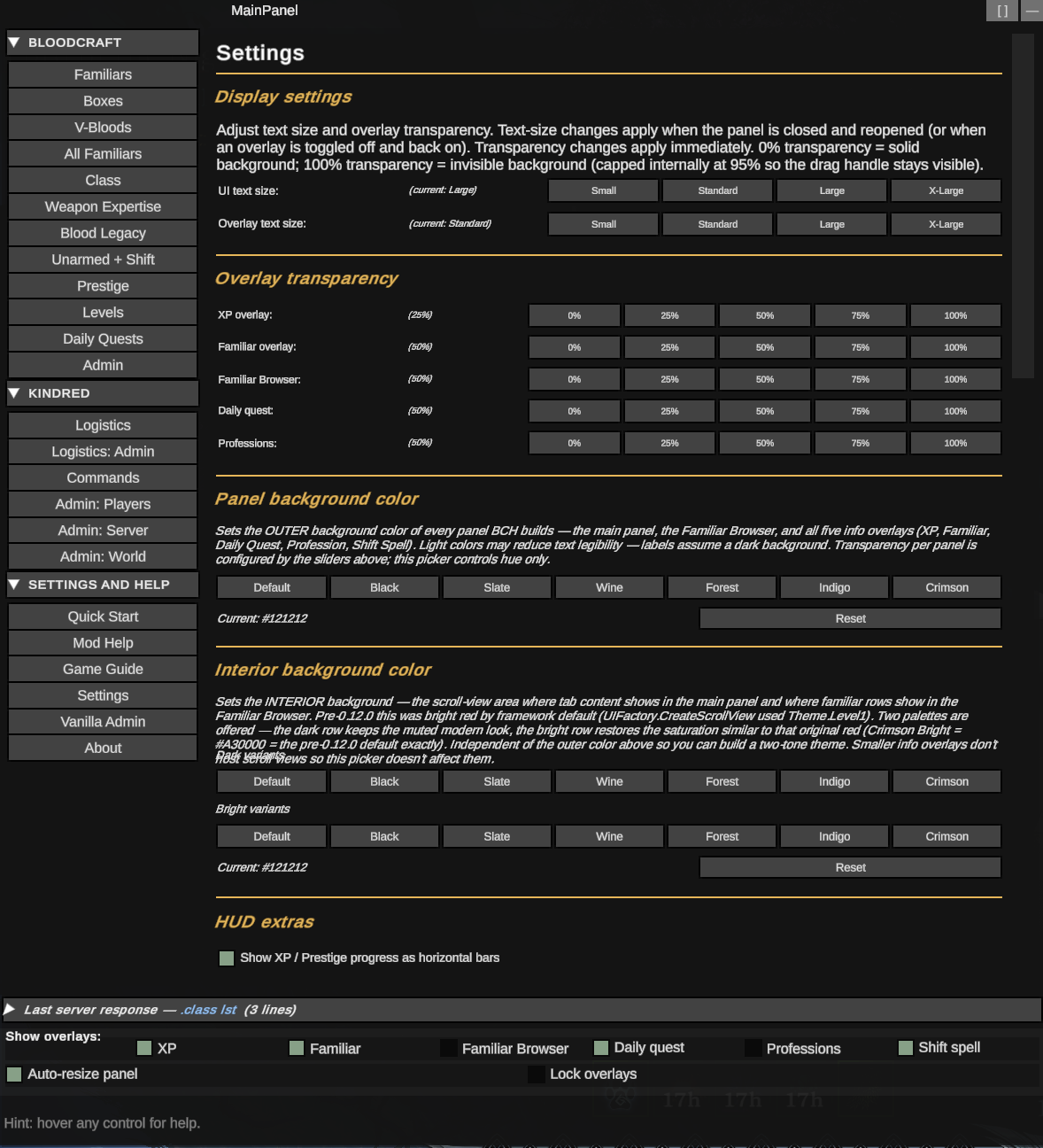 Settings & Help → Settings — the v0.12 two-zone panel color theme (outer chrome + interior scroll surfaces, with seven dark + seven bright presets for the interior), per-overlay transparency sliders, panel-background color, and HUD extras toggles. v0.13.0's gold-band section markers make long Settings / Mod Help pages scannable.
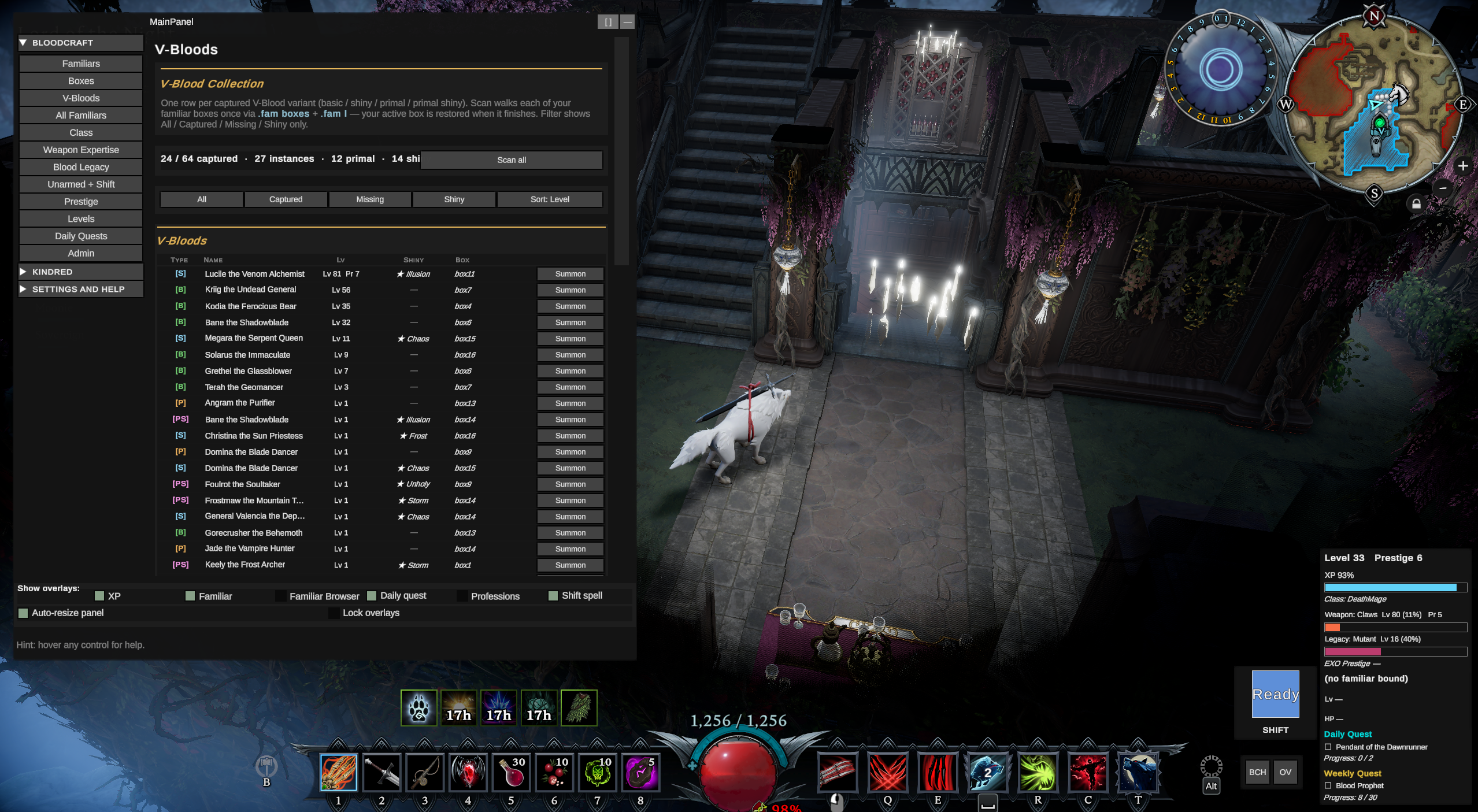 Main panel open in-world to the V-Bloods collection tab, with the bound-familiar indicator at the right of the screen and the floating BCH button strip at the top-right. The footer overlay-toggle row (visible at the bottom of the main panel) is where the v0.14 Combined toggle lives, sitting alongside XP / Familiar / Familiar Browser / Daily Quest / Professions / Shift Spell.
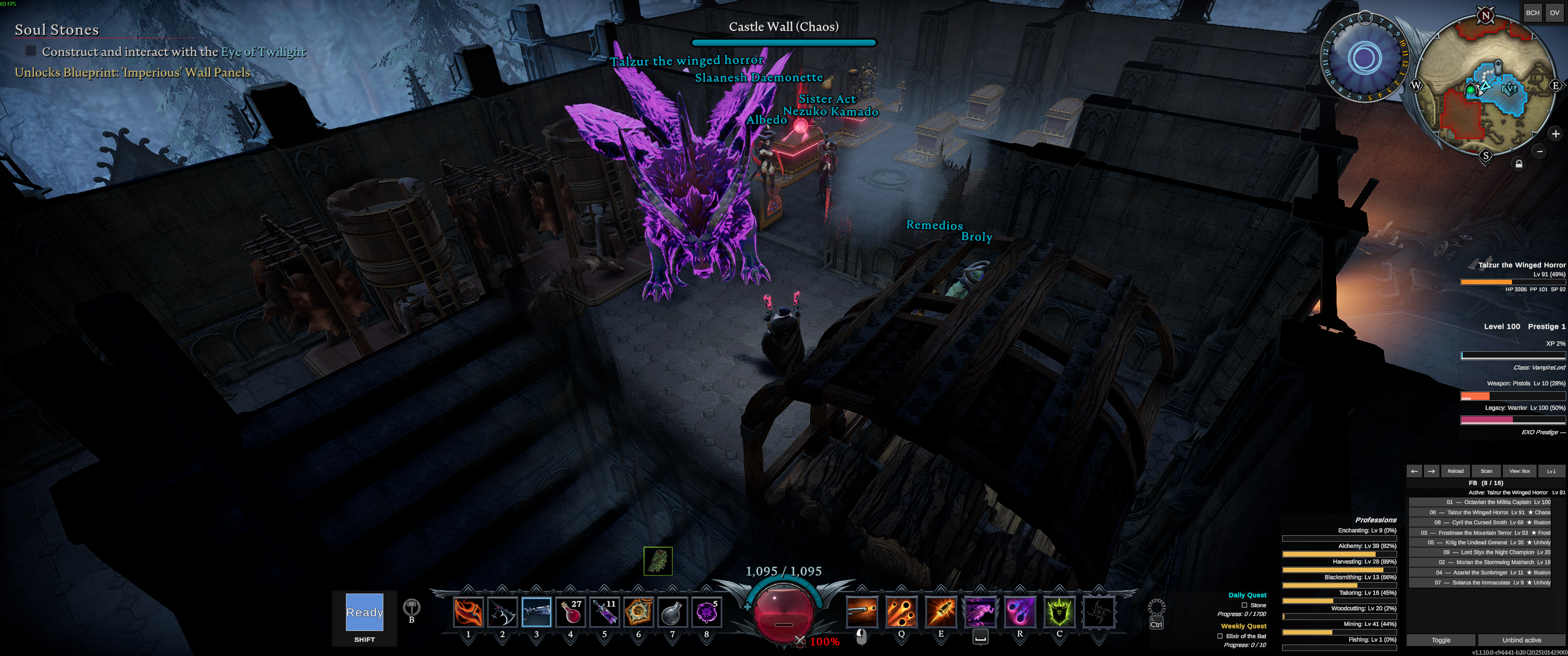 Mid-combat shot showing BCH's overlays running unobtrusively alongside the V Rising HUD. The right-side stack shows the XP / weapon / blood / familiar progress readouts streaming live data via Bloodcraft's signed broadcast protocol; the per-overlay transparency settings keep them legible without competing for visual attention with the vampire-vs-VBlood fight in the center.
.fam boxes, .quest p, .bl get, etc.) remains usable..wep get, .class l, .misc userstats, .clan list, etc.) appear in-UI as well as in chat, so you don't have to chase the chat box for the answer..lvl set <Player> <Level> in chat..fam boxes / .fam l / .bl get / .wep get and other read-data replies that the structured protocol doesn't cover.BloodCraftHub is a client-side mod. It does nothing on the server; install only on the V Rising client of the player who wants the UI.
Same flow — open r2modman, V Rising profile, search BloodCraftHub, install, launch.
BepInExPack_V_Rising 1.733.2 or compatible).BloodCraftHub.dll into <V Rising>/BepInEx/plugins/.When you connect to a server running Bloodcraft, a small floating BCH button appears top-right. Click to open the panel. Hover any control to see what it does — the description prints in the panel's bottom footer.
You don't need to be an admin to use BloodCraftHub — non-admin commands work for everyone. Admin tabs return permission errors gracefully if you're not authorized.
BloodCraftHub talks to the server through chat commands and Bloodcraft's signed Eclipse-protocol channel. It was tested against these versions:
| Mod | Tested version | Role |
|---|---|---|
| BepInEx for V Rising | BepInExPack_V_Rising 1.733.2 |
Loader (hard dependency) |
| Bloodcraft (server) | v1.13.21 | Primary integration target |
| KindredCommands (server) | v2.5.8 | Admin/player commands surfaced under KINDRED |
| KindredLogistics (server) | v1.6.0 | Personal/admin toggles surfaced under KINDRED |
| Eclipse (client) | v1.3.13 | Source mod for the signed-protocol design. ⚠ Currently conflicts — see the Eclipse heads-up at the top of this README. Disable Eclipse while running BloodCraftHub. Coexistence work is planned for a future release. |
| BloodCraftUI / OnlyFams (client, optional) | v1.1.0 | Source mod for the panel framework; coexists, doesn't conflict |
If the server is running a newer Bloodcraft, most things should still work — the chat-command grammar is fairly stable. If a tab silently does nothing on click, the server probably renamed a command and MessageService_Processing.cs's BCCOM_* constants need a bump.
LogOutput.log but the footer never updates while hovering, please open a GitHub issue (or toggle Settings → Display → Hotkeys & diagnostics → Diagnostic mode to This session and share the relevant LogOutput.log snippet)..clan list — the other paginated commands (.castle plotsowned, .search item, etc.) accept a page int but don't have prev/next widgets yet. Type the command in chat for now.BloodCraftHub.dll and the post-build copy step errors.For the full open-issue list, see the project's GitHub issues.
BloodCraftHub is a client UI for server-side mods built by other developers. The features it surfaces would not exist without their work. If you use BCH, please also show the upstream mods some love:
Leveling, expertise, legacies, professions, familiars, classes, quests! The bulk of what BloodCraftHub surfaces (every BLOODCRAFT-group tab) is wrapping zfolmt's chat-command surface.
Server administration utilities and personal/admin logistics toggles. The KINDRED admin tabs (Players / Server / World) and the Logistics section all call into odjit's mods.
BCH was built on the V Rising server The Shadow Realm (Brutal PvE), maintained by Chaos. If you want to support BCH development directly:
The post-v0.14 release cycle (v0.15.0 + the v0.15.1 hotfix arc) was shaped almost entirely by hands-on playtesting and detailed reports from these friends. Every false-positive, every "this looks wrong" screenshot, and every controller / partial-server / disabled-system scenario in the release notes traces back to their patience and careful repro work:
Thank you all. The mod is meaningfully better because of you.
BloodCraftHub is open source (MIT). Bug reports, feature ideas, and pull requests welcome at https://github.com/KDavidP1987/BloodCraftHub.
| Doc | Purpose |
|---|---|
CHANGELOG.md |
Full phase-by-phase history. Read this to catch up on what's been built. |
CONTRIBUTING.md |
Daily workflow, commit-message format, release procedure. |
docs/MOD_DESIGN.md |
User-facing feature/UX spec. |
docs/ARCHITECTURE.md |
Internal code structure and porting map from BloodCraftUI/Eclipse. |
docs/VERSIONING.md |
Semver policy, single-source-of-truth rules, how to bump. |
docs/PREFLIGHT.md |
Pre-commit / pre-release checklist. Enforced by tools/preflight.ps1. |
docs/LOCAL_TESTING.md |
How to side-load the built DLL into your V Rising client and verify it loads. |
docs/THUNDERSTORE.md |
Thunderstore packaging + publishing. |
cd BloodCraftHub
.\tools\install-hooks.ps1   # wires up the pre-commit + commit-msg hooks
cd BloodCraftHub
dotnet restore BloodCraftHub.sln
dotnet build BloodCraftHub.sln -c Release
Optional: deploy the built DLL directly to your client's BepInEx plugins folder:
# Default target is r2modman / Thunderstore Mod Manager "Default" profile.
dotnet build BloodCraftHub\BloodCraftHub.csproj -c Release -p:DeployToClient=true

# Override the r2modman profile name:
dotnet build BloodCraftHub\BloodCraftHub.csproj -c Release -p:DeployToClient=true -p:R2ModmanProfile=MyProfile

# Or target a non-r2modman install (vanilla Steam path):
dotnet build BloodCraftHub\BloodCraftHub.csproj -c Release `
    -p:DeployToClient=true `
    "-p:ClientPluginDirectory=C:\Program Files (x86)\Steam\steamapps\common\VRising\BepInEx\plugins"
Heads up: fully quit V Rising before redeploying. A running game file-locks the DLL and MSBuild's Copy step errors with
MSB3021. The compile itself still succeeds — just the copy fails.
BloodCraftHub/
├── BloodCraftHub.sln
├── docs/                          ← read CHANGELOG + ARCHITECTURE first
├── tools/                         ← preflight.ps1, bump-version.ps1, install-hooks.ps1
├── .githooks/                     ← pre-commit + commit-msg
└── BloodCraftHub/                 ← plugin project
    ├── BloodCraftHub.csproj
    ├── Manifest.props             ← generates Thunderstore manifest.json
    ├── thunderstore.toml          ← package metadata for tcli
    ├── Plugin.cs                  ← BepInEx entry
    ├── Core.cs                    ← runtime singleton
    ├── icon.png                   ← 256×256 BCH icon
    ├── Behaviors/
    │     CoreUpdateBehavior.cs    ← IL2CPP-registered MonoBehaviour, per-frame loop
    ├── Config/
    │     Settings.cs              ← BepInEx-bound, static accessors
    ├── Patches/                   ← Harmony patches
    │     ClientChatPatch          ← inbound: Eclipse protocol + regex fallback + name harvest
    │     InitializationPatch      ← UI bring-up + LocalCharacter/User capture
    │     GameManagerPatch / EscapeMenuPatch / UICanvasSystemPatch / VersionStringPatch
    ├── Services/
    │     MessageService           ← outbound chat injection (immediate send)
    │     MessageService_Processing ← BCCOM_* command constants + regex pipeline
    │     EclipseProtocolService   ← MAC-signed protocol decode + registration
    │     PlayerStateService       ← single source of truth for parsed state
    │     PlayerNameCacheService   ← passive name harvest + autocomplete cache
    ├── UI/
    │     BCHubUIManager           ← root, owns floating button + lazy panels
    │     TooltipHover             ← hover-tooltip polling service
    │     Framework/               ← UniverseLib + CustomLib + ModernLib (folded in)
    │     Forms/
    │         FormBuilder          ← builds form panels from FormField specs
    │         FormField            ← TextField/IntField/EnumField<T>/BoolField/PlayerNameField
    │         CollapsibleSection   ← accordion wrapper, fires Toggled event
    │     ModContent/
    │         FloatingButtonPanel       ← 40×40 BCH button (top-right)
    │         MainPanel                 ← tabbed primary UI (Bloodcraft tabs + Quick Start)
    │         MainPanel.KindredAdmin    ← partial-class file: 3 KindredCommands admin sub-tabs
    │         ExperienceOverlayPanel / FamiliarOverlayPanel
    │     ModContent/Data/PanelType ← enum of every tab and overlay identity
    ├── Utils/                     ← LogUtils + Extensions (Entity.Read/Write/Has, color helpers)
    └── Resources/
        ├── PrefabGUIDs.cs              ← static prefab GUID lookup (stub)
        ├── PrefabNameResolver.cs       ← runtime PrefabCollectionSystem name lookup
        ├── SecretManager.cs            ← HMAC shared-key loader (regex-parses secrets.json)
        ├── secrets.json                ← embedded HMAC key (same default Bloodcraft+Eclipse ship)
        └── Localization/English.json
MIT — see LICENSE.txt for the full text plus third-party attribution for ported code from BloodCraftUI (panthernet), Eclipse (zfolmt), and the runtime peers we integrate with: Bloodcraft (zfolmt), KindredCommands (odjit), and KindredLogistics (odjit).
