
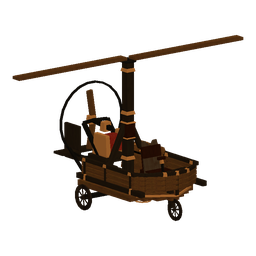
Core Gyro
Two-person Surtling Core gyro: overweight characters can board and fly. Center pilot, standing passenger, cargo, searchlight, hover, banked turns, reverse and boat-like buoyancy. Multiplayer with BepInEx and Jotunn.Core Gyro 0.1.12
A two-person, Surtling-core-assisted gyrocopter for Valheim: one centered pilot seat, one standing mast-grip passenger, a cargo chest and a single forward/down 45-degree exploration light. Built from Valheim timber, copper, leather and cart parts, with positional engine/rotor audio and a flight HUD.
Changes in 0.1.12
- Characters over their carrying-weight limit can board and pilot the gyro. The same boarding change applies to the standing passenger position.
- Removed only the local encumbrance gate on seat requests. Normal walking encumbrance, inventory capacity and cargo-weight effects are unchanged.
- Existing seat occupancy, range, player/peer identity and ward checks still apply. Flight, buoyancy, reverse selection, lights, cargo and controls are retained.
Close the game before updating and install the same version on every player and server. This change passes build/API and focused code checks; overweight boarding and flight still require live-game verification.
Changes in 0.1.11
- Repair water sampling with the game's native liquid query plus a loaded-water-column fallback, so a hull carried below a trigger volume can still find the surface above it.
- Strengthen and damp the four-point buoyancy with continuous mass-scaled forces. Saturated displacement limits deep-water recovery speed instead of launching the hull upward.
- Keep water contact through deep submersion, apply water drag and level the hull on the surface. Buoyancy remains active with the engine off and at different cargo weights.
- Change R from held reverse to a forward/reverse gear toggle. One press selects reverse and release keeps that selection; a second press returns forward. HUD displays the selection.
- Add a 2 km/h minimum powered reverse creep, scaling up to the existing 5 km/h maximum. The engine still starts with Shift and stops at zero throttle. Reverse does not request powered takeoff.
- Preserve the cockpit, mast passenger, 45-degree forward/down light, 22 m/s forward flight, bank/rudder controls, Hover, RMB brake, ground parking and construction recipe.
Install or update
Close Valheim before replacing the mod. In Thunderstore Mod Manager, select your Valheim profile, install BepInExPack_Valheim by denikson and Jotunn by ValheimModding, then use Settings > Profile > Import local mod and select the whole CoreGyro-0.1.12.zip. Do not extract the ZIP for this option. If asked, use package name Core_Gyro and version 0.1.12. Replace the previous local Core Gyro import and keep only one CoreGyro.dll in the profile. Start with Modded.
For an already published release, use Download/Update in Get mods after the uploading team has published this version. Import profile / From file is for .r2z profiles and is a different feature.
Manual installation: copy BepInEx/plugins/CoreGyro/CoreGyro.dll to the same relative folder in the modded game/server. Dependencies are installed separately.
Every player and the server must use the same Core Gyro version. With in-game Start Server, the host's modded game is the server. Dedicated servers also require the mod and dependencies.
Build
Use the normal Hammer > Crafting > Core Gyro, near a Workbench. Discover the materials to unlock the recipe. Place on clear, level ground or water with room for the rotor.
| Material | Amount |
|---|---|
| Core Wood | 20 |
| Copper | 15 |
| Bronze Nails | 20 |
| Deer Hide | 10 |
| Surtling Core | 5 |
This replaces the old one-of-each testing recipe. No Crystal and no consumed fuel. One centered pilot seat, one standing passenger position and an eight-slot cargo chest remain; cargo weight increases vehicle mass.
Controls
| Key | Action |
|---|---|
| E on pilot chair / mast / cargo, on foot | Sit as pilot / grab mast as passenger / open cargo |
| Left Shift, held | Start engine and raise stored throttle toward 100% |
| Left Ctrl, held | Lower stored throttle toward 0%; engine switches off at zero |
| S / W | Nose up / nose down in cruise; selected pitch holds after release |
| A / D | Helicopter-style banked left / right turn in cruise, target up to 55 degrees |
| Q / E | Faster rudder left / right, up to 60 deg/s in flight, without commanded bank |
| H | Toggle the forward/down 45-degree survey light while the engine runs |
| R, pressed | Toggle surface reverse / forward in Cruise; engine required, reverse 2-5 km/h |
| V | Switch Hover / Cruise; engaging Hover requires engine on and at least 50% throttle |
| Space / C | Rise / descend vertically in Hover, default 5 m/s; release to hold height |
| Right mouse button, held | Horizontal brake; release to let propulsion resume from stored throttle |
| E, held 1.5 seconds while parked, engine off | Leave the crew position; applies to pilot and passenger |
| Mouse / wheel | Normal look / seated camera zoom |
E has two contexts: while driving it is right rudder. To leave, land or float on the surface, brake below 1 m/s, reduce throttle to zero to switch the engine off, then hold E for 1.5 seconds. There is no timed airborne E bailout, so a long rudder turn cannot eject the pilot. Release the boarding E press before using it again. Space remains Hover ascent and C remains descent.
Release the boarding key after sitting before steering. The mast passenger cannot issue flight commands. Native use, weapon-block, autorun, walk-toggle and pickup-toggle actions are suppressed while seated, with one frame of exit grace; ordinary on-foot input resumes afterward. F is no longer the exit binding.
Throttle and flight
The 0.1.5 throttle scheme is retained. Shift adds 30 percentage points per second; Ctrl removes 40 by default. Release both to keep the selected throttle. Ctrl takes priority if both are held. Ctrl changes throttle, not a separate altitude target.
Maximum horizontal powered speed is 22 m/s (79.2 km/h). The HUD still displays km/h. Powered speed scales with stored throttle and changes gradually. R selects reverse only on a surface in Cruise, with braking through zero before direction changes.
Hold the right mouse button to brake horizontal motion, including surface reverse and lateral drift. This is a held input, not a toggle: button transitions send a fresh command immediately, subject to network delivery. Cruise propulsion is suspended while the brake is held; stored throttle, pitch and vertical lift are retained. Releasing resumes propulsion gradually from that stored throttle. The brake does not stop a gravity-driven fall or replace Hover altitude hold. In Hover it brakes without pulling back to an older horizontal hold point, while vertical controls/hold remain active. AirbrakeDeceleration defaults to 8 m/s squared. The HUD shows BRAKE HELD.
Banked turns and rudder
A/D targets up to 55 degrees of roll in airborne cruise, scaled down at low forward speed. The physics controller builds the roll rather than snapping the body; actual bank adds bounded inward acceleration and changes the heading into the curve. Release A/D to return toward level. This is helicopter-inspired assisted steering, not a full helicopter aerodynamic simulation.
Q/E remains a separate rudder input, now 60 deg/s in flight (surface steering uses 55% of that rate). It can counteract or reinforce the heading change without changing the requested bank angle. Combined heading rate is bounded. In Hover the airframe remains level, with Q/E rotation and the existing A/D heading input.
R selects the gear. On land or while floating in Cruise, press R once to select reverse; release the key and the selection remains. Press R again to select forward. The HUD shows REVERSE SELECTED (or PARKED - REVERSE when parked), and a short message confirms the selection.
Start the engine with Shift and choose the throttle as before. Reverse now has a minimum powered creep of 2 km/h, increasing to the 5 km/h cap at higher throttle. This fixes the near-invisible old reverse target at low throttle: at 6%, the previous 0.3 km/h target is now 2 km/h. Selecting reverse does not start an engine at zero throttle. RMB still brakes while held; Ctrl still reduces stored throttle. The motor brakes through zero before changing direction.
Reverse is surface-only and does not command powered climb. Return to forward before taking off, or switch to Hover and use Space. Hover or leaving the surface clears reverse selection. Menu/chat input does not accidentally change the selected gear.
Rotors take about 1.2 seconds to spin up. In cruise, level pitch at about 50% throttle commands a neutral vertical target; higher power adds climb and lower power adds sink. S/W adjust the persistent pitch angle at 25 degrees/second, limited to 35 degrees in flight and 8 near the surface. Nose angle and actual forward speed also affect climb/descent.
At 0% the engine stops, the survey light goes off and Hover disengages. No powered thrust or gravity-cancelling lift remains: momentum persists, drag slows the craft and gravity makes it fall. Restart with Shift and allow spin-up. Lost pilot input ramps throttle down. Water buoyancy remains active with the engine off.
Vertical flight and Hover
- Start the engine, reach at least 50% throttle and let the rotor spin up.
- Press V. The gyro brakes first and captures the stopping position.
- Space rises vertically; C descends vertically, targeting 5 m/s by default. Release to capture and hold the current height.
- Q/E yaw without banking. Hover levels the airframe, so cruise W/S pitch and surface reverse are inactive. A/D still contribute heading input while Hover keeps the craft level.
- Press V again to return to cruise; retained throttle resumes forward propulsion gradually.
Hover applies bounded physics forces to correct position, velocity and height. It does not teleport or rigidly lock the body. Obstacles, waves, loading and network conditions can affect the hold. Below 50% throttle, an already active Hover sinks and the HUD shows LOW POWER; raise power again to regain height hold. At zero, all powered Hover forces stop. Surface contact prevents downward Hover force from pushing the craft through land/water.
The new HoverVerticalSpeedV2 setting defaults to 5 m/s so an old 2.5 m/s setting will not mask the update. The actual speed accelerates toward the target rather than changing instantly.
Centered cockpit and standing passenger
Aim at the centered pilot chair and press E to sit and fly. The control stick, base, seat pads, dashboard and gauges are aligned with the new centerline. The passenger chair and its pads have been removed.
Aim at the mast/holdfast and press E to Hold mast. The passenger is attached to the vehicle using Valheim's existing attach_mast animation; it is not free walking on the moving deck. The native stance's sideways/forward offset is reused and rotated to the left of the mast, leaving the cargo chest on the right accessible. The mast has a leather grip and copper collars. There are still two crew reservations, with normal occupancy checks and only the pilot authorized to fly.
The existing E-hold dismount rule applies to both crew: land/float, stop below 1 m/s, engine off, hold E 1.5 seconds. Exit offsets lead out to the appropriate side rather than through the center cockpit. The wider orbit camera and HUD also work for the standing passenger. The exact hand contact, character proportions and two-client animation still need a live game check.
Forward/down 45-degree Core survey light
Both front-facing lamps and bezels are removed. A single native Surtling Core sits in a copper yoke and protective ring below the middle of the deck, above the wheel-bottom clearance. Its emitter sits beneath the mount so the deck does not cover the forward/down beam.
Press H with the engine running to toggle a warm spotlight angled 45 degrees forward and down. Its direction follows the craft's heading, while the depression angle stays 45 degrees below the horizon through pitch/bank. At level ground, the center of the beam lands approximately one emitter-height ahead, subject to terrain and the configured range. The light uses a 70-degree outer / 45-degree inner cone, 60m configured range and intensity 12. Effective visibility depends on height, ambient light and game lighting settings; this range is not a promise of equal brightness at every distance. The normal rear engine core remains.
Light state uses the existing owner-authorized H action and replicated light flag. Each graphical client creates one real-time per-pixel spotlight; headless servers create no rendering light. Zero throttle/engine shutdown switches it off. The legacy local config entry Headlights=H is retained for compatibility and now controls the survey light.
Automatic ground parking
The craft has a 600 kg base mass; cargo adds mass as before. On static solid ground, when at least two wheels have nearby support, the engine is off and motion has settled for 0.75 seconds, parking chocks lock the rigidbody against incidental pushing. The HUD shows PARKED. Walking into the parked gyro does not launch it away.
Starting the engine with Shift releases parking immediately. Water, Hover, missing support, and moving platforms cannot retain the static-ground lock. Support is checked every owner tick, even while parked, so removing the supporting floor releases it. It does not freeze a powered or falling aircraft in midair and does not lock a floating craft to the water. Water buoyancy remains independent of the engine. Combat damage and destruction still work while parked.
Camera and HUD
The wider camera retained from 0.1.6 focuses on the whole gyro, starts approximately 8 m away and supports wheel zoom from 5-20 m. Mouse look remains normal. Camera collision ignores this gyro's own colliders and characters, checks world obstacles and handles water clipping. Nearby walls may bring the camera closer. On-foot zoom is restored on exit. This override applies only to the local seated gyro crew.
The attached pilot/passenger HUD shows PARKED / SURFACE REVERSE / BRAKE HELD status alongside throttle, horizontal speed in km/h, height above the nearest detected solid/water surface, signed pitch, hull condition, engine readiness and Hover/Cruise state. Menu, inventory and console hide the panel. Values are read from the network owner; the HUD does not capture mouse input.
Durability and water
Colliding with trees, logs, rocks, terrain, buildings, players or creatures causes no collision self-damage. Colliders still block and deflect the vehicle. The gyro does not damage trees by ramming them.
Weapon/projectile combat remains enabled through Valheim's native damage path: PlayerHit, EnemyHit, Turret and Catapult, plus Undefined hits carrying an attacker for mod-weapon compatibility. Generic impact/environment categories are ignored for this gyro only; unrelated structures are unaffected. Combat can still destroy it at zero hull. Repair with the ordinary hammer. Third-party damage without a recognized combat category or attacker may be ignored.
The retired tree collision component is no longer compiled or attached. The structural support destruction fix remains enabled: this dynamic vehicle does not use building support wear. Four-point buoyancy now samples native water first, then searches loaded WaterVolume columns by horizontal bounds when a point has passed outside a volume's vertical collider extent. Cached columns retain native wave heights; no fixed sea level or teleport is used. Deep submersion remains water contact instead of becoming airborne at one metre depth.
Buoyancy uses mass-scaled continuous forces at four hull points, with stronger spring/damping, saturated displaced volume, and water drag. This supports the 600kg base hull and cargo, including with the engine stopped, while limiting upward recovery speed. Surface pitch/bank are leveled. The ground parking lock remains disabled in water. A hard splashdown may still briefly submerge the craft while forces slow it, and contact/obstacles can affect recovery; it is not an instant surface snap.
Multiplayer and configuration
Only the current network owner applies physics. Pilot commands validate peer ownership, seat identity, distance, finite bounded axes and sequence order. Passengers cannot pilot. Seat reservations, ward checks, occupied-removal protection, disconnect cleanup and input timeout remain. Vehicle/cargo state persists through native network data and inventory storage.
Configuration: BepInEx/config/arioh.valheim.coregyro.cfg. Flight tuning synchronizes through Jotunn as admin-only settings. Keyboard bindings remain local. Restored Left=A and Right=D reuse the 0.1.5 entries. New ExitSeatHoldV2=E selects the contextual held dismount key; old Dismount and ExitSeat entries are ignored. New RudderLeft=Q and RudderRight=E are independent. The 0.1.6 YawLeft, YawRight and ExitSeat entries are ignored. Hover retains HoverMode=V, VerticalUp=Space and VerticalDown=C. Camera distance is under [Camera] SeatedDistance.
New MaximumBankAngleV2=55 and RudderTurnRateV2=60 avoid older 20-degree bank / 35 deg/s turn values masking the new steering. TurnRate still controls surface/level A/D heading input.
New MaximumSpeedMpsV3 defaults to 22 m/s, replacing both old km/h keys so an existing 72 km/h setting cannot override the update. ThrottleIncreasePerSecond, ThrottleDecreasePerSecond, PitchRate, MaximumPitchAngle, PoweredClimbLimit and PoweredSinkLimit retain their meaning. Old pre-throttle LiftSpeed/ClimbRate/DescentRate/MaximumSpeed/Engine settings are obsolete. All peers must update together because the validated input packet now carries a separate rudder axis and validated reverse/brake flags.
Publishing the update
Upload this complete ZIP to Thunderstore's Valheim community using the same team and package name Core_Gyro. Version is 0.1.12. Do not rename the package or change teams to update the existing listing. Editing CHANGELOG.md alone does not release new code; the new manifest version and DLL must be uploaded together. Earlier versions stay in the listing's history. This same ZIP works for local app import; no second archive is needed.
Validation and assets
Compiled against installed Valheim 1.0.20 / Unity 6000.0.75, BepInEx 5.4.23.5 and Jotunn 2.30.2. Release build, installed-game API checks, control/damage/camera audits, numerical flight/Hover checks and package integrity checks pass. Live verification of this revision's water detection/recovery, waves, reverse movement, save/reload and two-PC multiplayer remains outstanding. Numerical splashdown, submerged recovery, cargo-mass and wave/roll checks passed, but these do not execute Unity physics.
Meshes and materials are referenced from the installed game at runtime. No game DLLs, extracted models, textures or native audio are redistributed. The engine loop is generated by the mod. The timber infill, centered cockpit and mast grip use installed game meshes/materials. The standing pose comes from the native raft mast attachment. The survey light references the installed Surtling Core mesh. No new external asset bundle is required.