

WorldItemDropDisplay
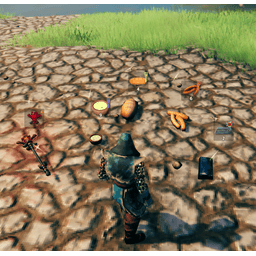
A client-side Valheim mod that shows floating UI markers above dropped items in the world, giving you at-a-glance info of items in range.WorldItemDropDisplay

A client-side Valheim mod that shows floating UI markers above dropped items in the world, giving you at-a-glance info (for items in range) on:
- Stack size
- Quality level
- Durability (with a bar)
- Teleport-lock icon
- Food effect color coding
Client only mod, not needed on server.
This mod uses a file watcher. If the configuration file is not changed with BepInEx Configuration manager, but changed in the file directly, upon file save, it will live update the changes.
Configuration
All settings live in BepInEx/config/Azumatt.WorldItemDropDisplay.cfg (or use BepInEx’s in-game Config Manager). Edit
by hand or via UI, either way, changes reload on the fly.
| Setting | Description | Default |
|---|---|---|
| Position Interval | How often (seconds) to refresh UI positions | 0.01 |
| Data Interval | How often (seconds) to refresh stack/quality data | 0.01 |
| Max Display Distance | Maximum distance (meters) at which markers appear | 5.0 |
| World Item Offset | Offset (X, Y, Z) relative to each item |
(0, 1.2, 0) |
Features
- Real-time data: Stack, quality, durability, teleport status, food effect, and equip status update automatically.
- Low GC & smooth: Uses object pooling, caching, and early-exit checks to minimize garbage collection and per-frame work.
- Live config reload: Change your
.cfgby hand and see it apply immediately—no restart required.
Installation Instructions
You must have BepInEx installed correctly! I can not stress this enough.
Manual Installation
Note: (Manual installation is likely how you have to do this on a server, make sure BepInEx is installed on the server correctly)
- Download the latest release of BepInEx.
- Extract the contents of the zip file to your game's root folder.
- Download the latest release of WorldItemDisplay from Thunderstore.io.
- Extract the contents of the zip file to the
BepInEx/pluginsfolder. - Launch the game.
Installation through r2modman or Thunderstore Mod Manager
-
Install r2modman or Thunderstore Mod Manager.
For r2modman, you can also install it through the Thunderstore site.

For Thunderstore Mod Manager, you can also install it through the Overwolf app store

-
Open the Mod Manager and search for "WorldItemDisplay" under the Online tab.
Note: You can also search for "Azumatt" to find all my mods.The image below shows VikingShip as an example, but it was easier to reuse the image.
-
Click the Download button to install the mod.
-
Launch the game.
Feel free to reach out to me on discord if you need manual download assistance.
Author Information
Azumatt
DISCORD: Azumatt#2625
STEAM: https://steamcommunity.com/id/azumatt/
For Questions or Comments, find me in the Odin Plus Team Discord or in mine:

