

CDEV EquipmentSlots
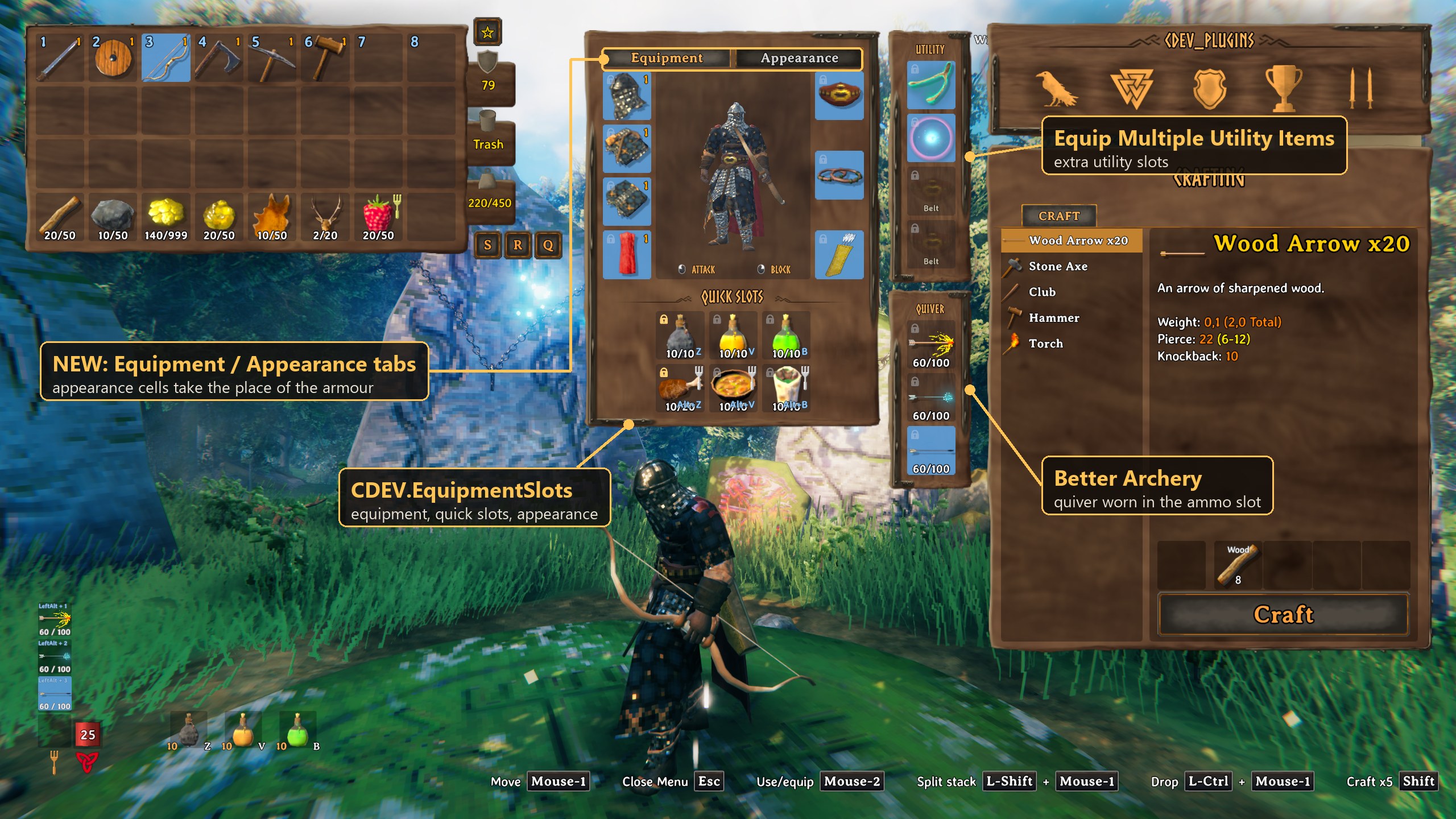
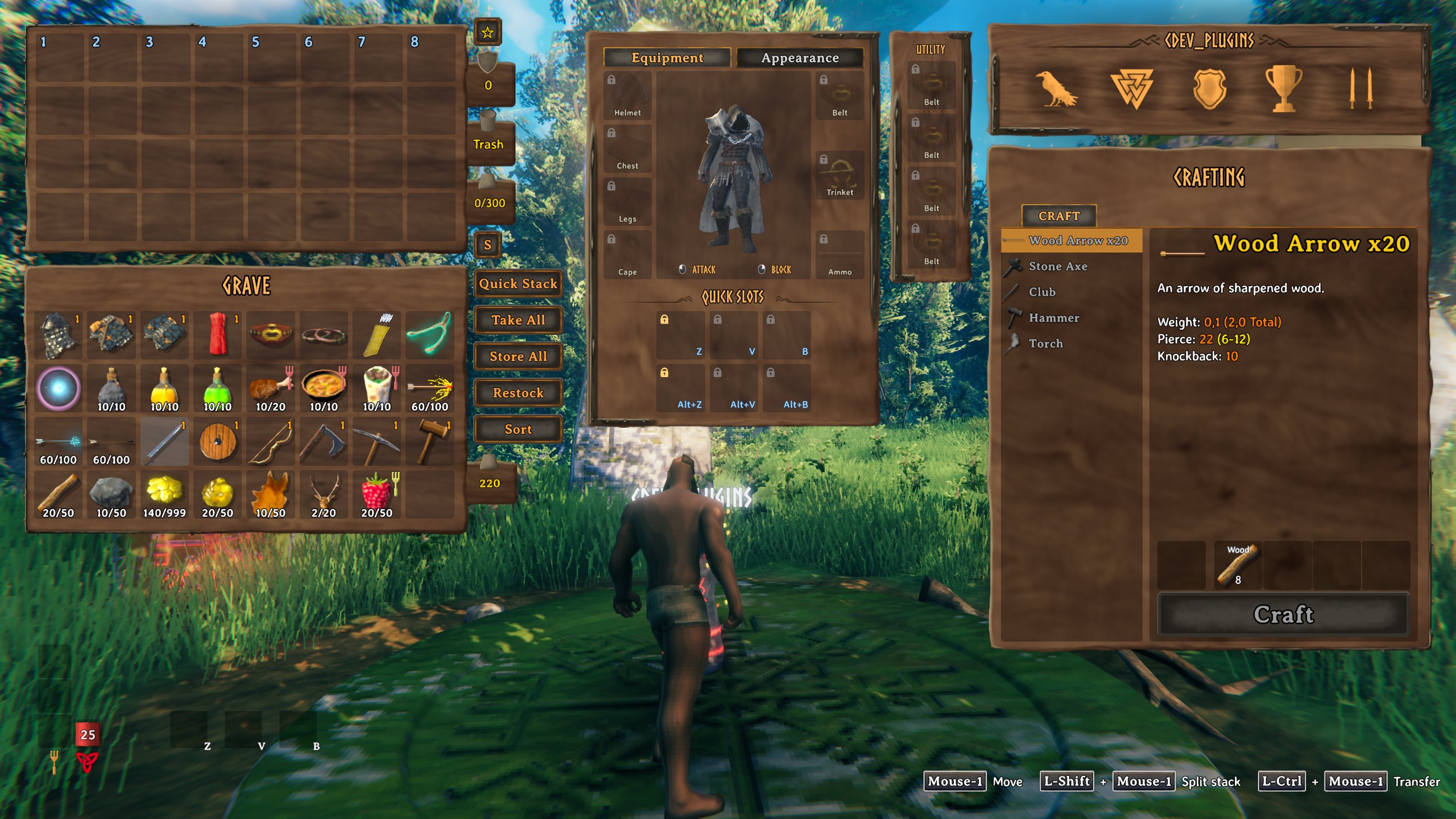
Armour, quick slots and an appearance tab on a character sheet beside the inventory. / Броня, быстрые слоты и вкладка внешнего вида на листе персонажа рядом с инвентарём.EquipmentSlots
A character sheet beside the inventory: armour, six quick slots and an appearance for your gear. Armour no longer takes rows of your backpack. (Русское описание — ниже.)
Features
- Equipment slots — helmet, chest, legs, cape, belt, trinket and ammo. Drag an item in to wear it, out to take it off. Right-click works both ways.
- Six quick slots for anything:
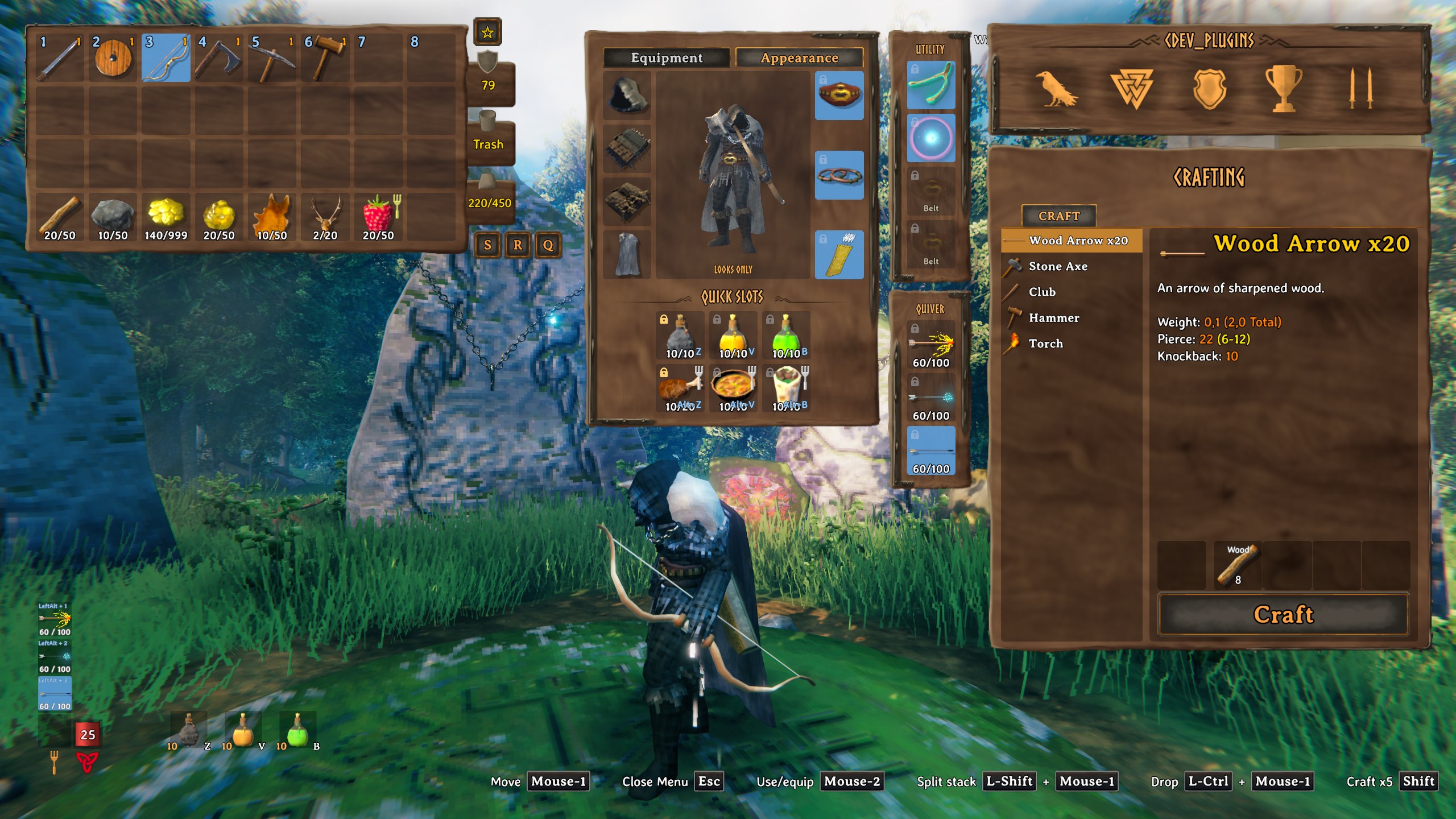
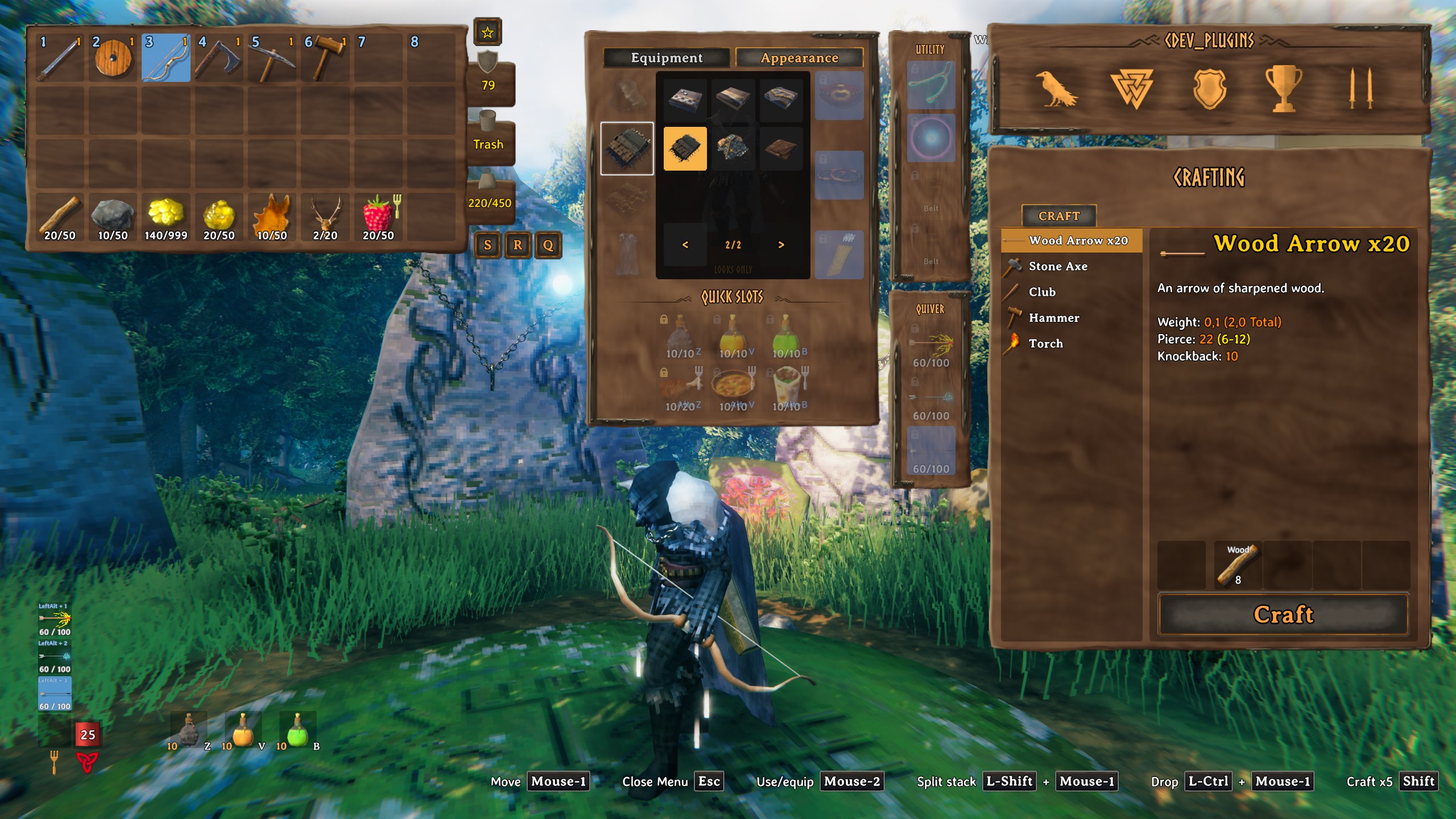
ZVB, and the same keys withLeft Alt. Shown on the HUD next to the forsaken power. - Appearance tab — choose how your helmet, chest, legs and cape look, from every piece you have ever held. Looks only: no armour, no weight, no effects. Other players see it too, even without the mod.
- Padlocks — a locked cell is never emptied by "stack similar" or by other mods' store and sort buttons.
- Death — your worn gear lies in the top row of the grave. Take All puts everything back in place and on.
Installation
With a mod manager — install, done.
By hand:
- Install BepInExPack Valheim and Jötunn.
- Put
CDEV.EquipmentSlots.dllintoValheim\BepInEx\plugins\CDEV.EquipmentSlots\. - Remove EquipmentAndQuickSlots if you have it. Your character's items are moved over on the first start.
Before uninstalling, take everything out of the slots: without the mod the game drops it at your feet.
Multiplayer: a client mod. A server that has it asks every player for it; servers without it let everyone in.
Works with
Better Archery (quiver in the ammo slot), Equip Multiple Utility Items (extra utility slots), QuickStackStore, Local Craft From Storage Prime, MouseTweaks, Adventure Backpacks, Valheim Plus. Not together with EquipmentAndQuickSlots.
Settings
File: Valheim\BepInEx\config\cdev.equipmentslots.cfg. It appears after the first start with the mod. Close the
game, open the file in any text editor, change the value after =, save.
| Setting | Default | What it does |
|---|---|---|
[QuickSlots] Key1 Key2 Key3 |
Z V B |
Keys of quick slots 1-3 |
[QuickSlots] AltModifier |
LeftAlt |
Hold it with Key1-3 for slots 4-6. None turns it off |
[QuickSlots] Key4 Key5 Key6 |
empty | One more key for slots 4-6, used with Alt: Alpha1 = Alt+1 |
[QuickSlots] KeysWinOverVanilla |
true |
A quick slot key that is also a game key (1-8, V) only uses the slot |
[Hud] Enabled |
true |
Quick slots on the HUD |
[Hud] Offset |
{"x":0.0,"y":0.0} |
Moves them, in pixels |
[Hud] Spacing |
8 |
Gap between them (0-64) |
[Inventory] CellLocks |
true |
Show the padlocks |
[Panel] Offset |
{"x":0.0,"y":0.0} |
Moves the panel, in pixels |
[Panel] ShowCharacter |
true |
Your character in the panel |
Keys use Unity names: A-Z, Alpha1-Alpha9, F1-F12, LeftAlt, LeftControl, Mouse3, Mouse4.
Texts in 22 languages, following the game's language. Licence: MIT. By CDEV — bug reports with
BepInEx\LogOutput.log are welcome.
EquipmentSlots — по-русски
Лист персонажа рядом с инвентарём: броня, шесть быстрых слотов и внешний вид снаряжения. Броня больше не занимает ряды рюкзака.
Возможности
- Слоты экипировки — шлем, нагрудник, штаны, плащ, пояс, тринкет и стрелы. Перетащил вещь в слот — надета, вытащил — снята. ПКМ работает в обе стороны.
- Шесть быстрых слотов под что угодно:
ZVBи те же клавиши сLeft Alt. Видны в HUD рядом с силой стража. - Вкладка «Внешний вид» — выберите, как выглядят шлем, нагрудник, штаны и плащ, из всего, что когда-либо было у вас в руках. Только облик: без брони, веса и эффектов. Его видят и другие игроки, даже без мода.
- Замочки — запертую ячейку не опустошают ни «сложить похожие», ни кнопки сортировки и складывания других модов.
- Смерть — надетое лежит в верхнем ряду могилы. «Взять всё» возвращает всё на места и снова надевает.
Установка
Через менеджер модов — установите, и всё.
Вручную:
- Установите BepInExPack Valheim и Jötunn.
- Положите
CDEV.EquipmentSlots.dllвValheim\BepInEx\plugins\CDEV.EquipmentSlots\. - Если стоит EquipmentAndQuickSlots — удалите его. Вещи персонажа перенесутся при первом запуске.
Перед удалением мода выньте всё из слотов: без мода игра выбросит это вам под ноги.
Мультиплеер: клиентский мод. Сервер с модом требует его от всех игроков, серверы без мода пускают всех.
Совместимость
Better Archery (колчан в слоте стрел), Equip Multiple Utility Items (дополнительные слоты утилит), QuickStackStore, Local Craft From Storage Prime, MouseTweaks, Adventure Backpacks, Valheim Plus. Не вместе с EquipmentAndQuickSlots.
Настройки
Файл: Valheim\BepInEx\config\cdev.equipmentslots.cfg. Появляется после первого запуска с модом. Закройте игру,
откройте файл любым текстовым редактором, измените значение после =, сохраните.
| Настройка | По умолчанию | Что делает |
|---|---|---|
[QuickSlots] Key1 Key2 Key3 |
Z V B |
Клавиши быстрых слотов 1-3 |
[QuickSlots] AltModifier |
LeftAlt |
Зажать вместе с Key1-3 — слоты 4-6. None — выключить |
[QuickSlots] Key4 Key5 Key6 |
пусто | Ещё одна клавиша слотов 4-6, вместе с Alt: Alpha1 — это Alt+1 |
[QuickSlots] KeysWinOverVanilla |
true |
Клавиша слота, занятая и игрой (1-8, V), работает только как слот |
[Hud] Enabled |
true |
Быстрые слоты в HUD |
[Hud] Offset |
{"x":0.0,"y":0.0} |
Сдвиг слотов в HUD, в пикселях |
[Hud] Spacing |
8 |
Промежуток между ними (0-64) |
[Inventory] CellLocks |
true |
Показывать замочки |
[Panel] Offset |
{"x":0.0,"y":0.0} |
Сдвиг панели, в пикселях |
[Panel] ShowCharacter |
true |
Персонаж в панели |
Клавиши — имена Unity: A-Z, Alpha1-Alpha9, F1-F12, LeftAlt, LeftControl, Mouse3, Mouse4.
Тексты на 22 языках, по языку игры. Лицензия: MIT. Автор CDEV — об ошибках пишите с файлом
BepInEx\LogOutput.log.