

CDEV PerfectUI
Crafting stations get search, category icons, folding groups, an amount field and recipe pins; a trophy hunt with kills left and map zones; a journal with effects, knowledge and stats; cleaner skills and trophies windows. Client-only.PerfectUI
A crafting window you can find things in. Every crafting station gets a search field, category icons, folding groups, an amount field and pinned recipes on screen; the skills, trophies and achievements windows get a cleaner look; a trophy hunt shows how many kills a trophy is away and where to find it on the map, and the journal becomes tabs with effects, knowledge and statistics. (Русское описание — ниже.)
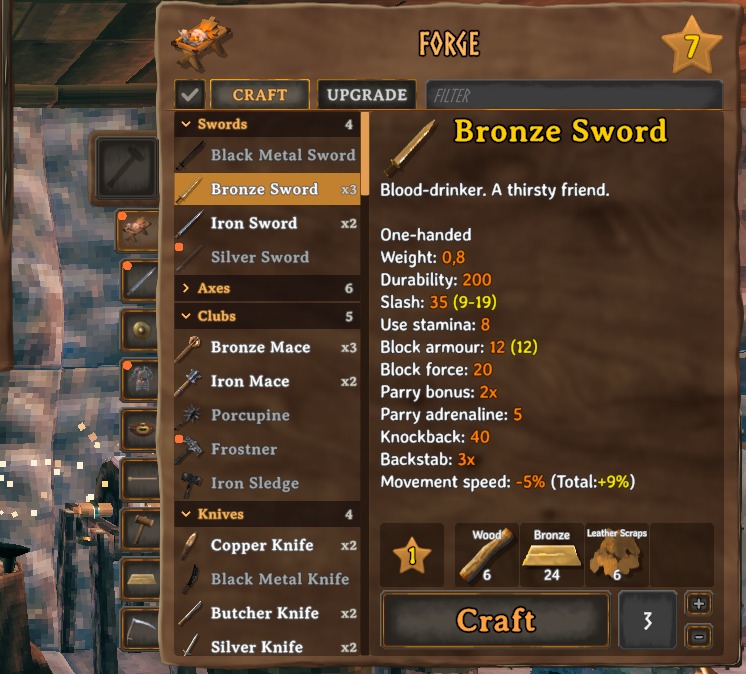
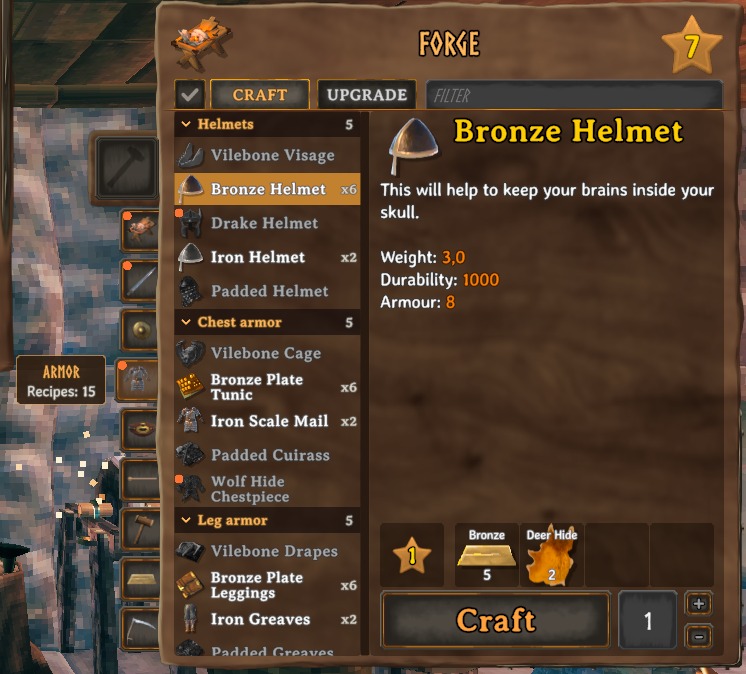
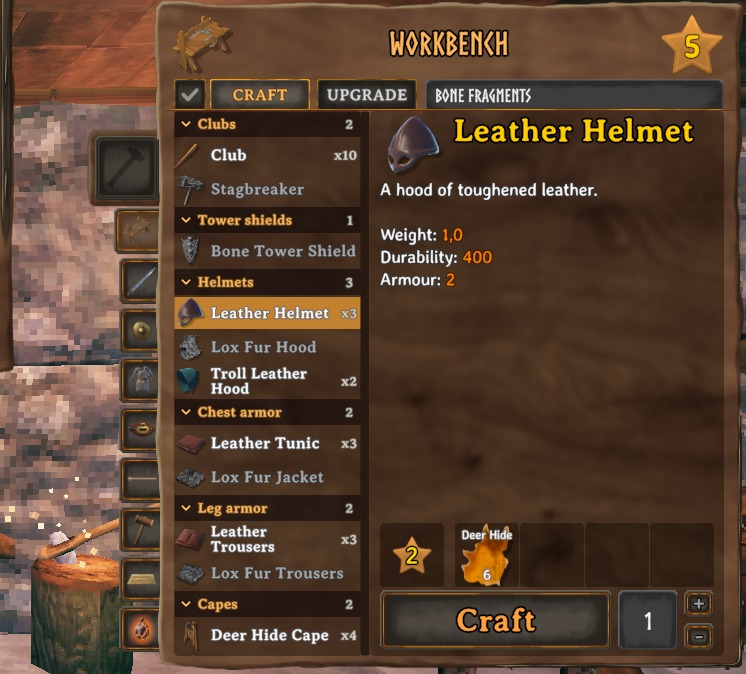
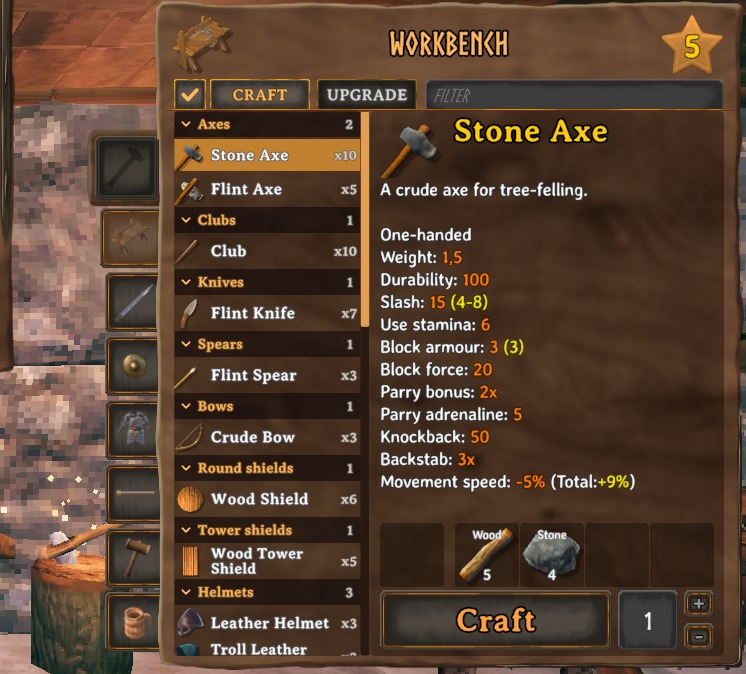
Crafting stations
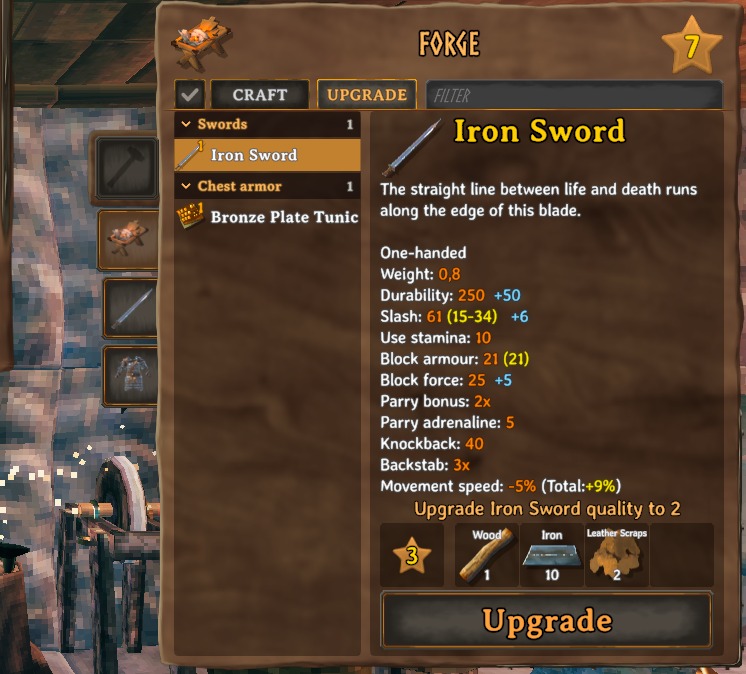
- Search next to the Craft / Upgrade tabs: type part of a name — or of a material, to see everything it goes into.
- Food sorting: at the cauldron, three buttons beside the search put the food with the most health, stamina or eitr first, its value on each row. The × at its right end clears it.
- Category icons beside the window: weapons, shields, armor, accessories, ammo, tools, food, meads and potions, materials, other. Only the categories the station has are shown; hover one for its name and how many recipes it holds.
- Groups — swords, axes, bows, helmets, arrows and so on — under headings you can fold; they stay folded next time. Inside a group the recipe you learnt last is at the bottom.
- How many you can make with what you carry, on every recipe (x3).
- Amount field right of the Craft button with + and − beside it. Right-click + for as many as you can make, right-click − for one. Holding Shift still crafts 5, as in the game.
- Only available: the check button before the tabs hides what you cannot make right now.
- New recipes carry a dot until you look at them; so does their category icon.
- The Upgrade tab shows what the next level adds (+50 durability, +6 slash).
- Gamepad: right stick left / right — category, up — search, down — only available; D-pad left / right — amount.
- Only at a station: the inventory opened on its own keeps the game's crafting window.
- Pin a recipe with the pin in the window's top right corner: its materials (have / need) and how many you can make stay on screen under the minimap, as wide as the map, and under the crafting window while the inventory or a chest is open; at a ship's helm they are hidden. The newest pin is on top. It goes away by itself once you craft it; right-click it under the crafting window, or under the map while the hammer's menu is open, to unpin.
- Pin a build piece with the pin in its bottom right corner in the hammer's menu: it stays on screen with the pinned recipes, its materials (have / need), until you click the pin again.
- Build calculator: in the hammer's menu (up to ten pieces), point at a piece, click its calculator mark and say how many - the menu's Calculator tab then shows them with how many are left (click one to change it, its trash can removes it, Clear removes them all) and, at the foot, every material they need (have / need). Every piece you place counts down; right-click the mark to take it out.
- Auto-repair (off by default,
AutoRepairin[Crafting]): opening a station repairs everything it can, and the repair hammer is hidden. - The group headings and their counts can each be switched off (
ShowGroups,ShowGroupCountsin[Crafting]). - The recipe order — as you learnt them, the game's own, or by name — is
RecipeOrderin[Crafting]. Enabled = falsein[Crafting]switches all of this off at once and leaves the game's own crafting window.
Build menu
- New pieces carry the same dot until you point at them (or, with
NewMarksClear = OnSelectin[Build], until you pick them); so do the tags and tabs that hold one. Double click All to mark everything as seen. - Comfort: a Comfort row in Categories lists every piece that gives comfort, the ones that would raise the comfort where you stand first. Each comfort piece carries a +N chip — green raises it, grey equals what already counts, red is lower, amber is already here but unlit. On the Comfort row, hovering a piece lights up the rest of its group (only the best of a group counts). With the hammer out, "This room: N" under the minimap shows the base, the shelter and every piece that counts. Off while ComfortMe is on, so nothing shows twice.
Skills, trophies, achievements
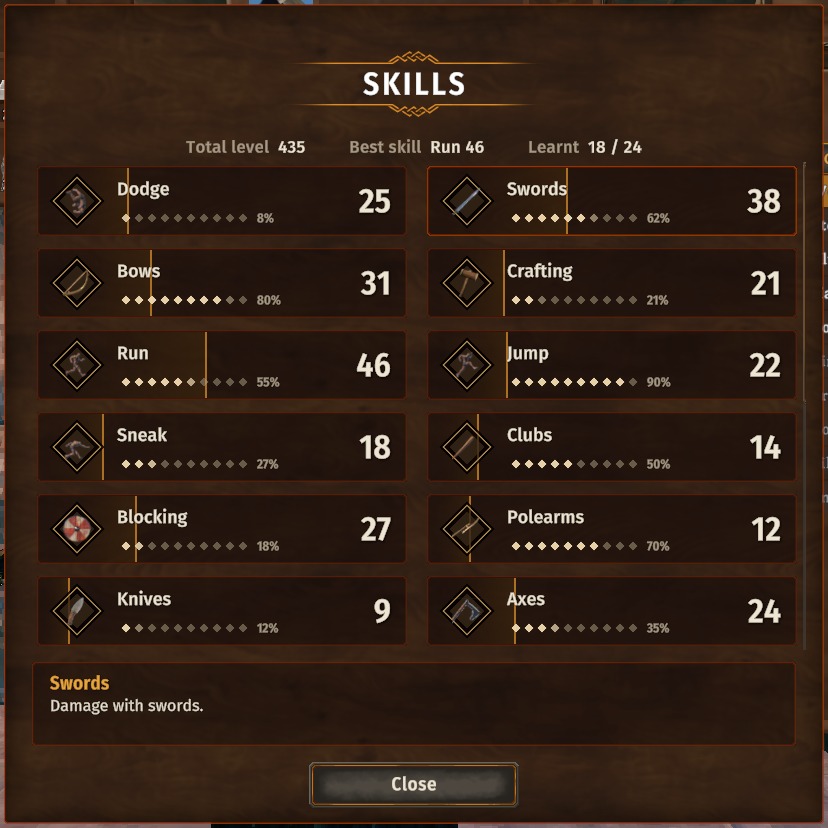
- Skills: cards with the level (gear bonus included) and a band to the next one, a summary on top; click a skill to read what it does. Drag a card onto another to swap the two. A check box lists them in one column.
- Pin a skill ("Pin to screen", or right-click its card): its card sits above the forsaken power and fills as you
level up. One skill at a time. The pinned skill and the tracked trophy can be moved anywhere on screen (
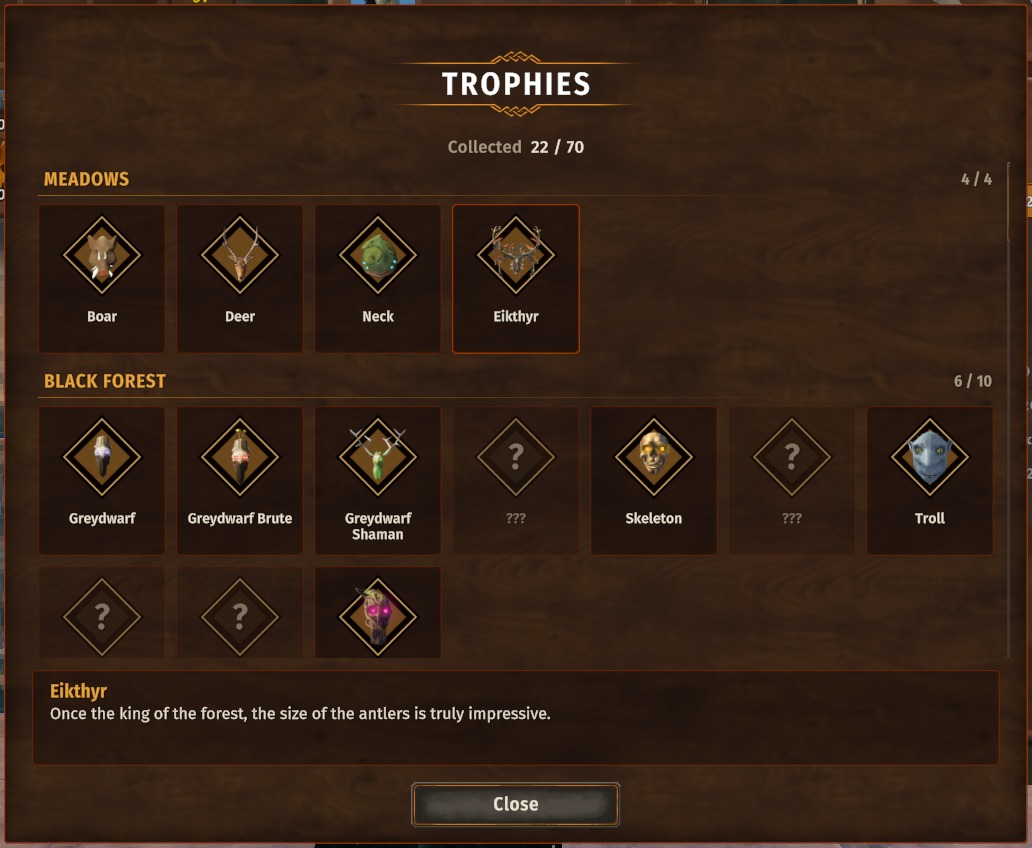
SkillOffsetX / Y, TrophyOffsetX / Yin[Pins]). - Trophies: by biome, with how many of each biome you have; click one to read its lore. Click a biome's heading to fold it; a biome starts folded until you have one of its trophies. A boss's trophy has a gold frame. Right-click a trophy to track it in the trophy hunt (with spoilers shown, any trophy).
- Trophy hunt (the button in the trophies window): every trophy the game gives, except the bosses', in one alphabetical list (or by biome, under headings that fold) with a search — its picture, who drops it, and how many more kills it takes to drop (the game's own count) or its chance. Track one: its card with the kills left sits under the stamina bar, and where it drops is tinted on the map, in the area you have explored. You can also track a trophy by right-clicking it in your inventory or a chest, or by pressing Use while aiming at a creature.
- Journal (the raven): tabs for the active effects (time left, what each does, the forsaken power's cooldown), the message log (with each line's picture and time, kept with your character), what Huginn and the rune stones taught you (with a search), and statistics with pictures, four a row, long lists folding out — kills, items, buildings, food, causes of death, time in each world. Pages other mods add have their own tab — Epic Loot's magic effects, Haldor's bounties and treasure maps show there.
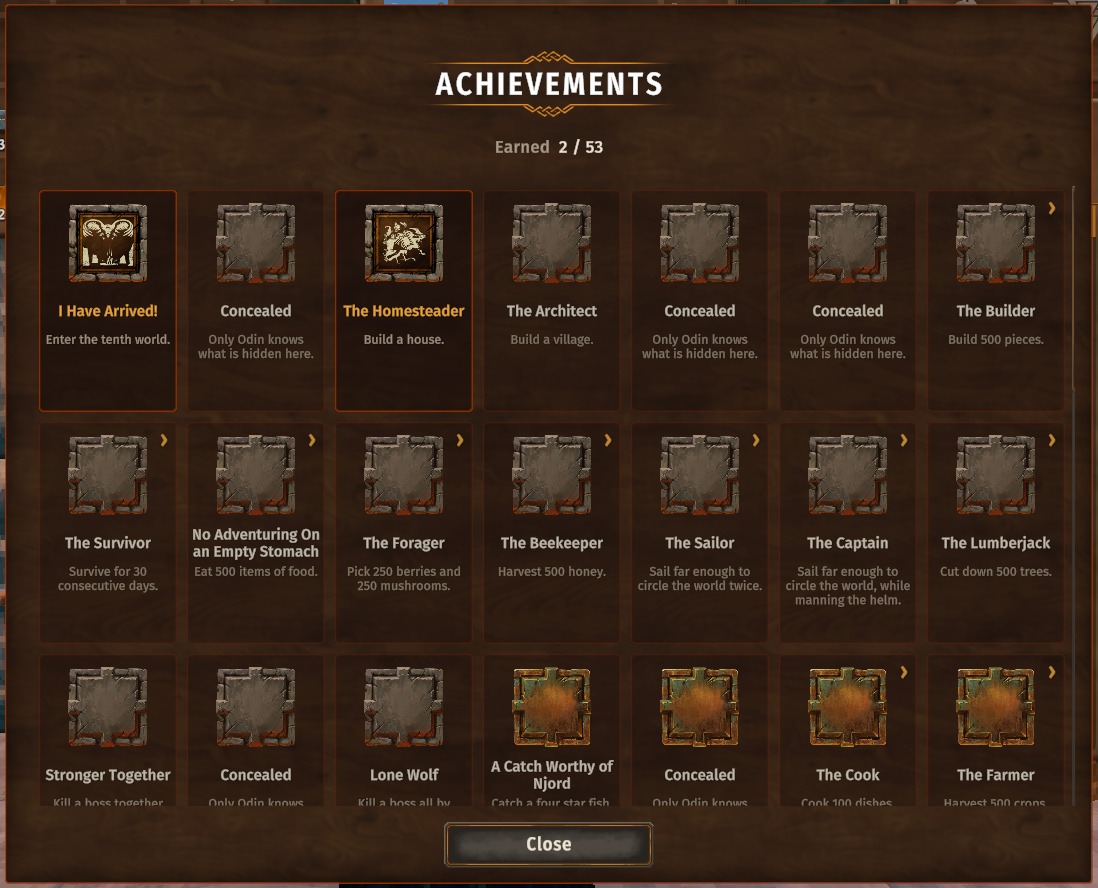
- Achievements: tiles with icon, name and what to do; in the details the creatures are listed by biome and every condition has a proper name.
- Show spoilers (check box at the foot of the achievements and trophies windows): secret achievements and trophies you do not have yet with their real names, pictures and texts. Asks first.
- Each window can be switched off in the config (
[Windows]).
On screen
- Compass along the top of the screen, with your map pins nearby at their direction.
- Day and time on the small map. The large map grows out of the small one and shrinks back into it.
- Pickup list in the top left: icon, name, amount and how many you now carry; picking up more of the same item adds to its row. "New item / recipe / piece" show as larger rows above it. Readable over the open inventory too.
- Messages in the middle (a new day, rested, a boss's words) in the mod's font; every skill level-up shows there, the new level striking into the skill's icon.
- Creature info: crouch and keep a creature under the crosshair for a second (a small ring over its head fills) — a plate over it shows its name, stars, health, distance, and its trophy with the kills left and the chance per kill. For an animal you can tame: how far the taming is, the time it still takes, how long it stays fed and what it eats; for a tame one its mood and love. It stays until you stand up.
- Skill level-ups wait while an enemy nearby is alerted, and show one after another once the fight is over.
- "Not enough: Wood" instead of the game's "You have no more: Wood".
- Pickup filter (the funnel button in the inventory): a black or white list of items, with a search - auto-pickup leaves the listed items on the ground, or takes only them. Picking up with Use is not filtered. Kept per character. Delete / Insert put the item under the mouse (or the one on the ground you look at) on the blacklist / whitelist or take it off; the cells of blacklisted items are tinted black with a red outline in the inventory and chests, and their tooltip says so.
- The crosshair is turned 45 degrees (
CrosshairRotationin[Hud], 0 = as in the game). - Teleport: while the world loads the portal's swirl slowly zooms in; on arrival its middle dissolves and the world shows through it while the outer rings grow off the screen.
- Effects: their descriptions also list the extra skill experience they give, which the game never shows (Rested: +50%).
- Every text field gets a × that clears it, and a map pin's name is kept when you click elsewhere instead of pressing Enter.
- Hotbar keys in the inventory: point at an item (inventory or chest) and press 1-8 - it goes into that hotbar cell, an item already there swaps places with it.
- With CDEV.EquipmentSlots: its ammo strip sits under the weapon's cell, its quick slots under the large map. Its quick slot keys put the item under the mouse in a quick slot, and picked-up arrows go into its empty ammo slot.
- Everything is a setting: each part switches off on its own (
[Crafting],[Pins],[Build],[Windows],[Hud],[Fields]), with timings, row counts and the clock's format adjustable.
Gamepad
Every window of the mod works with a gamepad: the D-pad moves, A chooses, X does what the right click does (pin a skill, track a trophy), Y searches, LB / RB switch tabs, B closes; the buttons are shown in the window's corner. View pins a recipe at a station, puts the chosen item on the pickup filter in the inventory, and pins a piece in the hammer's menu, where the right stick's press adds it to the calculator. On the large map the right stick's press shows the ruler.
Fix
- Switching the keyboard language (Alt+Shift, Win+Space) no longer throws you out of the text field you are typing in — portal and sign names, the F5 console, the chat. A bug of the game itself.
Installation
With a mod manager — install, done.
By hand:
- Install BepInExPack Valheim.
- Put the
CDEV.PerfectUIfolder fromplugins/intoValheim\BepInEx\plugins\.
Uninstalling: delete that folder. Nothing in your world or on your character depends on it.
Multiplayer: client-only. Servers and other players need nothing; players with and without it play together. No Jotunn needed.
The pins follow the hotbar and the forsaken power wherever Zenox BetterUI moves them.
Texts in 35 languages. Licence: MIT; the windows' font is Fira Sans (SIL Open Font License, included). By CDEV —
bug reports with BepInEx\LogOutput.log are welcome.
PerfectUI — по-русски
Окно крафта, в котором легко найти нужное. У каждой станции крафта появляются поиск, иконки категорий, сворачиваемые группы, поле количества и закреплённые рецепты на экране; окна навыков, трофеев и достижений становятся аккуратнее; погоня за трофеем показывает, сколько ещё убить и где искать на карте, а журнал становится вкладками с эффектами, знаниями и статистикой.
Станции крафта
- Поиск рядом с вкладками «Создать» / «Улучшить»: введите часть названия — или материала, чтобы увидеть всё, что из него делается. Крестик справа очищает поле.
- Иконки категорий рядом с окном: оружие, щиты, броня, аксессуары, боеприпасы, инструменты, еда, медовуха и зелья, материалы, прочее. Показаны только категории, которые есть у станции; при наведении — название и число рецептов.
- Группы — мечи, топоры, луки, шлемы, стрелы и так далее — под заголовками, которые сворачиваются и остаются свёрнутыми в следующий раз. Внутри группы последний изученный рецепт — внизу.
- Сколько можно сделать из того, что при себе, — у каждого рецепта (x3).
- Поле количества справа от кнопки «Создать», рядом + и −. ПКМ по + — максимум, ПКМ по − — один. Shift по-прежнему создаёт 5, как в игре.
- Только доступное: кнопка с галочкой перед вкладками прячет то, что сейчас не сделать.
- Новые рецепты отмечены точкой, пока вы их не посмотрите; их категория — тоже.
- Вкладка «Улучшить» показывает, что добавит следующий уровень (+50 прочности, +6 рубящего).
- Геймпад: правый стик влево / вправо — категория, вверх — поиск, вниз — только доступное; крестовина влево / вправо — количество.
- Только у станции: инвентарь, открытый сам по себе, показывает обычное окно крафта игры.
- Закрепите рецепт булавкой в правом верхнем углу окна: его материалы (есть / нужно) и сколько можно сделать видны под мини-картой, шириной с неё, а при открытом инвентаре или сундуке - под окном крафта; за штурвалом корабля они скрыты. Новый закреп сверху. Скрафтили - он пропадает сам; ПКМ по нему под окном крафта или под картой при открытом меню молота открепляет его.
- Закрепите постройку булавкой в её правом нижнем углу в меню молота: она останется на экране вместе с закреплёнными рецептами, с ресурсами (есть / нужно), пока не нажмёте булавку снова.
- Калькулятор построек в меню молота (до десяти): наведите на постройку, нажмите на значок калькулятора и укажите сколько - во вкладке меню Калькулятор они появятся со счётом, а внизу - все нужные ресурсы (есть / нужно). Каждая поставленная постройка уменьшает счёт; ПКМ по значку убирает её.
- Автопочинка (по умолчанию выключена,
AutoRepairв[Crafting]): открытая станция сразу чинит всё, что может, а молоток починки скрыт. - Заголовки групп и цифры на них отключаются отдельно (
ShowGroups,ShowGroupCountsв[Crafting]). - Порядок рецептов — как изучены, как в игре или по имени —
RecipeOrderв[Crafting]. Enabled = falseв[Crafting]выключает всё это разом и оставляет обычное окно крафта игры.
Меню строительства
- Новые постройки отмечены такой же точкой, пока вы не наведёте на них (или, с
NewMarksClear = OnSelectв[Build], пока не выберете); их вкладки и разделы — тоже. Двойной щелчок по Все снимает отметку со всего. - Комфорт: строка «Комфорт» в Категориях — все постройки, дающие комфорт, сначала те, что поднимут комфорт там, где вы стоите. У каждой такой постройки метка +N: зелёная — поднимет, серая — столько же уже есть, красная — меньше, жёлтая — уже стоит рядом, но не горит. В строке «Комфорт» наведение подсвечивает остальные постройки той же группы (из группы считается только лучшая). С молотом в руках под мини-картой — «Эта комната: N»: основа, укрытие и всё, что сейчас считается. Пока включён ComfortMe, это выключено, чтобы ничего не было дважды.
Навыки, трофеи, достижения
- Навыки: карточки с уровнем (с бонусом снаряжения) и полосой до следующего, сводка сверху; щелчок по навыку показывает его описание. Перетащите карточку на другую - они поменяются местами. Галочка выводит их в одну колонку.
- Закрепите навык («Закрепить на экране» или ПКМ по карточке): его карточка висит над силой Отрёкшихся и
заполняется по мере прокачки. Закрепить можно один навык. Закреплённый навык и отслеживаемый трофей можно передвинуть в любое место экрана (
SkillOffsetX / Y,TrophyOffsetX / Yв[Pins]). - Трофеи: по биомам, со счётом собранных; щелчок по трофею — его история. Щелчок по заголовку биома сворачивает его; биом свёрнут, пока у вас нет ни одного его трофея. Трофей босса — в золотой рамке. ПКМ по трофею — отслеживать его в погоне (со спойлерами — любой).
- Погоня за трофеем (кнопка в окне трофеев): все трофеи, которые дают в игре, кроме боссовых, одним списком по алфавиту (или по биомам, со сворачиваемыми заголовками) с поиском — картинка, кто роняет и сколько ещё убить до выпадения (счёт самой игры) или шанс. Отслеживайте один: его карточка с остатком висит под полоской выносливости, а где он выпадает — подсвечено на карте в открытой области. Отслеживать трофей можно и ПКМ по нему в инвентаре или сундуке, и клавишей «Использовать», наведясь на существо.
- Журнал (ворон): вкладки с активными эффектами (сколько осталось, что дают, перезарядка силы Отрёкшихся), журналом сообщений (у каждой строки картинка и время, хранится в персонаже), знаниями от Хугина и рунных камней (с поиском) и статистикой с картинками, по четыре в ряд, длинные списки разворачиваются — убийства, предметы, постройки, еда, причины смерти, время в каждом мире. Страницы других модов — на своей вкладке: там магические эффекты Epic Loot, заказы Халдора и карты сокровищ.
- Достижения: плитки с иконкой, названием и условием; в подробностях существа разложены по биомам, у каждого условия нормальное название.
- Показывать спойлеры (галочка внизу окон достижений и трофеев): секретные достижения и ещё не собранные трофеи с настоящими названиями, картинками и текстами. Сначала спрашивает подтверждение.
- Каждое окно можно отключить в конфиге (
[Windows]).
На экране
- Компас вверху экрана с вашими метками карты поблизости в их направлении.
- День и время на миникарте. Большая карта вырастает из маленькой и сворачивается обратно в неё.
- Список подобранного слева вверху: иконка, название, количество и сколько теперь при себе; тот же предмет добавляется в свою строку. «Новый предмет / рецепт / постройка» — крупными строками над ним. Виден и поверх открытого инвентаря.
- Сообщения по центру (новый день, отдых, слова босса) шрифтом мода; там же каждое повышение навыка — новый уровень влетает в иконку навыка.
- Сведения о существе: присядьте и держите существо под прицелом секунду (над головой заполняется кружок) — над ним появится табличка: имя, звёзды, здоровье, расстояние, трофей с остатком убийств и шансом за убийство. У животного, которое можно приручить, — ход приручения, сколько ещё ждать, сколько оно будет сыто и что ест; у прирученного — настроение и любовь. Держится, пока вы не встанете.
- Повышения навыков ждут, пока рядом встревоженный враг, и выходят по очереди после боя.
- «Недостаточно: Древесина» вместо «У вас больше нет: Древесина».
- Фильтр подбора (кнопка-воронка в инвентаре): чёрный или белый список предметов с поиском — автоподбор оставляет предметы из списка на земле или берёт только их. Подбор на E не фильтруется. Свой у каждого персонажа. Delete / Insert добавляют предмет под мышкой (или тот, на который смотрите на земле) в чёрный / белый список или убирают из него; ячейки предметов из чёрного списка в инвентаре и сундуках затемнены и обведены красным, а в подсказке предмета это написано.
- Прицел повёрнут на 45 градусов (
CrosshairRotationв[Hud], 0 — как в игре). - Телепорт: пока грузится мир, вихрь портала медленно приближается, а по прибытии его середина плавно растворяется, сквозь неё проступает мир, а внешние кольца разлетаются за край экрана.
- В каждом поле ввода крестик для очистки, а название метки на карте сохраняется, если кликнуть мимо вместо Enter.
- Клавиши 1-8 в инвентаре: наведите на предмет (в инвентаре или сундуке) и нажмите цифру — он ляжет в эту ячейку панели быстрого доступа, а лежавший там предмет поменяется с ним местами.
- С CDEV.EquipmentSlots: полоска стрел — под ячейкой оружия, быстрые слоты — под большой картой. Его клавиши быстрых слотов кладут предмет под мышкой в быстрый слот, а поднятые стрелы ложатся в пустой слот для стрел.
- Всё настраивается: каждая часть отключается отдельно (
[Crafting],[Pins],[Build],[Windows],[Hud],[Fields]), время показа, число строк и формат часов меняются.
Геймпад
Все окна мода работают с геймпадом: крестовина двигает выбор, A выбирает, X делает то же, что правая кнопка мыши (закрепить навык, отслеживать трофей), Y — поиск, LB / RB — вкладки, B закрывает; кнопки показаны в углу окна. View закрепляет рецепт у станции, добавляет выбранный предмет в фильтр подбора в инвентаре и закрепляет постройку в меню молота, где нажатие правого стика добавляет её в калькулятор. На большой карте нажатие правого стика показывает линейку.
Исправление
- Смена раскладки (Alt+Shift, Win+Space) больше не выкидывает из поля ввода — имя портала или таблички, консоль F5, чат. Это ошибка самой игры.
Установка
Через менеджер модов — установите, и всё.
Вручную:
- Установите BepInExPack Valheim.
- Положите папку
CDEV.PerfectUIизplugins/вValheim\BepInEx\plugins\.
Удаление: удалите эту папку. Ни мир, ни персонаж от неё не зависят.
Мультиплеер: только клиент. Серверу и другим игрокам ничего не нужно; игроки с модом и без него играют вместе. Jotunn не нужен.
Закрепы следуют за панелью быстрого доступа и силой Отрёкшихся, куда бы их ни передвинул Zenox BetterUI.
Тексты на 35 языках. Лицензия: MIT; шрифт окон — Fira Sans (SIL Open Font License, приложена). Автор CDEV — об
ошибках пишите с файлом BepInEx\LogOutput.log.