

CDEV StationUpgrade
Upgrade crafting stations from a page in the crafting window instead of building extensions: the game's costs and unlocks, any order, remove for a refund, a twinkling level star and Hugin-style notices. Every station.StationUpgrade
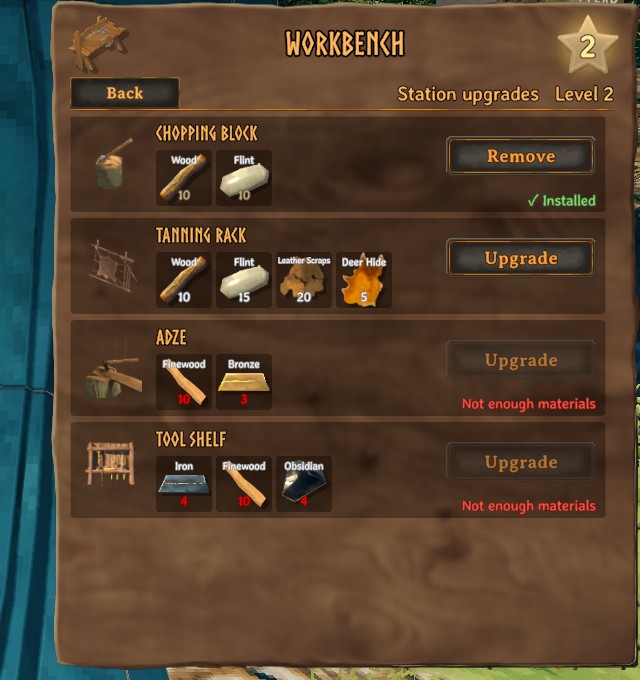
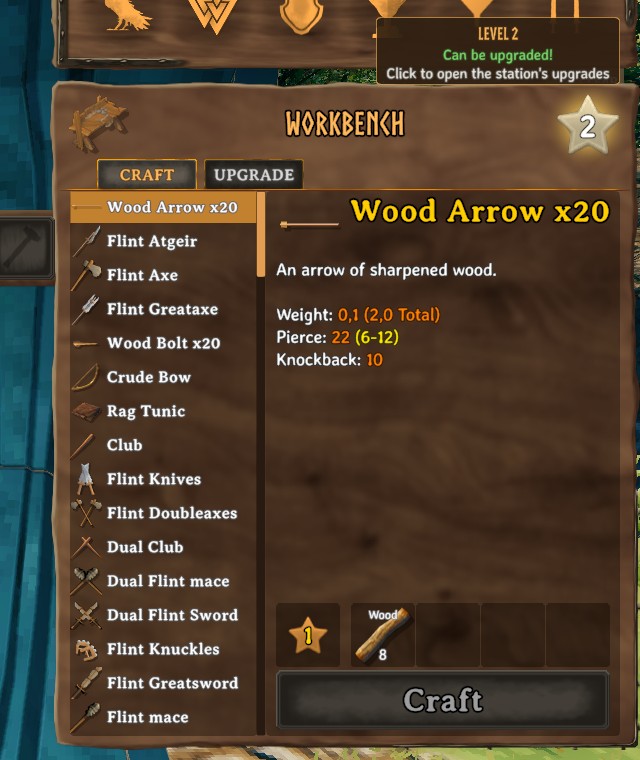
Upgrade crafting stations from their own window instead of building extensions around them. Open a workbench, a forge or any other station and click the level star next to its name: the crafting window shows the station's upgrades in place of its recipes. Press Upgrade and the station gains a level. (Русское описание — ниже.)
Features
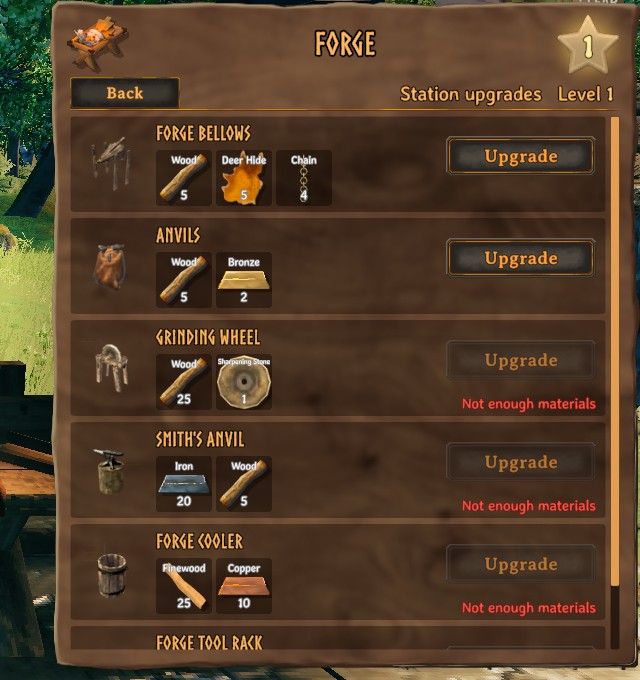
- The game's own rules. Every upgrade is one of the station's extensions - the chopping block, tanning rack, adze and tool shelf of the workbench, the forge's bellows, anvils, grinding wheel and so on. It costs what the extension costs and unlocks when the extension would: an upgrade whose materials you have not found yet is not listed.
- Any order, as in the game: buy whichever upgrade you can afford.
- Remove takes an upgrade off again: the station loses that level and its materials go back into your inventory.
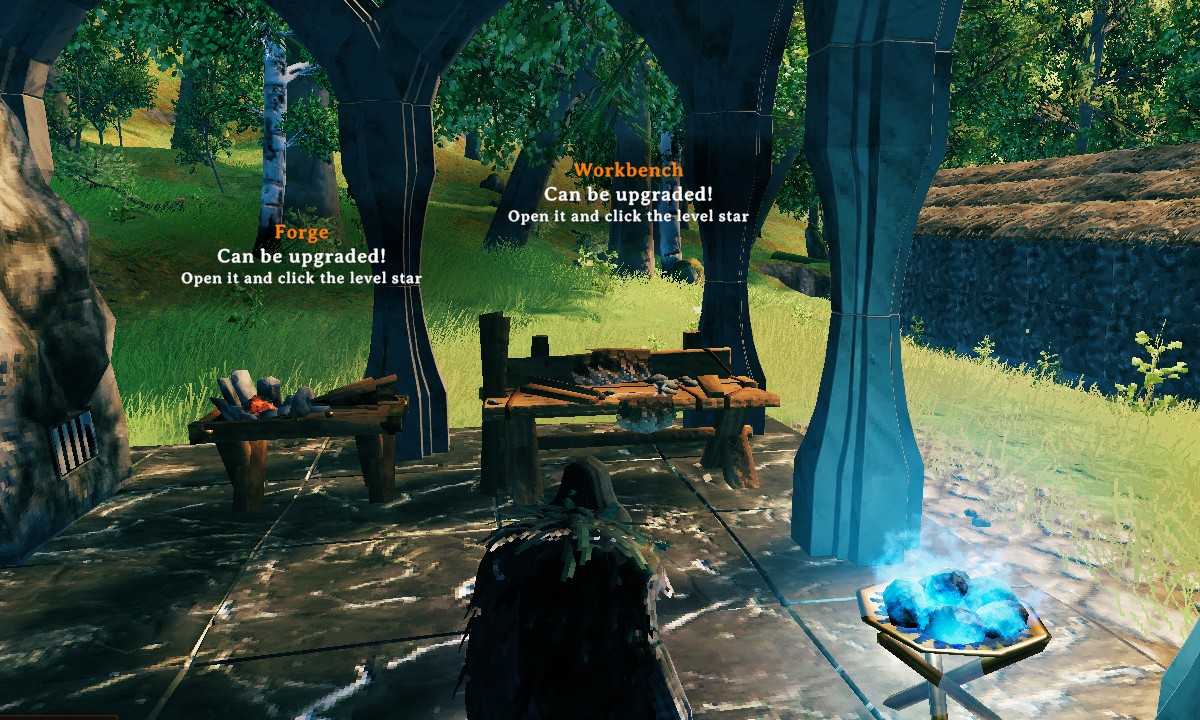
- You will not miss one. While an upgrade you can afford is waiting, the level star twinkles, and the station tells you above itself, the way Hugin talks.
- No more building room. The extension pieces leave the hammer's menu. Extensions you have already built keep counting and show as "Built next to it".
- Every station that has extensions: workbench, forge, black forge, galdr table, cauldron, artisan table - and other mods' stations too.
- A destroyed or torn down station drops what its upgrades cost.
Settings
BepInEx\config\cdev.stationupgrade.cfg. Set on the server, the same for everybody: whether the extension pieces
leave the hammer's menu, and the refund of a destroyed station. Each player's own: the star's twinkle, the station's
message and how close you have to be to see it.
Installation
With a mod manager - install, done.
By hand:
- Install BepInExPack Valheim and Jotunn.
- Put the
CDEV.StationUpgradefolder fromplugins/intoValheim\BepInEx\plugins\.
Multiplayer: every player needs the mod - a player without it sees an upgraded station at its old level. On a server that has the mod, players without it cannot join; the server needs it only to hand out its settings.
Uninstalling: delete that folder. Stations fall back to the extensions built around them and the extension pieces come back to the hammer. Bought upgrades stay stored in the stations and return with the mod.
Texts in 35 languages. Licence: MIT. By CDEV - bug reports with BepInEx\LogOutput.log are welcome.
StationUpgrade — по-русски
Улучшайте станции из их собственного окна, а не пристройками вокруг. Откройте верстак, кузницу или другую станцию и нажмите на звезду уровня рядом с названием: окно крафта покажет улучшения станции вместо рецептов. Нажмите Улучшить — и станция получит уровень.
Возможности
- Правила самой игры. Каждое улучшение — одна из пристроек станции: колода для рубки, дубильный станок, тесло и полка для инструментов у верстака, кузнечные меха, наковальни, шлифовальный круг у кузницы и так далее. Оно стоит столько же, сколько пристройка, и открывается тогда же: улучшение, материалы которого вы ещё не находили, не показывается.
- В любом порядке, как в игре: покупайте то, на что хватает ресурсов.
- Убрать снимает улучшение: станция теряет этот уровень, а материалы возвращаются в инвентарь.
- Не пропустите. Пока есть улучшение, на которое хватает ресурсов, звезда уровня мерцает, а станция сообщает об этом над собой — так, как говорит Хугин.
- Не нужно место для пристроек. Пристройки пропадают из меню молотка. Уже построенные продолжают давать уровень и отмечены «Пристройка рядом».
- Любая станция с пристройками: верстак, кузница, чёрная кузница, стол гальдра, котёл, стол ремесленника — и станции других модов.
- Разрушенная или разобранная станция роняет стоимость своих улучшений.
Настройки
BepInEx\config\cdev.stationupgrade.cfg. На сервере, одинаково для всех: убирать ли пристройки из меню молотка и
возврат при разрушении станции. У каждого игрока свои: мерцание звезды, сообщение станции и расстояние, с которого
его видно.
Установка
Через менеджер модов — установите, и всё.
Вручную:
- Установите BepInExPack Valheim и Jotunn.
- Положите папку
CDEV.StationUpgradeизplugins/вValheim\BepInEx\plugins\.
Мультиплеер: мод нужен каждому игроку — без него улучшенная станция видна со старым уровнем. На сервер с модом без него не зайти; самому серверу мод нужен только чтобы раздавать настройки.
Удаление: удалите эту папку. Станции вернутся к построенным вокруг пристройкам, пристройки вернутся в меню молотка. Купленные улучшения остаются в станциях и вернутся вместе с модом.
Тексты на 35 языках. Лицензия: MIT. Автор CDEV — об ошибках пишите с файлом BepInEx\LogOutput.log.