

SplitScrollMod
Scroll your mouse wheel to adjust the amount when splitting item stacks.Split Scroll Mod
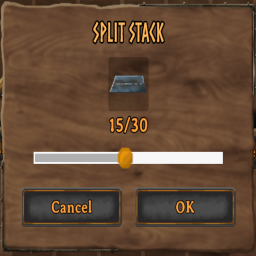
Scroll your mouse wheel to adjust the amount when splitting item stacks — no more clicking and dragging the slider one item at a time.
Features
- Scroll up/down with the split-stack slider open to increase/decrease the amount
- Modify the amount by holding CTRL or SHIFT
- Works anywhere the vanilla split dialog appears
- Lightweight — no impact on performance or other systems
Installation
- Install BepInExPack Valheim if you haven't already (handled automatically if installing via a mod manager)
- Install this mod through r2modman, Thunderstore Mod Manager or manually drop the DLL into
BepInEx/plugins/
Usage
- Open your inventory
- Split a stack as normal (Shift+click)
- With the split dialog open, scroll your mouse wheel to adjust the amount by 1 per notch
- Hold CTRL to adjust by 10 per notch or hold SHIFT to adjust by 5 per notch
- After first launch, edit the config file in
BepInEx\config\com.celticslayer.splitscroll.cfgfor custom scroll amounts.
Compatibility
- Client-side only — does not affect server state or require other players to have it installed
- Should be compatible with other inventory/UI mods, since it only modifies the local split dialog's slider value
Source
using BepInEx;
using BepInEx.Configuration;
using UnityEngine;

namespace SplitScrollMod
{
    [BepInPlugin("com.celticslayer.splitscroll", "Split Scroll Mod", "1.1.0")]
    public class Plugin : BaseUnityPlugin
    {
        private ConfigEntry<float> baseStep;
        private ConfigEntry<float> shiftStep;
        private ConfigEntry<float> ctrlStep;

        private void Awake()
        {
            baseStep = Config.Bind(
                "Scrolling",
                "BaseStep",
                1f,
                "Amount changed per scroll notch with no modifier key held"
            );

            shiftStep = Config.Bind(
                "Scrolling",
                "ShiftStep",
                5f,
                "Amount changed per scroll notch while holding Shift"
            );

            ctrlStep = Config.Bind(
                "Scrolling",
                "CtrlStep",
                10f,
                "Amount changed per scroll notch while holding Ctrl"
            );
        }

        private void Update()
        {
            if (InventoryGui.instance == null) return;

            var splitDialog = InventoryGui.instance.m_splitDialog;
            if (splitDialog == null || !splitDialog.IsActive) return;

            float scroll = Input.GetAxis("Mouse ScrollWheel");
            if (scroll == 0f) return;

            bool ctrl = Input.GetKey(KeyCode.LeftControl) || Input.GetKey(KeyCode.RightControl);
            bool shift = Input.GetKey(KeyCode.LeftShift) || Input.GetKey(KeyCode.RightShift);

            float step;
            if (ctrl)
                step = ctrlStep.Value;
            else if (shift)
                step = shiftStep.Value;
            else
                step = baseStep.Value;

            if (scroll > 0f)
                splitDialog.SliderValue += step;
            else if (scroll < 0f)
                splitDialog.SliderValue -= step;
        }
    }
}
Changelog
1.0.0
- Initial release
1.0.1
- Fixing Readme Markdown
1.0.2
- More formatting fixes
1.1.0
- Added modifiers for scroll amount (thanks u/overkillsd)
1.1.1
- Added Changelog