

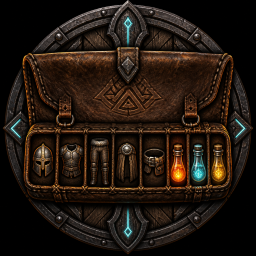
RunicInventory
Adds an automatic extra row with five equipment-only slots and three quick-use slots, preserving normal backpack space with locks, sorting, and pickup controls.Runic Inventory 1.1.5
Equipped armor is on your body, yet it occupies the same general backpack space as wood, stone, trophies, and everything else you collect. Frequently used tools and consumables compete for the same limited organization.
Runic Inventory adds eight dedicated slots to Valheim's existing inventory. This extra, clearly labeled role row is always enabled with the mod. Your normal backpack rows remain available; no separate extra-row switch is needed.
Major features
- Dedicated helmet, chest, legs, cape, and utility roles.
- Three quick-access roles for frequently used items.
- One additional row, separate from native pocket upgrades, with permanently assigned slot types.
- Automatic placement and safe swapping for recognized equipment.
- Per-slot Quick Stack exclusions and pickup controls.
- Sorting rules that respect equipment and item state.
How to use it
Better Archery quiver
Includes a compatibility adapter for Better Archery's Thunderstore 1.9.99 build (reported in the game log as 1.9.9). Its quiver slots and Runic's equipment/quick slots use separate reserved rows. Better Archery remains optional; its settings are not changed automatically. Restart the game after changing the quiver feature setting. Other Better Archery binaries, including 2.0.0, are not covered by this adapter.
[UI] CompactQuiverLayout = true removes unused space above the equipment row in the
standard inventory UI. It is enabled by default; set it to false for the previous spacing.
This changes only the display, not inventory capacity, saved item positions, or keybindings.
Better Archery's custom quiver positions remain unchanged. Auga keeps its own layout.
Both mods default to Alt+1/2/3. Set different Runic Quick 1-3 bindings if you use the quiver:
when those keys overlap, quiver selection takes precedence so it cannot also consume a quick-slot item.
The legacy ba drop extra-row cleanup command is blocked for the combined layout; move items manually instead.
Equipment and quick slots
Equip armor normally: recognized equipped armor moves into the matching slot on the added bottom row.
The five equipment slots accept only the matching helmet, chest, legs, cape, or utility type.
Quick 1-3 accept only consumables, tools, or utility items. Wood, stone, ore, and other unrelated
items cannot enter these slots, including through swapping or automatic transfers. The slot roles
cannot be unlocked or turned into general storage. You can still replace gear and quick-use items.
Place a consumable or tool in Quick 1-3 on the labeled bottom row. Press
Left Alt + 1, 2, or 3 to use those quick slots. With the inventory open, press Left Alt + I
to sort the configured safe rows. Hold Left Alt and right-click a player-inventory cell to lock or
unlock it; focusing a cell and pressing Left Alt + L is the keyboard fallback. Controller chords
can be changed in the BepInEx configuration manager or config file.
To keep food or supplies out of Runic Quick Stack, use RunicInventory 1.1.9 or newer together with
RunicStorage 1.2.5 or newer. Open your player inventory and Alt-right-click each cell to exclude.
A yellow outline and a lock/unlock message confirm the change, including for empty cells.
Locked Slots apply only to Runic Quick Stack (Alt+Q). You can add to matching stacks, shoot
arrows, use food and potions, swap a broken tool for a working one, move or drop items, equip
replacement gear, upgrade, cook, and process normally. Store All, Restock, consolidation, and
inventory sorting also ignore these slot exclusions. Equipment-role rules and other mods'
independent safeguards still apply.
The exclusion stays on the cell, not the item: a replacement item in that cell is excluded from
Quick Stack; an item moved out loses that exclusion. Sorting can change which item occupies it.
Existing saved locks keep their cells and automatically use this new behavior.
Storage's Sort -> LockedSlots setting only fixes chest
positions during chest sorting and does not create player-inventory locks.
How it feels in-game
Gear stays where gear belongs, quick items remain predictable, and sorting stops scattering the things you deliberately arranged. The inventory still looks and behaves like Valheim's inventory—only more intentional.
Safety and compatibility
The mod adds eight specialized slots, not additional carry weight. Every item remains in the native Inventory with its complete metadata, and death, tombstones, saving, and loading use the native item paths. Unknown modded categories stay ordinary items. Incompatible inventory modifications may prevent row initialization; failed migrations do not remove items.
Native ownership and persistence
Inventory does not maintain a second item store. Every item stays in the
same vanilla Inventory with full item metadata: prefab, stack, durability, equipped state, quality,
variant, crafter identity, custom data, world level, pickup state, weight, and effects.
- Valheim
Inventory.SaveandInventory.Loadremain the item persistence path. - Death and tombstones remain Valheim's native grave-transfer path.
- Topology and locks use a small checksummed custom-data entry; a separate marker records the added row.
- Disable through
General -> Enabledbefore uninstalling. In Configuration Manager, this control is grayed out while normal inventory lacks room for the extra-row items, with an explanation. Free normal cells, then disable; items move into those cells and the row disappears. - An attempted config-file disable with insufficient space is refused and Enabled is restored to true. Freeing space does not automatically disable the mod; you choose when to disable again.
- Avoid an abrupt uninstall with items in the added row: vanilla no longer reserves or maintains those extra slots.
- Sort, lock changes, quick use, and relocation require the exact owning
Player.m_localPlayer.
Mutations use one short-lived mutation scope owned by this mod and perform exact in-memory rollback when a position proof fails. There is no global lock, cross-mod transaction coordinator, durable journal, quarantine, or recovery protocol.
Optional integration
RunicInventory.Api.InventoryIntegrationApi.TryGetProtection(object, out int) is a tiny optional
reflection seam for independently installed mods. It returns state 0 for governed-but-unknown,
1 for proven unlocked, and 2 for protected dedicated-row items. Player slot exclusions do not
affect this general query. A false return means the supplied object is outside
Inventory's active protection domain. Consumers must treat unknown as fail-closed and must not retain
the native item.
TryGetQuickStackProtection(object, out int) additionally reports player slot exclusions as
locked. RunicStorage uses this query only for Quick Stack. Other storage actions and general
integrations use TryGetProtection. TryGetUseProtection(object, out int) provides the native-use
view for cooking, refueling, and processing. Unknown states and domain checks are unchanged.
Slot locks remain available when valid native slots and lock metadata exist but optional layout
features are unavailable. The dedicated row's item-type restrictions remain in effect while enabled.
A confirmed startup
failure before protection activated yields NotApplicable rather than blocking ordinary cooking.
Stable disabled, unsupported-layout, remote non-owner, and headless states also yield NotApplicable.
Brief load,
rebind, shutdown, malformed-evidence, and exception states remain Unknown and fail closed while the
provider could still govern an owning local inventory. A proven non-owner or headless path remains
NotApplicable because Inventory cannot enforce locks in that read-only context.
Storage, Safety, and Interaction may use this optional reflection API when Inventory is installed; none is a hard dependency in either direction. Inventory loads and functions on its own. The normal workstation repair call receives a narrowly scoped unlocked view, so equipped armor in the protected bottom row can still be repaired; protection resumes as soon as that repair call ends.
Authority modes
AuthoritativeLocal: exact owning local player; gameplay features may mutate through native APIs.RemoteDedicatedCompatibility: a non-local or non-owning player reference is read-only.MigrationSafeCompatibility: topology or item evidence is incompatible, so special mutations stop.Disabled/BatchInert: ordinary vanilla behavior.
A connected dedicated-server client owns its character inventory and can use Inventory normally. The headless server process has no local player, so this mod remains inert there.
Install only BepInEx and Runic Inventory. Existing 1.0.0 configuration and topology metadata remain valid; no data migration or version bump is required.
Game compatibility
Verified against Valheim 1.0.15. Startup checks required APIs directly; an unfamiliar game version alone does not disable the mod.
Compatibility: startup validates required game APIs rather than rejecting an unfamiliar game version. Actual API incompatibilities still disable safely.


