
You are viewing a potentially older version of this package. View Latest Version
ItemFinder
在背包面板上添加“查找”按钮:模糊搜索、拼音首字母搜索附近箱子的物品,穿墙标记 + 箭头 + 愿望骨音效指引,附带 P 键两点测距。Item Finder 物品查找
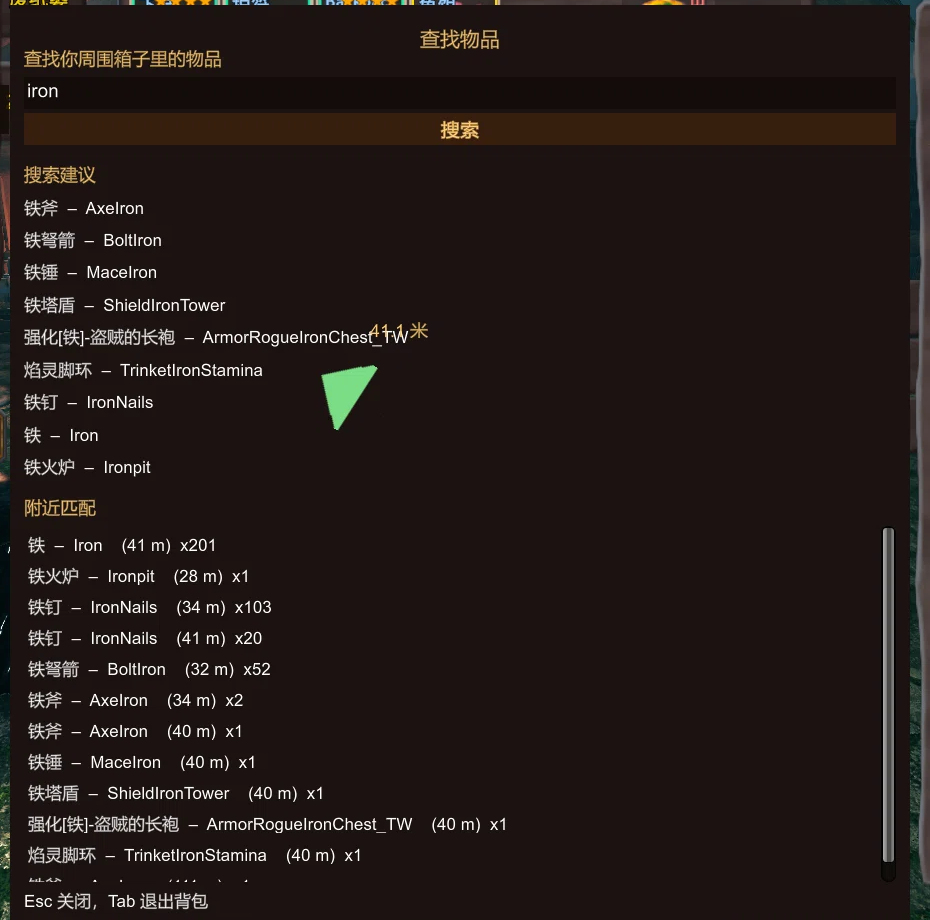
给背包面板加一个「查找」按钮:输入名字(中文 / 英文 / 拼音首字母),立刻列出附近箱子里有这个物品的容器,选中后用穿墙标记 + 中心箭头 + 愿望骨音效把你带到跟前。
顺手带了个按 P 的两点测距。
功能
- 背包右下角一个「查找」按钮,打开即时搜索窗口,不用记快捷键
- 模糊搜索:
铁、iron、IronNails都能命中;支持拼音首字母(td→ 铁锭、tfp→ 铁斧) - 搜索建议:输入时实时给出候选名称(中文名 + 英文名),点一下或回车选第一个
- 结果列表:物品名 / 英文名 / 距离 / 数量,按匹配度与距离排序,只列附近容器里的
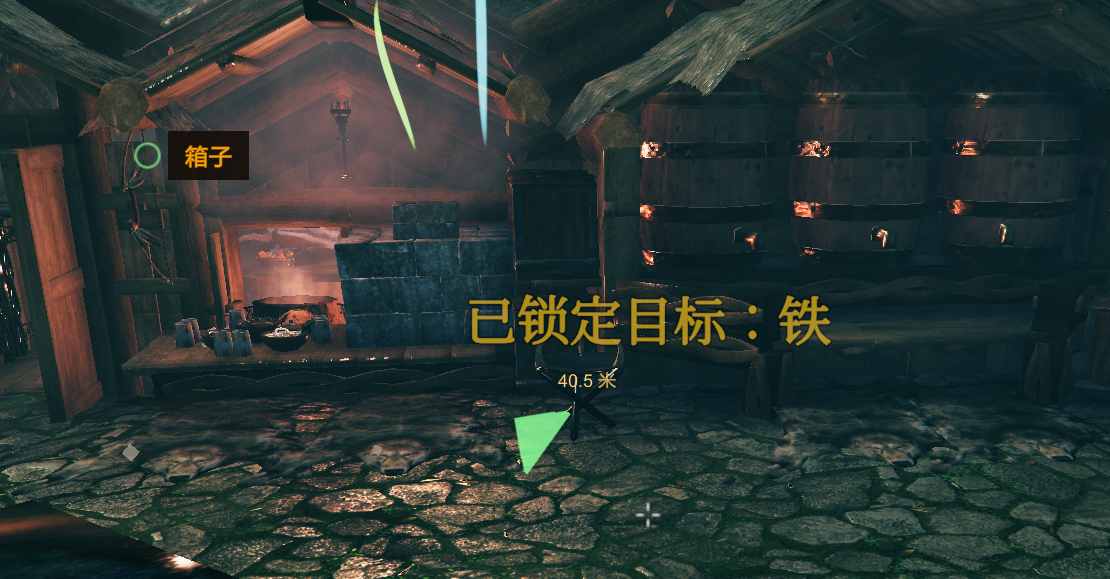
- 穿墙标记:屏幕上给目标箱子画圆环 + 中心方向箭头 + 距离,靠近自动提示到达
- 愿望骨音效:选中目标后按距离播放脉冲音效,越近越快,可以关
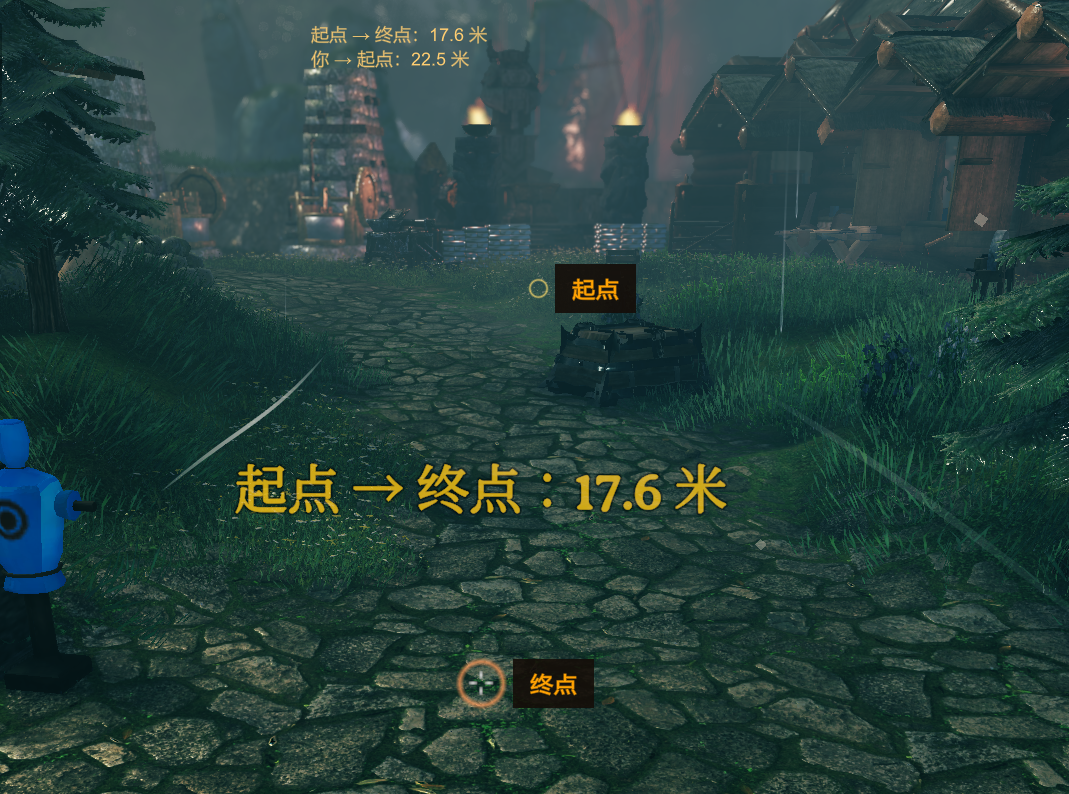
- 两点测距:
P键第一次记起点、第二次记终点、第三次清除;准星放置,实时显示到起点的距离
安装
- 先装好 BepInEx 5.4.x(Valheim 1.0.x 用 5.4.2360 即可)
- 把压缩包里的
ChineseCanFly.ItemFinder.dll和两个ItemFinder.*.yml放进BepInEx/plugins/ChineseCanFly-ItemFinder/ - 启动游戏,打开背包就能看到「查找」按钮
配置文件在 BepInEx/config/ChineseCanFly.ItemFinder.cfg,也可以装 Configuration Manager 在游戏里改。
使用
| 操作 | 说明 |
|---|---|
| 点背包面板右下角「查找」 | 打开搜索窗口 |
| 直接打字 | 输入即搜,中文 / 英文 / 拼音首字母都行 |
| 回车 | 选中第一个结果 |
| Esc / Tab | 关闭搜索窗口(Tab 同时收起背包) |
P |
两点测距:起点 → 终点 → 清除 |
选中结果后会关闭搜索窗口并收起背包,标记和音效持续到你走到目标或手动重新搜索。
配置
[UI]
| 键 | 默认 | 说明 |
|---|---|---|
| Show Inventory Button | true | 是否显示背包上的「查找」按钮 |
| Anchor To Inventory | true | 吸附背包面板(面板变高会跟随);自定义背包布局位置不对时关掉,改为吸附物品网格 |
| Button X Percent | 100 | 横向位置,占面板宽度百分比:100 = 贴右边缘,0 = 贴左边缘 |
| Button Y Pixels | -6 | 相对面板底边的像素:负值往下挂到面板外,正值往上进面板内 |
[Search]
| 键 | 默认 | 说明 |
|---|---|---|
| Search Radius | 0 | 只列出这个范围内的箱子(米),0 = 所有已加载容器 |
| Pinyin Search | true | 允许拼音首字母搜索 |
| Max Results | 24 | 最多显示多少条结果(5–60) |
| Include Ships And Carts | true | 是否包含船和推车上的箱子 |
[Guide]
| 键 | 默认 | 说明 |
|---|---|---|
| Use Sound | true | 是否播放愿望骨脉冲音效 |
| Sound Interval | 1.5 | 距离远时两次脉冲的间隔(0.4–5 秒),越近越快 |
| Marker Scale | 1 | 屏幕标记和箭头的尺寸倍数(0.5–3) |
[Measure]
| 键 | 默认 | 说明 |
|---|---|---|
| Measure Hotkey | P | 测距热键 |
| Show Player Distance | true | 是否同时显示你到起点的实时距离 |
| Place Range | 60 | 准星放置测量点的最大距离(5–200 米) |
说明与限制
- 只适合单人 / 自己开房:客户端读不到未加载区域的容器,多人服务器上别人家里的箱子搜不到,这是游戏机制,不是 bug。
- 和 ExtraSlots / ExtraSlotsCustomSlots / QuickStackStore 等改背包布局的模组可以共存:如果按钮位置被挤歪,用
Button X Percent/Button Y Pixels调一下即可。 - 搜索时按
E不会关背包(这是 1.3.2 修的),可以正常往搜索框里打字母。 - 有问题或建议:https://github.com/tutu8420/ItemFinder/issues
English
Adds a Search button to your inventory panel. Type a name (Chinese, English or pinyin initials), and Item Finder lists nearby containers holding that item, then guides you there with an on-screen marker, a center arrow and the wishbone ping.
- Fuzzy search + pinyin initials (
td→ 铁锭), suggestions while typing - Results show name, English name, distance and count
- On-screen ring / arrow / distance, wishbone-style sound that speeds up as you get closer
Pfor two-point distance measuring- Bilingual (Chinese / English) via yml, follows the game language
Requires BepInEx 5.4.x. Drop the DLL and both yml files into BepInEx/plugins/ChineseCanFly-ItemFinder/.
Works best in singleplayer / hosted worlds: containers outside loaded areas are not visible to the client, which is a game limitation.