

Valheim Foresight
Combat threat assessment mod that displays color-coded indicators on enemy nameplates to show blocking/parrying viability based on damage calculations and player stats.
| Date uploaded | 2 weeks ago |
| Version | 1.0.0 |
| Download link | CoffeeNova-Valheim_Foresight-1.0.0.zip |
| Downloads | 246 |
| Dependency string | CoffeeNova-Valheim_Foresight-1.0.0 |
This mod requires the following mods to function

denikson-BepInExPack_Valheim
BepInEx pack for Valheim. Preconfigured and includes unstripped Unity DLLs.
Preferred version: 5.4.2202
ValheimModding-YamlDotNet
Shared version 16.3.0 of YamlDotNet from Antoine Aubry and contributors, net47 package for use in Valheim mods. Maintained by the ValheimModding team.
Preferred version: 16.3.1README
Valheim Foresight
A combat threat assessment mod that enhances your situational awareness by displaying color-coded threat indicators on enemy nameplates. Know at a glance whether you can safely block, need to parry, or should avoid direct engagement.

Features
Real-Time Threat Assessment
Valheim Foresight calculates the effective damage of enemy attacks based on multiple factors:
- Enemy base damage and level
- World difficulty multipliers
- Player count scaling
- Your current armor and shield stats
- Block power vs. Parry power
Four Threat Levels
The mod displays threat levels through color-coded enemy names:
| Color | Threat Level | Meaning |
|---|---|---|
| White | Safe | You can safely block this attack |
| Yellow | Caution | Significant damage but survivable when blocking |
| Orange | Block Lethal | Blocking will kill you, but parrying will save you |
| Red | Danger | Even a perfect parry won't save you - avoid or prepare to dodge |
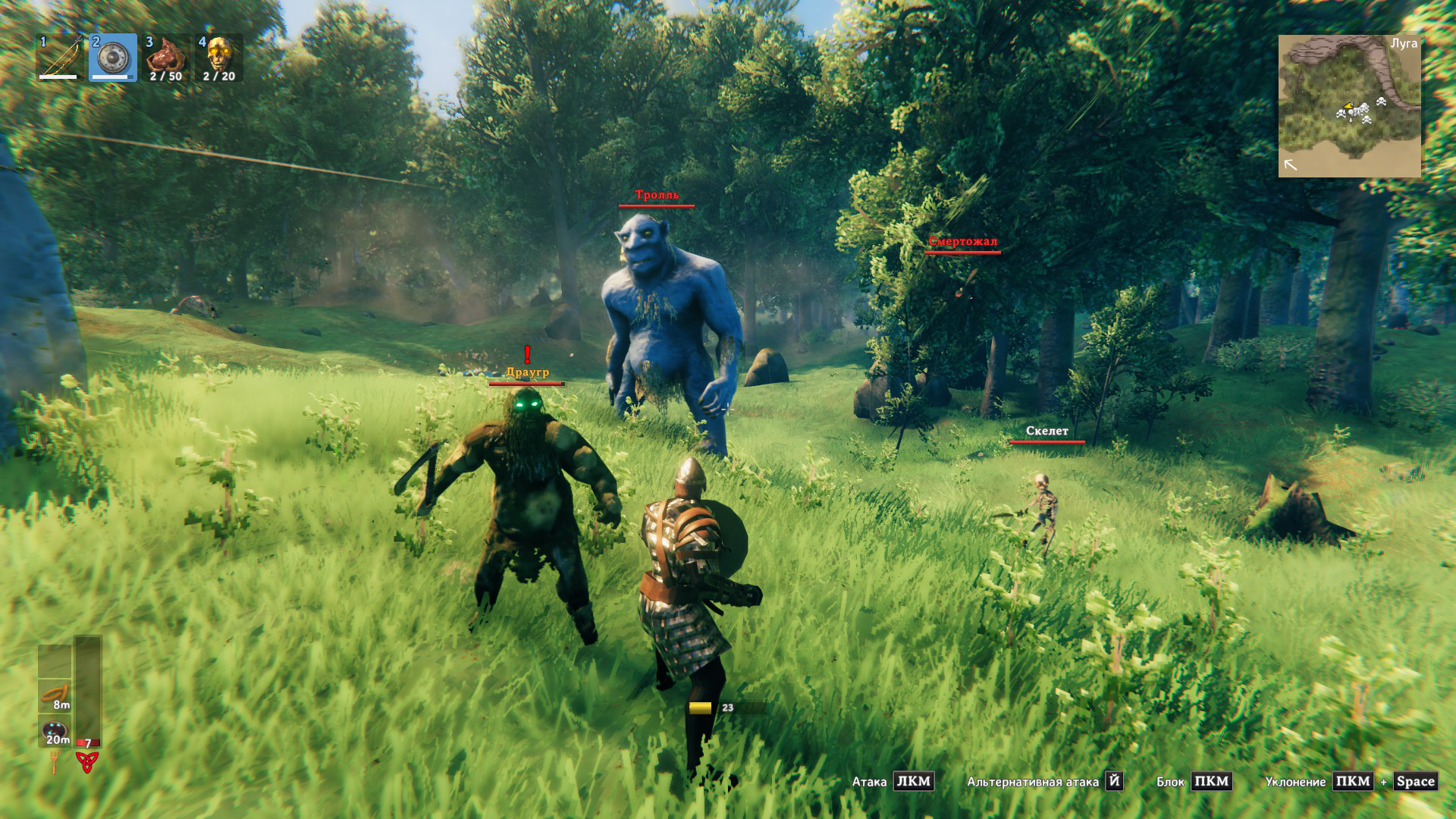
Intelligent Difficulty Scaling
Foresight accounts for Valheim's dynamic difficulty system:
- World progression modifiers
- Multiplayer scaling based on nearby players
- Biome difficulty
- Enemy star levels
Performance Optimized
- Caches threat calculations to minimize performance impact
- Automatic cleanup of distant/dead enemies
- Configurable update intervals
Installation
Requirements
- BepInEx 5.4.2202+
- Valheim
Using a Mod Manager (Recommended)
- Install r2modman or Thunderstore Mod Manager
- Search for "Valheim Foresight"
- Click Install
Manual Installation
- Download and install BepInExPack for Valheim
- Download the latest Valheim.Foresight.dll from releases
- Extract and place
Valheim.Foresight.dllintoBepInEx/plugins/folder - Launch the game
Configuration
Configuration file is generated at BepInEx/config/coffeenova.valheim.foresight.cfg after first launch.
Available Settings
- Enable Logs - Toggle mod logging (default: true)
- Debug HUD - Show detailed threat calculation info (default: false)
Usage
Simply play the game normally! Foresight works automatically in the background:
- Enemy nameplates will be colored based on threat level
- Check the color before engaging
- Adjust your combat strategy accordingly
How It Works
Damage Calculation Pipeline
- Base Damage Detection: Extracts weapon damage from enemy's equipped items or attacks
- Difficulty Multipliers: Applies world difficulty and player count scaling
- Defense Simulation: Calculates effective damage after your block/parry power
- Threat Classification: Compares effective damage to your current HP
- Visual Feedback: Updates enemy nameplate color
Block vs. Parry
The mod distinguishes between blocking and parrying:
- Block: Uses your shield's base block power
- Parry: Uses 2.5x block power (configurable by shield type)
This is why some attacks show orange (Block Lethal) - they exceed your block power but not your parry power.
Compatibility
Confirmed Compatible
- Server-side compatible (clients without the mod won't see threat colors)
- Works with enemy scaling mods that modify damage
- Compatible with HUD mods
CHANGELOG
Changelog
All notable changes to Valheim Foresight will be documented in this file.
The format is based on Keep a Changelog, and this project adheres to Semantic Versioning.
2.0.0 - 2025-12-26
Added
- Attack Castbar System: Visual castbars display above enemy nameplates showing attack progress and timing
- Customizable castbar appearance (size, position, colors)
- Optional attack name and remaining time display
- Configurable to always show or only during attacks
- Parry Window Indicators: Visual indicators on castbars showing optimal parry timing window
- Orange indicator shows approaching parry window
- Turns red when parry window is active
- Configurable window size (default: 0.25 seconds before impact)
- Defense Strategy Icons: Visual icons recommend best defensive action (block/parry/dodge)
- Shield icon for safe blocks
- Parry icon for recommended parries
- Dodge icon when blocking/parrying won't help
- Fully customizable size and position
- Intelligent Attack Timing Learning System: Automatically learns and predicts enemy attack timings
- Pre-learned timing database for 60+ common enemy attacks
- Adaptive learning algorithm improves predictions over time
- Maintains statistical data (mean, variance, sample count) for each attack
- Stores learned data in human-readable YAML format
- Attack Timing Editor UI: In-game editor for managing attack timing data
- View all learned and prelearned attack timings
- Edit timing values manually
- Reset attacks to prelearned defaults
- Toggle learning on/off per attack
- Access via configurable hotkey (default: F7)
- Attack Override System: Configure custom attack timings via config file
- Override specific attack durations
- Ignore attacks (hide castbar)
- Map animation aliases for variant attacks
- Disable parry indicators for specific attacks
- Enhanced Configuration Options: Extensive new config settings
- Separate sections for threat icons, castbars, attack timing, and colors
- All colors fully customizable (RGB with alpha)
- Position and size adjustments for all visual elements
- Configuration manager integration with proper categorization
Known Issues
- Timing predictions may be less accurate for first few observations of new attacks
- Some boss attacks with complex multi-phase animations may require manual timing overrides
- Parry window may not align perfectly for attacks with highly variable timing
1.0.1 - 2025-12-22
Fixed
- Fixed multiplayer bug where threat was calculated incorrectly
- Fixed mob level not being applied for threat calculation
1.0.0 - 2025-12-12
Added
- Four-tier threat assessment system: Safe (White), Caution (Yellow), Block Lethal (Orange), Danger (Red)
- Color-coded enemy nameplates: Visual indicators show threat level at a glance
- Block damage estimation: Calculates effective damage when blocking attacks
- Parry damage estimation: Simulates damage reduction from successful parries
- World difficulty scaling: Accounts for game progression and world modifiers
- Multiplayer scaling support: Adjusts calculations based on nearby player count
- Configurable settings: Enable/disable logging, debug mode, and detailed attack analysis
- Performance optimization: Threat calculation caching and automatic cleanup system
