
Valheim Foresight
Combat threat assessment mod that displays color-coded indicators on enemy nameplates to show blocking/parrying viability based on damage calculations and player stats.
| Date uploaded | 3 weeks ago |
| Version | 2.0.1 |
| Download link | CoffeeNova-Valheim_Foresight-2.0.1.zip |
| Downloads | 796 |
| Dependency string | CoffeeNova-Valheim_Foresight-2.0.1 |
This mod requires the following mods to function

denikson-BepInExPack_Valheim
BepInEx pack for Valheim. Preconfigured and includes unstripped Unity DLLs.
Preferred version: 5.4.2202
ValheimModding-YamlDotNet
Shared version 16.3.0 of YamlDotNet from Antoine Aubry and contributors, net47 package for use in Valheim mods. Maintained by the ValheimModding team.
Preferred version: 16.3.1README
Valheim Foresight
Master Valheim's combat with real-time threat assessment, attack prediction castbars, and defensive strategy recommendations. See which attacks you can block, when to parry, and when you need to dodge - all displayed clearly above enemy health bars!

What Does This Mod Do?
Valheim Foresight is your personal combat advisor that helps you make split-second defensive decisions. It analyzes enemy attacks, your equipment, and the current difficulty to give you actionable information right when you need it.
Color-Coded Threat Levels
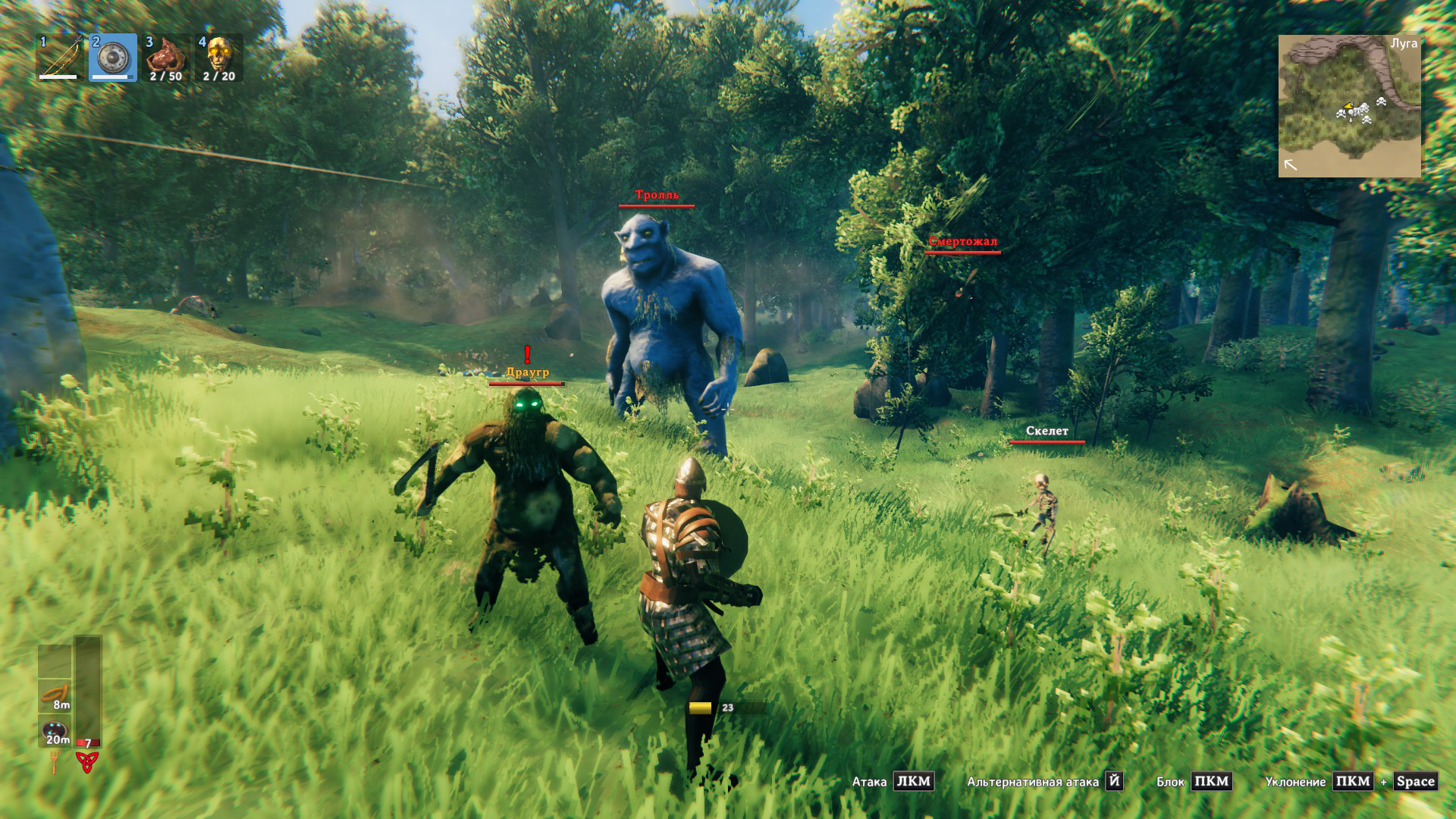
Enemy names change color to show how dangerous their next attack will be:
| Color | Threat Level | Meaning |
|---|---|---|
| White | Safe | You can safely block this attack |
| Yellow | Caution | Significant damage but survivable when blocking |
| Orange | Block Lethal | Blocking will kill you, but parrying will save you |
| Red | Danger | Even a perfect parry won't save you - avoid or prepare to dodge |
Attack Castbars - Time Your Parries Perfectly!
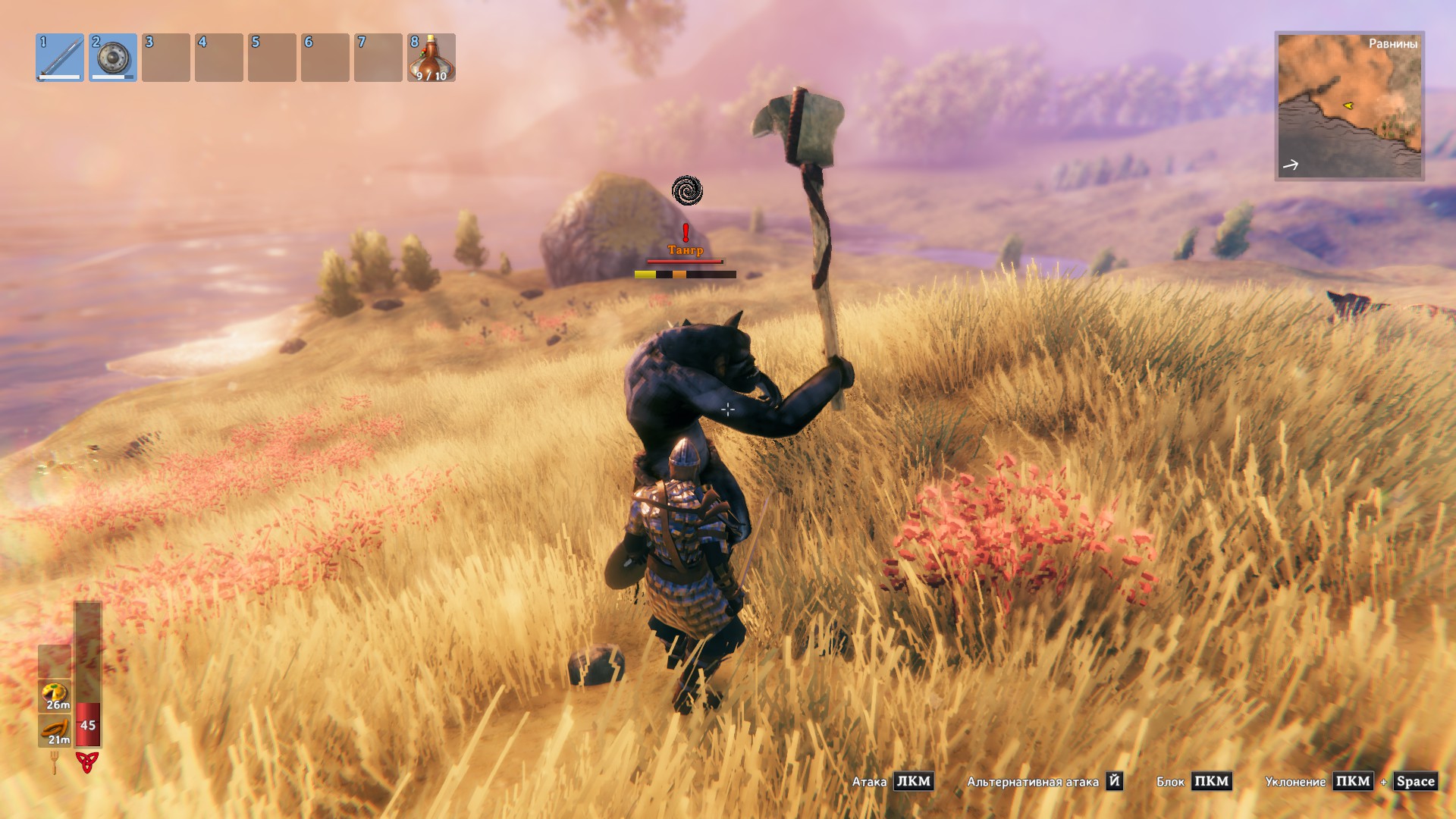
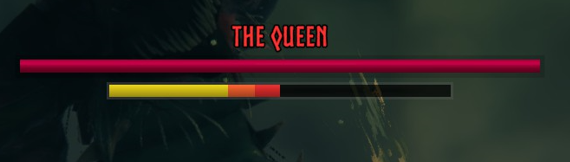
NEW! See exactly when enemy attacks will land with visual castbars:
- Progress bar fills as the enemy winds up their attack
- Golden window shows the perfect parry timing
- Turns red when you're in the parry window - hit that block button!
- Optional attack names and countdown timers
Perfect for beginners learning enemy attack patterns and veterans optimizing their parry timing!
Defense Strategy Icons
NEW! Icons show your best defensive option at a glance:
- Shield icon: Safe to block
- Parry icon: Parry recommended
- Dodge icon: Get out of the way!

Smart Learning System
The mod learns enemy attack patterns as you play!
- Starts with pre-loaded timing data for common enemies
- Automatically improves predictions by watching actual attacks
- Gets more accurate the more you play
- Works for modded enemies too!
Why Use Foresight?
- Learn faster: New players can understand combat mechanics visually
- React better: Know your defensive options before attacks land
- Survive longer: Avoid unnecessary deaths from misjudged blocks
- Master parrying: Perfect parry timing with visual indicators
- Multiplayer friendly: Works on any server, no server-side installation needed
Installation
Easy Way (Recommended)
- Install r2modman or Thunderstore Mod Manager
- Search for "Valheim Foresight"
- Click Install
- Play!
Manual Way
- Install BepInExPack
- Install YamlDotNet
- Download Foresight from Thunderstore
- Extract to
BepInEx/plugins/ - Launch Valheim
Configuration
The mod creates a config file at BepInEx/config/coffeenova.valheim.foresight.cfg on first launch.
Quick Settings
Want to customize? Here are the main settings you might want to adjust:
- Attack castbar enabled: Turn castbars on/off (default: ON)
- Threat icon enabled: Show/hide defense recommendation icons (default: OFF)
- Show text: Display attack names on castbars (default: OFF)
- Always display castbar: Keep castbar visible even when idle (default: OFF)
- Parry window size: Adjust how early the parry indicator appears (default: 0.25 seconds)
All colors, sizes, and positions are fully customizable!
How to Use
Just play normally! The mod works automatically:
- Face an enemy - their name will be colored by threat level
- When they attack, a castbar appears showing the windup
- Watch for the orange parry indicator
- When it turns red, hit block for a perfect parry!
- Defense icons show whether to block, parry, or dodge
Pro tip: Press F7 to open the timing editor and see all learned attack patterns!
Does This Work With...?
- Multiplayer: Yes! Works on any server
- Dedicated servers: Yes! Client-side only
- Enemy mods: Yes! Learns new enemy attacks automatically
- HUD mods: Yes! Compatible with most HUD mods
- Combat mods: Mostly yes, as long as they don't heavily modify base mechanics
FAQ
Q: Is this cheating? A: Not at all! It shows information you could learn through experience and provides visual feedback for timing you can already do manually. Think of it as training wheels for Valheim's combat system.
Q: Will I get banned? A: No. This is a client-side mod that doesn't modify game mechanics or give unfair advantages. It's allowed on all servers.
Q: Does it affect performance? A: Minimal impact. The mod is optimized for performance and shouldn't affect your FPS.
Q: Do I need to enable learning? A: No! The mod ships with pre-learned data for common enemies. Learning is optional but makes predictions more accurate.
Q: What if the predictions are wrong? A: The mod will automatically correct itself as it observes actual attack timings. You can also manually edit timings in the config or timing editor.
Q: Can I use this to practice parrying? A: Absolutely! That's one of the best uses. The visual parry window helps you learn the timing for each enemy type.
Support
- Issues or bugs? Report on GitHub
- Questions? Ask on Thunderstore or GitHub Discussions
- Want to contribute? Pull requests welcome!
Changelog
See CHANGELOG.md for version history.
Created by CoffeeNova | GitHub | Thunderstore
CHANGELOG
Changelog
All notable changes to Valheim Foresight will be documented in this file.
The format is based on Keep a Changelog, and this project adheres to Semantic Versioning.
2.0.1 - 2025-12-28
Fixed
- Fixed multiplayer bug where castbars were not displaying correctly for all players
2.0.0 - 2025-12-26
Added
- Attack Castbar System: Visual castbars display above enemy nameplates showing attack progress and timing
- Customizable castbar appearance (size, position, colors)
- Optional attack name and remaining time display
- Configurable to always show or only during attacks
- Parry Window Indicators: Visual indicators on castbars showing optimal parry timing window
- Orange indicator shows approaching parry window
- Turns red when parry window is active
- Configurable window size (default: 0.25 seconds before impact)
- Defense Strategy Icons: Visual icons recommend best defensive action (block/parry/dodge)
- Shield icon for safe blocks
- Parry icon for recommended parries
- Dodge icon when blocking/parrying won't help
- Fully customizable size and position
- Intelligent Attack Timing Learning System: Automatically learns and predicts enemy attack timings
- Pre-learned timing database for 60+ common enemy attacks
- Adaptive learning algorithm improves predictions over time
- Maintains statistical data (mean, variance, sample count) for each attack
- Stores learned data in human-readable YAML format
- Attack Timing Editor UI: In-game editor for managing attack timing data
- View all learned and prelearned attack timings
- Edit timing values manually
- Reset attacks to prelearned defaults
- Toggle learning on/off per attack
- Access via configurable hotkey (default: F7)
- Attack Override System: Configure custom attack timings via config file
- Override specific attack durations
- Ignore attacks (hide castbar)
- Map animation aliases for variant attacks
- Disable parry indicators for specific attacks
- Enhanced Configuration Options: Extensive new config settings
- Separate sections for threat icons, castbars, attack timing, and colors
- All colors fully customizable (RGB with alpha)
- Position and size adjustments for all visual elements
- Configuration manager integration with proper categorization
Known Issues
- Timing predictions may be less accurate for first few observations of new attacks
- Some boss attacks with complex multi-phase animations may require manual timing overrides
- Parry window may not align perfectly for attacks with highly variable timing
1.0.1 - 2025-12-22
Fixed
- Fixed multiplayer bug where threat was calculated incorrectly
- Fixed mob level not being applied for threat calculation
1.0.0 - 2025-12-12
Added
- Four-tier threat assessment system: Safe (White), Caution (Yellow), Block Lethal (Orange), Danger (Red)
- Color-coded enemy nameplates: Visual indicators show threat level at a glance
- Block damage estimation: Calculates effective damage when blocking attacks
- Parry damage estimation: Simulates damage reduction from successful parries
- World difficulty scaling: Accounts for game progression and world modifiers
- Multiplayer scaling support: Adjusts calculations based on nearby player count
- Configurable settings: Enable/disable logging, debug mode, and detailed attack analysis
- Performance optimization: Threat calculation caching and automatic cleanup system
