

SignStyler
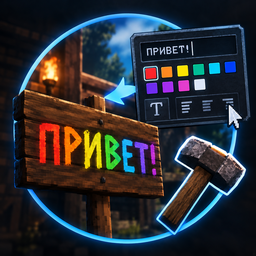
Панель стилей для знаков: цвета, размеры и шаблоны — стили видят все, даже без мода. / Style panel for signs: colors, sizes, presets. Styles are visible to everyone, even without the mod.SignStyler
EN | RU ниже
Style your sign text right in the text input dialog: 10 colors, font sizes and configurable presets. The styles are plain text markup, so they are visible to every player, even without the mod. Only the person styling the sign needs it.
How to use
- Look at a sign, press E — a style panel appears under the input dialog
- Type your text, pick a color and a size, press OK
- Preset buttons (configured in the config) replace the text with a ready-made snippet
- The preview at the top of the panel shows the result instantly
Configuration
File: BepInEx\config\DEEP_FROST.SignStyler.cfg — edit while the game is closed,
section [Style]:
Colors— swatch colors, hex, comma-separatedSizes— font sizes applied as<size=N>, comma-separatedStamps— preset slots1=…6=, entries separated by|; empty slot = no button,\n= line break. Example:1=<color=white><size=30>Resources
Русская версия
Панель стилизации текста знаков прямо в окне «Введите текст»: 10 цветов, размеры шрифта и настраиваемые шаблоны. Стили — это обычная текстовая разметка, поэтому их видят все игроки, даже без мода. Мод нужен только тому, кто красит табличку.
Как пользоваться
- Наведись на знак, нажми E — под окном ввода появится панель
- Введи текст, выбери цвет и размер, нажми ОК
- Кнопки-шаблоны (настраиваются в конфиге) заменяют текст на готовую заготовку
- Превью сверху панели показывает результат
Настройка
Файл: BepInEx\config\DEEP_FROST.SignStyler.cfg — править при закрытой игре,
секция [Style]:
Colors— цвета шариков панели, hex через запятуюSizes— размеры шрифта для<size=N>, через запятуюStamps— слоты шаблонов1=…6=, записи через|; пустой слот = кнопки нет,\n= перенос строки. Пример:1=<color=white><size=30>Ресурсы