
RoboticInbox
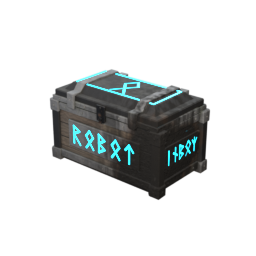
A glowing Viking Cybercrate that auto-sorts: dump items in and they fly into nearby chests that already hold the same item. Port of the 7 Days to Die Robotic Inbox. Server and all players need it.Robotic Inbox
Stop sorting your loot by hand. Build a Robotic Inbox next to your chests, dump everything into it, close it, and each item flies into the nearby chest that already holds that kind of item.
It's a Valheim version of the Robotic Inbox mod for 7 Days to Die, created by Jonathan Robertson (Kanaverum). All credit for the idea goes to them. Valheim port by DarthJML.
How to build it
- Equip your Hammer.
- Open the Misc tab of the build menu.
- Pick Robotic Inbox. It costs 10 Wood + 10 Stone and doesn't need a workbench.
- Place it near your storage chests.
It looks like a Viking Cybercrate: an old timber-and-stone crate with iron fittings and glowing cyan runes.
How sorting works
- Put items in the inbox, then close it. Nothing moves while someone has it open.
- Every second the inbox checks the chests around it (20 meters by default, about 10 floor tiles).
- An item goes to the closest chest that already has at least one of that item, as long as there's room. Got a chest with Wood in it? All your Wood goes there.
- Items no chest has yet stay in the inbox. To make a new "home" for an item, put one of it in a chest yourself.
- It never moves items into other inboxes, graves (tombstones), chests that are open, or private chests you can't open.
- A full chest is skipped and the next closest matching chest is tried.
Settings (optional)
You can change these in r2modman under Config editor, file com.darthjml.roboticinbox.cfg
(or BepInEx/config/com.darthjml.roboticinbox.cfg).
| Setting | Default | What it does |
|---|---|---|
General.Enabled |
true | Turns sorting on or off. |
General.ScanRadius |
20 | How far (in meters) the inbox looks for chests. 1 floor tile = 2 m. Max 64. |
Inbox.Columns / Inbox.Rows |
8 / 4 | Size of the inbox (8 x 4 = 32 slots). Takes effect the next time you load the world. |
Visual.GlowIntensity |
3 | Brightness of the glowing runes (0 = off, max 10). Only changes how it looks for you. |
Server.RequireMod |
true | Server only: kick players who don't have Robotic Inbox or have a different version. |
General.Debug |
false | Writes extra lines to the log for troubleshooting. |
On a multiplayer server, the server's ScanRadius, Columns and Rows are used for everyone.
Multiplayer
Everyone needs it: the server and every player, all on the same version.
- If you join a server with Robotic Inbox but you don't have the mod, you'll be disconnected with "Incompatible version". Install the mod (easiest: import the server's r2modman profile code) and join again.
- If you have a different version than the server, you'll get a message that tells you both versions.
- The server owner can turn this check off with
Server.RequireMod = false(not recommended: players without the mod won't be able to see or use inboxes). - Joining a server that doesn't have the mod is safe. Nothing breaks; you just play normally.
How to install with r2modman
From Thunderstore (easiest):
- Open r2modman, pick Valheim, and select your profile.
- Go to Online, search for RoboticInbox, and click Download. BepInEx is installed for you.
- Click Start modded.
From a zip file someone sent you:
- Open r2modman, pick Valheim, and select your profile.
- Go to Settings → Import local mod, choose the
DarthJML-RoboticInbox-1.2.0.zipfile, and confirm. - If you don't have BepInExPack_Valheim yet, install it from Online too.
- Click Start modded.
From a profile code (best for a group):
- The server owner exports their profile: Settings → Export profile as code, and shares the code.
- Everyone else: on the profile screen click Import / Update → Import new profile → From code, paste it, and give it a name.
- Select that profile and click Start modded. You now have exactly the same mods and versions as the server.
- If Robotic Inbox is missing from the imported profile (the code only carries mods published on Thunderstore), add it with Import local mod as described above.
Credits
- Original idea and 7 Days to Die mod: Jonathan Robertson (Kanaverum), MIT license.
- Valheim port and Viking Cybercrate model: DarthJML.