

PortalMonuments
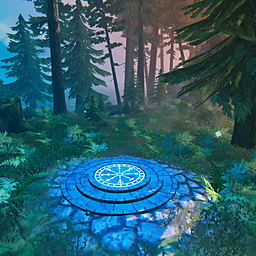
An alternative to vanilla portals. Find ancient stone monuments across the world, activate them, and teleport between them by picking one on the map. Activations are shared in multiplayer, and you can build your own. Highly configurable.Portal Monuments
This mod introduces an alternative to vanilla portals. Fast travel through ancient stone monuments. Find Portal Monuments scattered across the world, activate them, and use any activated monument to travel to another one by picking it on the map. Portal Monuments can also be built. Highly configurable.

Features
- Monuments across the world. New worlds get Portal Monuments in every biome, spaced about 800 m apart, plus one near the spawn point. They can't be damaged or destroyed.
- Discover and activate. Monuments start dark. Walk up and press E to activate one: its rune circle lights up blue and it starts to hum.
- Easy to spot. A pale column of light rises from every monument you haven't activated yet, visible from about 250 m and brightest at night. It fades away once you activate the monument.
- Teleport by map. Use an activated monument to open the map, then click any other activated monument's pin to travel there. Like vanilla portals, ore and metals can't come along, unless the server allows all items.
- Build your own. Portal Monuments can also be built with the hammer (Misc tab). They need flat ground, can be removed with the hammer, and take no damage.
- Shared in multiplayer. By default, a monument activated by one player is available to everyone on the server. This can be turned off so each player has to activate monuments themselves.
- No map? No problem. In no-map mode, monuments open a list of destinations instead of the map, and you can name them.
- Optional: disable vanilla portals, so monuments are the only way to travel.


What to expect (default settings)
- About 120–160 monuments per new world (test worlds got 118–157), always at least 800 m apart.
- One near the spawn, 30–100 m from the spawn stones, so you can activate your first monument right away.
- In every land biome, from Meadows to Ashlands and the Deep North, on dry, fairly flat ground. Never in water or lava.
- Light beams are visible from about 250 m, brighter at night, until you activate the monument.
- Activations are shared: what one player activates, everyone on the server can use.
- Vanilla item rules: no ore or metals, like vanilla portals. Admins can let every item through with the setting "Allow all items through monuments".
- Vanilla portals stay available. Admins can turn them off with the setting "Disable Vanilla Portals", so monuments become the only way to travel.
- Building one costs 10 Greydwarf eyes, 10 stone and 2 Surtling cores.
No-map mode
Playing without a map? Turn on No-map mode in the config (F1, Portal Monument section). Each player decides for themselves, and it turns on by itself in worlds with the No Map world modifier.
- Using an activated monument opens a Travel to... list instead of the map. Click a destination to travel there; Esc closes the list.
- Unnamed monuments are listed by biome and number, like Black Forest #2. The numbers are the same for every player in the world.
- Rename an activated monument with Shift+E, like vanilla portal tags, so it's easy to find in the list. Names are shared with everyone on the server.
Installation
Use a mod manager (r2modman, Thunderstore Mod Manager or Gale), or install manually:
- Install BepInExPack Valheim and Jötunn.
- Put
PortalMonuments.dllinBepInEx/plugins.
Multiplayer: the server and every player need the mod. Versions that share the first two numbers work together (for example 1.0.1 with 1.0.2).
Existing worlds
Valheim only places new kinds of locations when a world is created, so monuments don't appear in an existing world by themselves. An admin can add them with pm_generate (only fills areas nobody has explored yet). In single-player or as the host, pm_place puts one wherever you stand.
Configuration
Settings are in BepInEx/config/com.portalmonuments.cfg, or in game with a configuration manager (F1). On a server, the server's world settings apply to everyone.
| Setting | Default | |
|---|---|---|
| Multiplayer: Share activated monuments | On | Monuments activated by anyone are usable by everyone |
| Portal Monument: Allow all items through monuments | Off | Lets ore, metals and every other item travel through monuments (off = vanilla portal rules) |
| Portals: Disable Vanilla Portals | Off | Vanilla portals can't be built (existing ones keep working) |
| Portal Monument: Build recipe | GreydwarfEye:10, Stone:10, SurtlingCore:2 | Item:amount pairs, using item prefab names. If no entry is valid, the default is used; leave empty to make it free |
| Portal Monument: Disable building | Off | Removes the monument from the hammer |
| Generated Monuments | Spacing, biomes, ground unevenness and the spawn monument. Only used when locations are generated (new world or pm_generate). A few more (Count, MinAltitude, GapToOtherLocations, SpawnMinDistance, SpawnMaxDistance) are only in the config file |
|
| Portal Monument: No-map mode | Off | Destination list instead of the map, and renaming. Per player; turns on by itself in no-map worlds |
| Hum volume, teleport map pin size, light beam (on/off, brightness) | Per player |
Console commands
Open the console with F5. On a dedicated server, admins (listed in the server's adminlist.txt) can run pm_count and pm_generate from their own game. Valheim never allows cheat commands for players on a dedicated server, so pm_place and pm_show only work in single-player or for the host.
| Command | |
|---|---|
pm_help |
Lists these commands |
pm_count |
How many monuments the world has (generated, planned, built) |
pm_generate |
Adds generated monuments to unexplored areas (admin) |
pm_place [x z] |
Places a monument here, or at x z (needs devcommands, single-player or host) |
pm_show |
Shows or hides every monument on the map (needs devcommands, single-player or host) |
Changelog
- 1.0.2 - The hammer icon now shows the monument itself. New no-map mode: a destination list instead of the map, and monument names. Works together with 1.0.0 and 1.0.1.
- 1.0.1 - README: what to expect with default settings.
- 1.0.0 - First release.
Tested
Tested with Valheim 1.0.16, BepInExPack 5.4.2351 and Jötunn 2.30.2, in single-player and on a dedicated server. No-map mode was tested in single-player and with a 1.0.2 player on a 1.0.1 server; monument names on a 1.0.2 dedicated server haven't been tested yet. Not yet tested with several players online at the same time.
Known limits
- If the mod is removed from a world, monuments disappear. Generated monuments that nobody has visited yet are forgotten once the world saves, and the leveled ground around generated monuments returns to its natural shape.
- Built monuments disappear without returning their materials if the mod is removed.
- Building-copy mods (like Infinity Hammer or PlanBuild) can duplicate a monument together with its ID. Teleporting to copies may then go to the wrong one.
Feedback
Found a bug or have an idea? Message me on Discord: disr0d (with a zero). For bugs, please include your BepInEx/LogOutput.log.
Credits
Inspired by Waypoints by RustyMods. Portal Monuments is a separate mod with its own code and art.
If you enjoy the mod, you can support me on Ko-fi.