
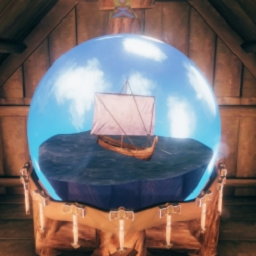
Thoracle
Thor's altar showing the weather of the next hours for a small sacrificeThoracle
Immersive ocean weather forecast
"Thoracle"
You defeated the Elder and built an outpost near the Swamp. You scavenge the crypts for iron until your chests overflow, load your ship, and set sail for your main base. But the wind turns against you. It takes longer than expected, night falls, and a severe storm rolls in. A Sea Serpent attacks, your ship shatters, and you lose everything. The next morning breaks with glorious, ideal sailing weather. You can't help but think: "If only I had waited one single day..."
After acquiring a Thunder Stone from Haldor the Trader, you gain the power to construct a small, weather oracle altar dedicated to the God of Thunder. Offer Thor a small sacrifice, and you'll be rewarded with a vision foretelling the ocean weather of the next few hours.
Visual Impression
Clear

Misty

Rainy

Clear day and night

Thunderstorm

Installation instructions
Option 1: Mod Manager (Recommended)
Click the "Mod Manager Download" button (Vortex or r2modman). Everything will be set up automatically.
Option 2: Manual Installation
- Ensure BepInEx for Valheim (v5.4.2333 or newer) is installed.
- Download the Thoracle archive and open the ZIP.
- Extract the entire Thoracle folder into your
Valheim/BepInEx/plugins/directory. - Launch the game, build Thor's altar, catch some fish, make the sacrifice and see the weather on the ocean!
Main features
On the open sea, fog and storms turn navigation into a true test of survival. Especially if you’re playing without a map, a single unseen obstacle or a sudden storm can throw you completely off course and turn a routine voyage into a disaster. While there are external web tools for checking the weather, switching between them with Alt-Tab completely interrupts your immersion in the game.
The Thoracle fills that exact gap. It’s a lightweight, lore-friendly "Vanilla+" tool designed to give your Thunder Stone a practical, immersive purpose. It lets you plan your journeys safely from inside the game world—keeping you immersed and ready for whatever the seas might throw at you.
Even if you're playing using a the map, the weather forecast can come in handy. If calm seas are predicted, then you can set sail. But if a storm is brewing, you might say to yourself instead, “Nice day for fishing, ain't it?”
How to Use
- Defeat The Elder to unlock the Thunder Stone at Haldor's shop.
- Purchase a Thunder Stone from Haldor.
- Build the Thoracle Altar using your Hammer.
- Place fish onto the altar hooks.
- Interact with the altar to start the ritual and read the forecast!
Requirements
- BepInEx Pack for Valheim (v5.4.2333 or newer recommended for Unity 6 compatibility).
Technical Details
Technology is advancing, even in Valheim. Unlike the “Obliterator,” this object is firmly grounded. As a result, the lightning bolts do not cause any damage.