

AutoMapPins
Automatically mark resources and locations on Valheim's map and minimap. Custom icons, category settings, temporary or saved pins.AutoMapPins
Automatically mark useful places and resources as you explore Valheim.
AutoMapPins adds pins for ore deposits, dungeons, chests, wild beehives, and other configured objects. Choose what appears on your map and which discoveries you want to keep.
Features
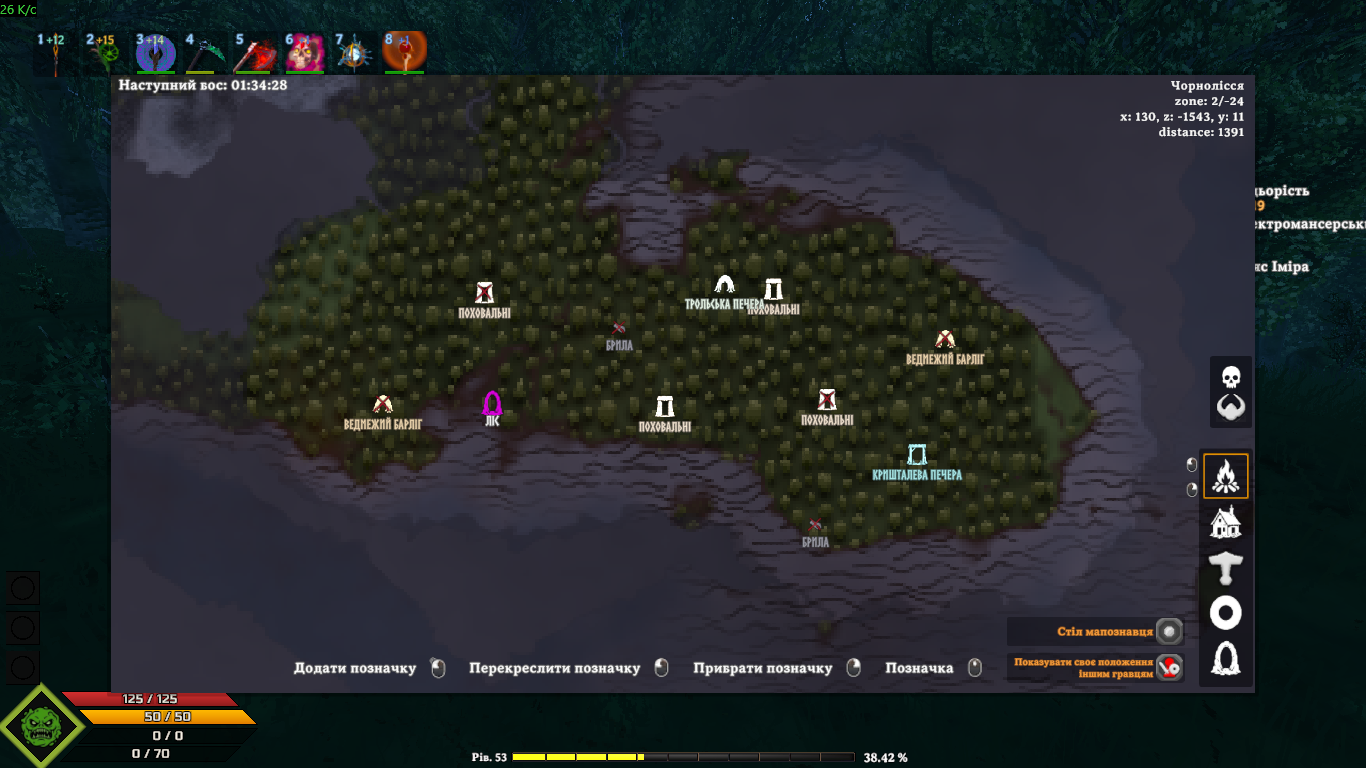
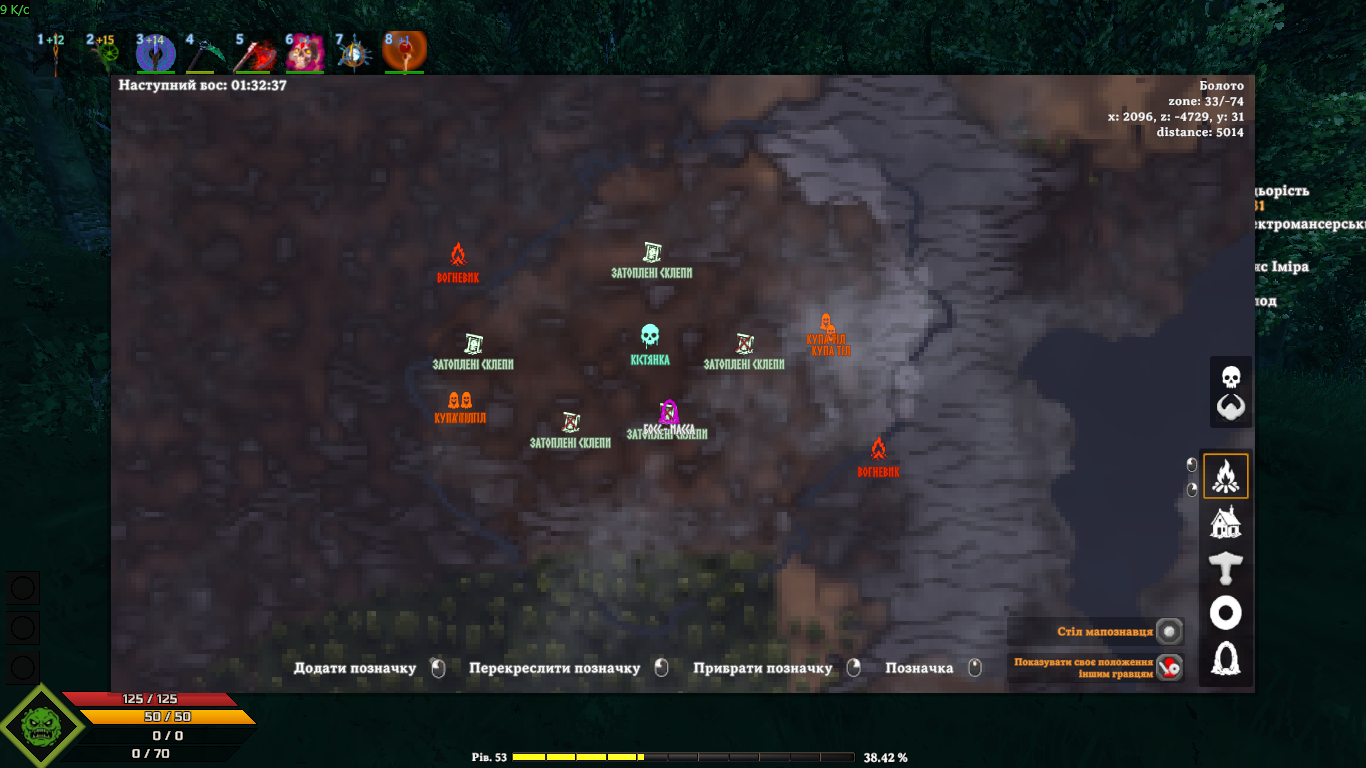
- Automatic map pins — mark nearby objects on the map and minimap in explored areas.
- Choose your categories — enable the resources and locations you care about.
- Temporary or permanent — show nearby objects while exploring, or save discoveries with your character.
- Custom icons — use the included Cartur artwork or your own PNGs; adjust colors and map icon sizes.
- Pin grouping — combine nearby objects into one marker with a count.
- Live configuration — reload category, icon, and PNG changes without restarting the game.
- Optional skill integration — set Exploration level requirements and follow discovery-radius changes from compatible skill mods.
- Server configuration sync — use the server's category settings in multiplayer.
In-game preview

Installation
Install with a Valheim mod manager, or copy the package's plugins and config folders into BepInEx.
Requires BepInExPack Valheim. The optional mods below are not required for normal use.
Configuration
The included setup by BioHazardN7 has 94 categories: 62 enabled and 32 disabled. Enable only what you want to see on your map.
Settings are in BepInEx/config:
| File | What to change |
|---|---|
FixItFelix.AutoMapPins.cfg |
General options and discovery radius |
FixItFelix.AutoMapPins.categories.yaml |
Active categories, names, grouping, permanent pins, and skill requirements |
FixItFelix.AutoMapPins.icons.yaml |
PNG paths, icon sizes, and replacements for game map icons |
Use isActive: true or false to toggle a category. See the configuration guide for examples and the icon guide for custom images.
Updating an existing setup? Back up your character save and AMP configuration first. Changing active/permanent policies can remove saved AMP pins. An old categories.vanilla.yaml takes precedence over categories.yaml; see the upgrade notes before switching presets.
Optional mods
The supplied configuration includes entries for:
| Mod | Configured objects |
|---|---|
| Smoothbrain Jewelcrafting | Gemstone deposits, crystal caves, and gacha locations |
| Therzie Wizardry | Witcheye, Deathcap, Wizardbutter, and Devilstongue mushrooms |
| Therzie Monstrum | Asmodeus, Svalt, and Vrykolathas altars and vegvisirs |
Some of these categories are off by default. Objects from mods you do not have simply do not appear. See the compatibility notes for scope and version verification.
Exploration can gate new discoveries by skill level; requirements are ignored if it is absent. Sailing can contribute to the exploration radius. Already discovered permanent pins survive skill loss.
Good to know
- Normal discovery uses loaded objects in explored areas. Increasing the radius does not generate distant zones.
- Permanent discoveries stay saved until removed or changed by your configuration.
- AMP pins are not shared through the cartography table.
- Previously generated-zone scanning is experimental and off by default. Its multiplayer behavior still needs field testing.
Current build: 2.3.17 release candidate. Full in-game acceptance is still tracked in release checks.
Bugs, questions, and ideas
Use GitHub Issues for all reports and questions. English and Ukrainian are welcome. For bugs, include your mod/game versions, reproduction steps, relevant config, and BepInEx/LogOutput.log.
Support development
If the mod is useful to you, you can support its development:

Credits
- Original mod: FixItFelix; compatibility work: littlebeagle.
- Maintained continuation: GrandpaUA.
- Testing and supplied configuration: BioHazardN7.
- Additional icon artwork: Cartur, author of Cartur's Map Pins. The images are included; installing Cartur's separate mod is not required.
Full artwork credits · Source · Changelog · Українською · Code license: LGPLv3.