

HexQuickStackStorage
Quick stack, sort and delete items from your inventory.HexQuickStackStorage
Inspired by Goldenrevolver's Quick Stack Store Sort Trash mod.
This mod adds Quick Stack, inventory sorting, chest sorting, trash management, and item favorites.
ServerSync is currently not supported, and the mod has not been tested in multiplayer. Multiplayer behavior may be inconsistent.
Any multiplayer feedback is welcome. I don't have testers for multiplayer scenarios.
Instructions
Quick Stack
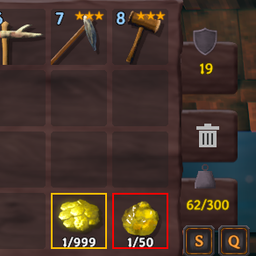
Click the Q button in your inventory or use the configured Quick Stack keyboard shortcut (default P).
Items will only be moved if:
- The item is not equipped
- The item is not in your hotbar
- The item is not favorited
- The item is inside the normal player inventory
- A nearby container created by your player already contains that item type
- The container has enough room for the item
Items will not be stored in empty containers or containers that do not already contain that item type.
Sort Inventory
Click the S button in your inventory to sort your normal player inventory.
Sorting will:
- Leave hotbar items in their current slots
- Leave equipped items in their current slots
- Leave favorited items in their current slots
- Consolidate compatible item stacks
- Sort the remaining inventory items
Sort Chests
When a chest is open, click the Sort button beneath the chest inventory to sort it.
Automatic chest sorting can also be enabled in the configuration. When enabled, supported chests will be sorted when opened.
Favorite Items
Hold Left Control and Right Click an item to favorite or unfavorite that item type.
Favorited items have a gold border and:
- Cannot be Quick Stacked
- Will not be moved or consolidated when sorting your inventory
- Cannot be deleted
Favorites apply to the entire item type. For example, favoriting Wood Arrows will cause all Wood Arrow stacks to be treated as favorites.
The Favorite modifier key can be changed in the configuration.
Delete Items
There are two ways to delete items.
Drag and Delete
Drag an item from your inventory, then click the trash icon.
Items cannot be deleted if they are:
- Equipped
- In the hotbar
- Favorited
Mark Items as Trash
Hold Left Shift and Right Click an item to mark or unmark that item type as trash.
Items marked as trash have a red border.
Click the trash icon to delete all currently marked trash items from your inventory.
Trash applies to the entire item type. Newly picked up items of the same type will also be treated as trash.
Items cannot be marked as trash if they are equipped, in the hotbar, or favorited.
Marking an item as trash removes its favorite state.
The Trash modifier key can be changed in the configuration.
Favorite and Trash Storage
Favorite and trash selections are stored as text files in the BepInEx config directory.
HexQuickStackStorage.favorites.txtstores favorited item typesHexQuickStackStorage.junk.txtstores item types marked as trash
Each file contains the internal item names used by the mod, with one item type per line.
These files are loaded when the mod starts and updated automatically whenever you favorite, unfavorite, mark, or unmark an item type.
Deleting either file will clear the corresponding saved selections the next time the mod starts.
Container Ownership
Quick Stack and chest sorting only work with containers created by your player.
Naturally generated and world containers are ignored.
Multiplayer
- Client-side mod
- Does not currently support ServerSync
- Has not been tested in multiplayer
- Quick Stack and chest sorting only use containers created by your player
Configuration
Configuration options include:
- Quick Stack search radius
- Quick Stack keyboard shortcut
- Trash modifier key
- Favorite modifier key
- Automatic chest sorting
The Trash and Favorite modifier keys cannot use the same key.
Support
Discord support:
Source
GitHub:


