

Campfire
WoW-style character select in the Jatify design: your characters at the fire, worlds and servers on one screen, saved server passwords, achievements, and every save change backed up first. Works with or without Jatify UI.Campfire


Valheim's character select, rebuilt in the Jatify design and laid out like World of Warcraft's: your characters stand around the fire, and worlds, servers and everything else live on the same screen. Client-side only; nothing is needed on the server.
Thunderstore · GitHub · jatify.com
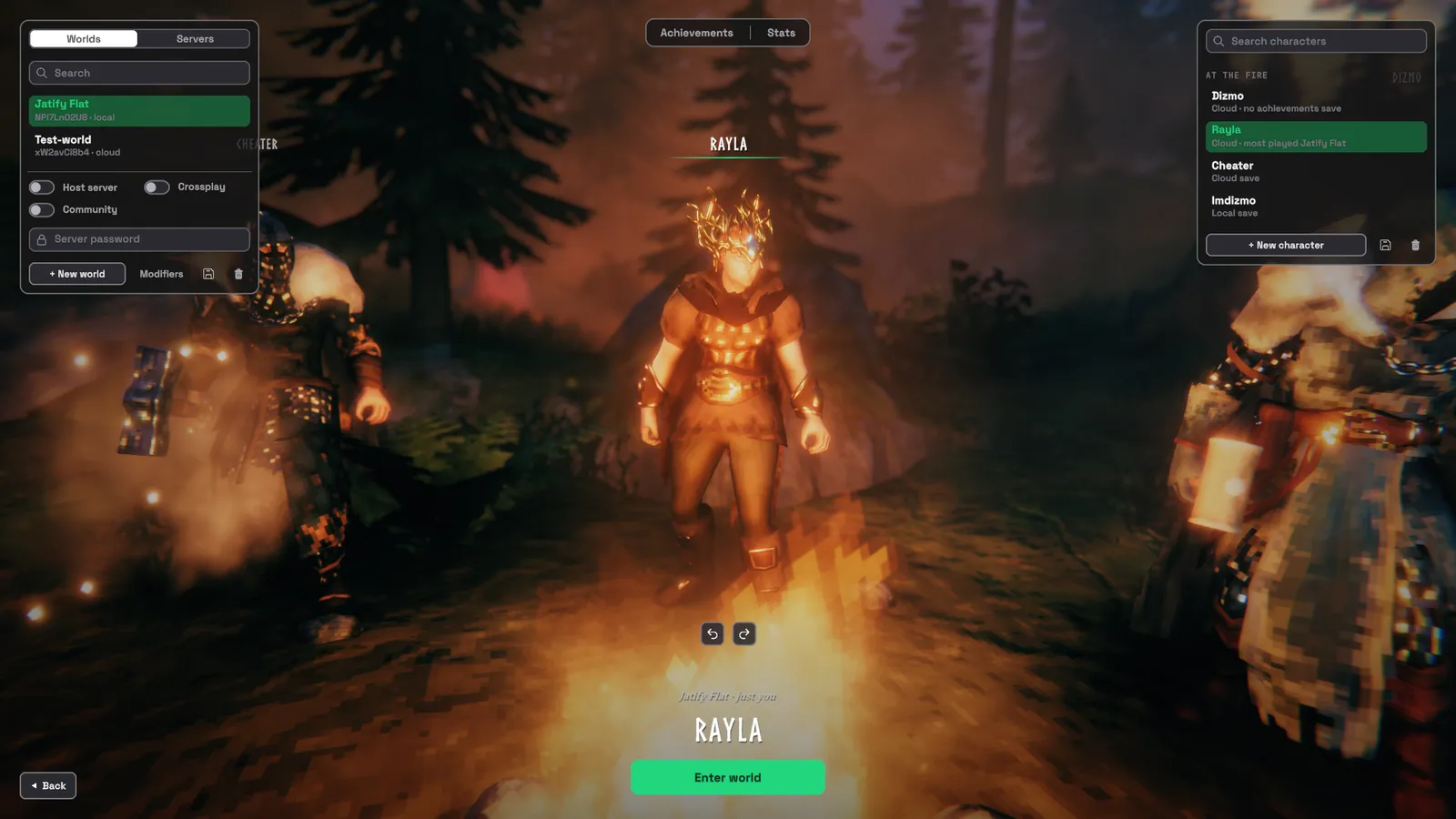
This screenshot is from Jatify UI, which includes Campfire. On its own, Campfire has the same layout in its own colours, with Valheim's fonts.
The screen
- Up to four characters at the fire, in their real gear, with name plates. The camera glides to whoever you pick, and a warm light finds them. Turn them with the arrows under their feet.
- Characters on the right. Drag a card, or use the arrows that appear on hover, to choose who stands at the fire (the top four). Each card shows the world you played most.
- Worlds and servers on the left. Pick a world (host-server, crossplay and community switches, server password), or a favourite server. Add and remove servers right there.
- Enter World / Join server at the bottom. The screen remembers the tab, world or server and character you last entered with: after a server night it is Start, then Join.
- Achievements and Stats in a strip at the top: your Steam achievements (read-only) with rare ones marked, and a warning when Valheim has flagged a character for cheats; and each character's lifetime stats.
Windows, all in the same style
New character, new world, world modifiers, manage saves (backups, move between cloud and local, restore), add server, and the server password prompt, with a Remember on this PC switch so the next join goes straight in.
Loading
A WoW-style loading bar on the startup screen and when joining, following Valheim's real load stages. The minimap of a server world is cached, so joins after the first skip Valheim's few-second map redraw.
Your saves are safe
Every create, delete, move and restore is Valheim's own code. Before Valheim deletes, moves or overwrites any character or world file, Campfire copies it to campfire-backups next to your saves, and refuses the operation if the copy fails. Deleting asks you to type the name.
Notes
- Jatify UI already includes Campfire, so you need one or the other. If both are installed, this Campfire runs the character screen, the party at the fire and the loading screen, and Jatify UI leaves them to it.
- Works with or without Jatify UI: with it installed, Campfire has Jatify UI's exact look (its fonts, panels and colours); without it, the same layout in the design's own colours with Valheim's fonts. It needs no other UI mod.
- Saved server passwords are kept encrypted in Valheim's own settings, with a key tied to your PC and Steam account: a copied settings file can't be read elsewhere. Other programs running on your PC could still read them, so it is not a password vault. Switch off Remember on this PC if that matters to you.
- Other mods' panels on the character screen (for example ReportCard's stats) are hidden while it is open; they come back on the main menu.
- Settings:
BepInEx/config/jatify.campfire.cfg(where the four stand, camera distance, remembered choices). Ctrl+R on the screen re-reads it.
Credits
- Interface: the Jatify design; with Jatify UI installed, its fonts, panels, colours and icons (none of its files are included). Titles and names use Valheim's own Norse font, descriptions its Averia Serif.
- Loading art: Iron Gate's Valheim press kit.
- Mod loader: BepInEx.
- Code: written together with Claude (Anthropic's AI), which shows up as a co-author in the commit history.
Campfire is an unofficial, fan-made mod. It is not made, endorsed or supported by Iron Gate AB or Blizzard Entertainment. Please report Campfire bugs on GitHub. Valheim is a trademark of Iron Gate AB; World of Warcraft is a trademark of Blizzard Entertainment.
Source: https://github.com/imdizmo/Campfire (MIT; the MIT licence covers Campfire's own code only)