

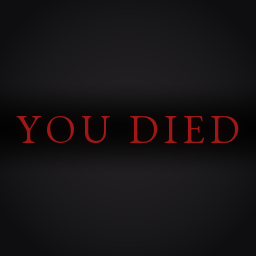
YouDied
Replaces the vanilla death screen with the classic Dark Souls "You died" screen.YouDied
Replaces the vanilla death screen with the classic Dark Souls "You died" screen.
Features
- Shortens the fade to black and the wait before respawning.
- Follows your language through the game's own translation of "You died".
Configuration
The only setting is in BepInEx/config/JevMods.YouDied.cfg, created on first launch.
Sound.Volume: volume of the death sound, from 0 to 1 (default 0.7).
Building from source
To build you need Windows, the .NET SDK 8 or newer (with the .NET Framework 4.8 developer pack), Valheim and BepInEx. The easiest way to get BepInEx is to install BepInExPack_Valheim in a Thunderstore Mod Manager profile.
git clone https://github.com/JevMods/YouDied.git
cd YouDied
dotnet build src/YouDied -c Release
Then copy src/YouDied/bin/Release/YouDied.dll and the src/YouDied/bin/Release/assets folder into a BepInEx/plugins/YouDied folder.
The build looks for Valheim through Steam and for BepInEx in the Default profile of the Thunderstore Mod Manager. If yours live elsewhere, pass the paths:
dotnet build src/YouDied -c Release -p:ValheimDir="D:\Games\Valheim" -p:BepInExDir="D:\Games\Valheim\BepInEx"
You can also set the VALHEIM_INSTALL environment variable. With no Valheim install at all, point ManagedDir at the valheim_server_Data/Managed folder of the free Valheim Dedicated Server (Steam app 896660). The GitHub workflow does exactly that.
Notes
- Client-side: only the player who wants the screen needs to install it.
- No assets from the Dark Souls games are used. The font is EB Garamond (SIL Open Font License, included in
assets) and the sound is generated for this mod. Not affiliated with FromSoftware or Bandai Namco. - Source: https://github.com/JevMods/YouDied