

ServerPlayerList
See how many players are online, plus their names, distances and directions. Works on any server; server install is optional.Server Player List
See who’s online and how far they are from you!
Ever wondered how many players are currently online on your server, or how far your friends are from you?
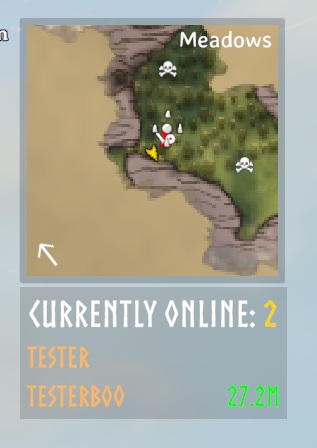
With Server Player List, you get a small, unobtrusive panel showing the number of online players, their names and, for players sharing their location, how far away they are and in which direction.
🧭 Features
- Displays the number of online players in a small HUD panel.
- Lists player names, with distances for players who share their location. Players with a private position show
N/A. - Distances are color-coded: green under 100 m, yellow under 400 m, orange under 1,200 m, red under 2,400 m, and grey beyond that or
N/A. - Shows a direction arrow for players sharing their position, relative to your camera or your character;
↑means ahead. - Toggle between compact and expanded view using Right Control + O. The shortcut is ignored while typing or in game menus.
- Compact view: only shows the online player count.
- Expanded view: shows names and distances.
- Right-click a player name in the expanded list to add or remove them as a favorite. Favorites are highlighted, listed first, and always shown while online.
- Optionally hide your own row or players with private positions, filter by maximum distance, and limit visible rows. These filters do not change the online count.
- The panel is draggable: click and drag to reposition it (easiest with the mouse cursor visible, e.g. in the ESC menu).
- The panel hides itself while the map is open and while you are dead, sleeping or teleporting.
- Works on any server without server installation. Installing it on the server adds synced settings and automatic RCON player filtering.
📸 Screenshot
⚙️ Installation
Recommended: install with a mod manager such as r2modman or Thunderstore Mod Manager.
Manual (client): you must have BepInEx installed.
- Locate your Valheim game folder.
- Extract the contents of the archive into the
BepInEx\pluginsfolder. - Launch the game and look for the Server Player List panel.
- Adjust settings in
BepInEx\config\JoksterCube.ServerPlayerList.cfgif needed.
Server (optional): put ServerPlayerList.dll in the server's BepInEx\plugins folder. Players do not need to install the mod to join.
🧩 Compatibility
- The mod works on any server, including servers without it, even if other players do not have it.
- Installing ServerPlayerList on the server does not require players to install it. Players without the mod can still join.
- Players who do have the mod must use the same ServerPlayerList version as the server. A player with a different version is disconnected when joining.
🔧 Configuration
The configuration file is BepInEx\config\JoksterCube.ServerPlayerList.cfg. Settings marked Server-synced are controlled by the server when ServerPlayerList is installed there; all others are local to your client.
Some updates change configuration sections or keys. If settings do not carry over or behave as expected after updating, back up and delete the configuration file, then relaunch the game to generate a fresh one. This resets all custom settings.
RCON Player Filtering
Supports ValheimRcon by Tristan-dvr (org.tristan.rcon).
- Setup: None. When ServerPlayerList and ValheimRcon are both installed on the server, ValheimRcon's player is hidden automatically.
- Effect: Hides one player named exactly like ValheimRcon's
[3. Chat]/Server name(defaultServer) when that player's position is private (N/A). Only the name is synced; RCON credentials stay on the server. - Note: A real player with the same name and a private position may be hidden instead. Restart the server after changing ValheimRcon's server name.
Ignore List
- Setup: Enter comma-separated names under
[2 - Player List]→Ignored users(for example,AltAccount, AnotherPlayer). Empty by default. Uses the server's setting when the mod is installed there, otherwise your local setting. - Matching: Exact and case-sensitive; surrounding spaces are ignored. Each name occurrence hides one player from the list and count, preferring
N/Aentries. Applied after RCON filtering; can also hide your own entry.
Configuration Reference
| Section | Setting | Default | Description |
|---|---|---|---|
| 1 - General | Lock Configuration | On | When enabled, only server admins can change server-synced settings. Server-synced. |
| 1 - General | Refresh Delay | 0.25 seconds | Time between player list refreshes. Valid range: 0.1–10 seconds. Server-synced. |
| 2 - Player List | Show Players | On | Expanded view: show player rows below the online count. Off shows only the count. Toggled with the Show List shortcut. |
| 2 - Player List | Hide Local Player | On | Hide your own non-favorite row; does not change the online count. |
| 2 - Player List | Hide Players with N/A Distance | Off | Hide non-favorite players who are not sharing their position. Does not change the online count. |
| 2 - Player List | Ignored users | Empty | Comma-separated, exact, case-sensitive names to hide. Each occurrence hides one matching player. Server-synced when the mod is installed on the server. |
| 2 - Player List | Use Kilometers | On | Display distances of 1,000 m or more in kilometers. |
| 2 - Player List | Maximum Player Distance | 0 m | Hide non-favorite players beyond this distance. Players with N/A distance are also hidden while this is set. 0 disables the filter. Valid range: 0–20,000 m. |
| 2 - Player List | Maximum Visible Players | 0 | Maximum player rows to display. Favorites fill the limit first and all remain visible if they exceed it. 0 means unlimited; valid range: 0–20. |
| 2 - Player List | Favorite Players | Empty | Comma-separated, exact, case-sensitive names. Favorites remain visible while online, bypass local display filters, and remain visible beyond the row limit. Ignored-user and RCON filters still apply. Your own row, when shown, stays first. |
| 2 - Player List | Show Player Direction | On | Show a direction arrow for players sharing their position. |
| 2 - Player List | Direction Reference | Camera | Choose camera-relative or character-relative direction. Camera mode falls back to character facing if the main camera is unavailable. |
| 2 - Player List | Local Player Tag | ᛝ (U+16DD) | Text shown in place of your distance when your row is visible. Leave empty to hide it. |
| 3 - Appearance | Anchor Position | (-239.75, -243.25) | Panel offset from the upper-right corner of the screen. Drag the panel to change and save it. |
| 3 - Appearance | Width | 199.5 | Width of the panel. |
| 3 - Appearance | Background Color | RGBA (0, 0, 0, 0.3) | Panel background color. |
| 3 - Appearance | Header Text Color | White | Header text color. |
| 3 - Appearance | Header Highlight Text Color | RGBA (1, 0.84, 0, 1) | Color of the online player count in the header. |
| 3 - Appearance | Header Font Size | 28 | Header text size. |
| 3 - Appearance | List Font Size | 22 | Player row text size. |
| 3 - Appearance | Favorite Player Name Color | RGBA (1, 0.84, 0, 1) | Name color used to identify favorite players. |
| 3 - Appearance | Header Text | Currently online: | Text displayed before the online player count. |
| 4 - Inputs | Show List Keyboard shortcut | Right Control + O | Toggle the player list between compact and expanded modes. |
💬 Feedback & Support
Report issues or suggest improvements via the mod’s Thunderstore page or GitHub repository.
Author: JoksterCube
Version: 1.3.2
License: GNU GPL v3 or later